What is OCR?
Optical Character Recognition technology that converts scanned documents and images into machine-readable text for automated invoice processing.
Quick Definition
OCR (Optical Character Recognition) is a technology that converts different types of documents—such as scanned paper invoices, PDF files, or images—into machine-readable and editable text data that can be processed by AP systems.
- Eliminates manual data entry from paper invoices
- Extracts key fields like amounts, dates, and vendor info
- Foundation for intelligent document processing
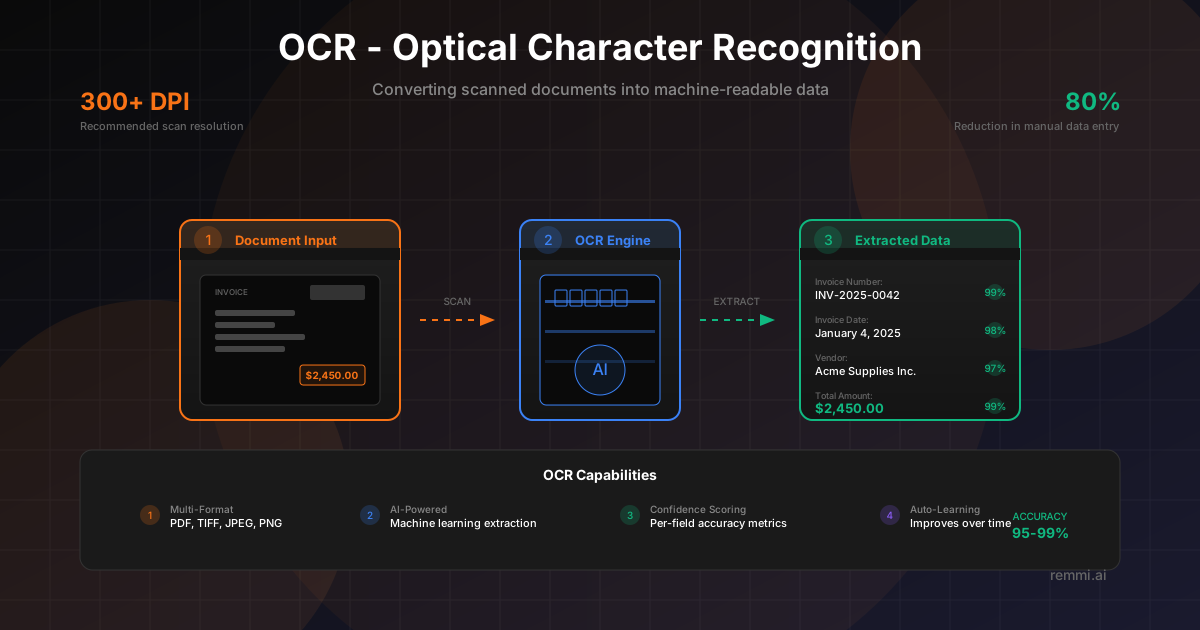
Understanding OCR in Invoice Processing
OCR (Optical Character Recognition) is the foundational technology that enables automated invoice processing. It's what allows AP teams to receive a scanned invoice or PDF and automatically extract the text content without manual data entry.
The technology works by analyzing the visual patterns in an image—recognizing individual characters, words, and numbers—and converting them into digital text that computers can process. For invoice processing, this means turning a picture of an invoice into structured data your ERP or AP system can use.
Modern OCR goes far beyond simple character recognition. Today's systems use machine learning and AI to:
- Identify specific fields like invoice numbers, dates, and amounts
- Handle various document layouts and formats
- Improve accuracy over time through learning
- Validate extracted data against business rules
While basic OCR has been around for decades, the combination of OCR with AI has revolutionized document processing, achieving accuracy levels that make truly touchless invoice processing possible.
How OCR Technology Works
1. Image Capture
Document enters the system as a digital image:
- Scanned paper documents
- PDF files
- Email attachments
- Mobile photos
2. Text Recognition
OCR engine analyzes and extracts text:
- Pre-processing (deskew, noise removal)
- Character segmentation
- Pattern matching
- Text output generation
3. Field Extraction
Structured data is identified and captured:
- Invoice number
- Date and due date
- Vendor details
- Line items and totals
OCR vs IDP: Understanding the Difference
Traditional OCR
- -Converts images to raw text
- -Template-based field location
- -Requires setup per document type
- -Static rules and zones
Best for: Consistent, high-volume document types
IDP (AI-Powered)
- +Understands document context and structure
- +Dynamic field identification via ML
- +Handles new layouts automatically
- +Improves accuracy over time
Best for: Variable formats, multiple vendors
OCR Accuracy: What Affects Results
Character accuracy on clean documents
Recommended scan resolution
Field-level extraction accuracy
OCR accuracy depends on image quality, document consistency, and the sophistication of the OCR engine. Modern AI-powered systems achieve significantly higher accuracy than traditional template-based approaches, especially for variable document layouts.
OCR Invoice Processing Workflow
Document Ingestion
Invoice arrives via email, scan, upload, or API and enters the processing queue.
Image Pre-Processing
System enhances image quality—correcting rotation, removing noise, adjusting contrast.
Text Recognition
OCR engine converts visual patterns into machine-readable text characters.
Field Identification
AI or templates locate specific fields like invoice number, date, amounts, and line items.
Data Validation
Extracted data is validated against business rules, checksums, and expected formats.
Confidence Scoring
System assigns confidence scores; low-confidence fields are flagged for review.
OCR Implementation Best Practices
Optimize Input Quality
Use 300+ DPI scans, ensure good lighting for photos, and prefer native digital PDFs over scanned images when available.
Define Critical Fields
Identify which fields require 100% accuracy (amounts, bank details) vs. which can tolerate some errors (descriptions).
Implement Validation Rules
Add business rule validation—date formats, amount checksums, vendor matching—to catch OCR errors automatically.
Use Confidence Thresholds
Set appropriate confidence scores for auto-approval vs. manual review to balance efficiency and accuracy.
Train on Your Documents
Feed corrected data back to AI-powered systems to improve accuracy on your specific vendor invoice formats.
Common OCR Mistakes to Avoid
- xPoor image quality — Low-resolution scans, blurry photos, and poor contrast dramatically reduce accuracy
- xExpecting 100% automation — Even the best OCR needs exception handling; plan for manual review workflows
- xIgnoring unstructured documents — Handwritten notes, stamps, and attachments need special handling
- xNo feedback loop — Failing to correct errors and retrain means accuracy never improves
Template-Based vs AI-Powered OCR
| Aspect | Template-Based | AI-Powered |
|---|---|---|
| Setup Time | Hours per vendor | Minutes to start |
| New Vendors | Requires new template | Handles automatically |
| Layout Changes | Template update needed | Adapts dynamically |
| Accuracy Over Time | Static | Improves with training |
| Best For | High-volume, consistent formats | Variable vendors and formats |
Related Terms
Invoice Processing
The end-to-end workflow of handling vendor invoices
AP Automation
Technology that automates accounts payable workflows
Data Extraction
Capturing specific fields from documents
Intelligent Document Processing
AI-powered document understanding and extraction
Invoice Capture
Converting invoice images into usable data
Machine Learning
AI that improves accuracy through training