What is Invoice Capture?
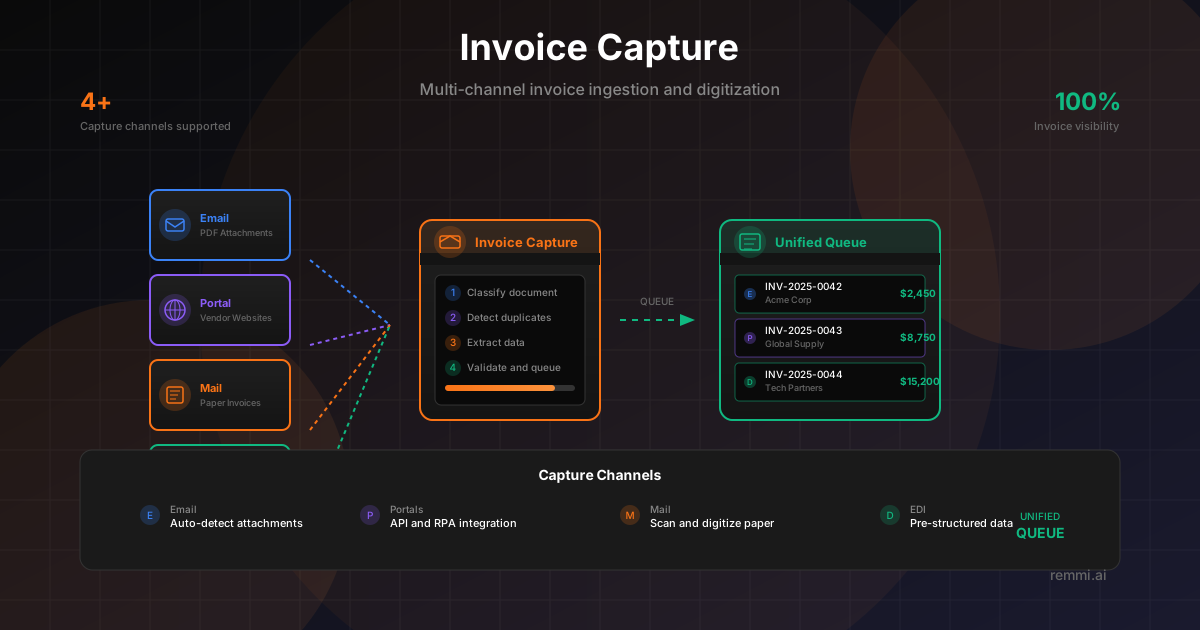
The process of receiving and digitizing invoices from various channels—email, vendor portals, physical mail, and EDI—into a unified processing pipeline.
Quick Definition
Invoice Capture is the first step in accounts payable automation—the process of receiving invoices from multiple channels (email, portals, mail, EDI) and converting them into structured digital data that can flow through automated workflows.
- Consolidates invoices from all receipt channels
- Digitizes paper and image-based invoices
- Foundation for touchless invoice processing
Understanding Invoice Capture
Invoice capture is the critical first step in any accounts payable automation initiative. Before invoices can be coded, matched, or approved, they must first be received, digitized, and converted into a format that systems can process.
In most organizations, invoices arrive through multiple channels: emails with PDF attachments, vendor portals requiring manual downloads, physical mail that needs scanning, and EDI transmissions from larger trading partners. Effective invoice capture unifies these disparate sources into a single processing queue.
Modern invoice capture goes beyond simple receipt—it includes:
- Automatic detection and extraction of invoice documents
- Classification to distinguish invoices from other documents
- Duplicate detection to prevent reprocessing
- Metadata capture (sender, timestamp, source channel)
- Routing to appropriate processing workflows
The goal is to achieve a "single pane of glass" where all invoices, regardless of origin, appear in one queue with consistent data quality and processing capabilities.
Invoice Capture Channels
Most common channel—monitor AP inbox for attachments:
- PDF and image attachments
- Embedded invoice content
- Auto-forwarded from staff
- Supplier notification emails
Vendor Portals
Supplier websites requiring login to access invoices:
- API integrations
- RPA bot downloads
- Manual retrieval
- Email notifications
Physical Mail
Paper invoices requiring digitization:
- Central mailroom scanning
- Mobile capture apps
- Outsourced scan services
- Multi-function device capture
EDI
Electronic data interchange for high-volume trading:
- ANSI X12 810 invoices
- EDIFACT INVOIC messages
- Pre-structured data
- No OCR required
The Invoice Capture Process
1. Receive
Invoice arrives via any channel
2. Classify
Identify as invoice vs. other docs
3. Digitize
Convert to machine-readable data
4. Queue
Route to processing pipeline
Typical Channel Distribution
Email attachments
Vendor portals
Physical mail
EDI / API
Distribution varies by industry. Retail and manufacturing typically see higher EDI volumes, while service industries rely more heavily on email. The trend continues toward electronic channels, with paper declining each year.
Invoice Capture Workflow Steps
Channel Monitoring
System continuously monitors all configured channels—email inboxes, portal integrations, scan folders, and EDI connections.
Document Detection
New documents are detected and queued for processing. Attachments are extracted from emails; files are pulled from portals.
Document Classification
AI classifies each document as an invoice, credit memo, statement, or other document type, routing appropriately.
Duplicate Check
System checks for duplicates using visual fingerprinting and invoice number matching to prevent reprocessing.
Data Extraction
OCR and AI extract invoice data—header fields, line items, amounts—converting to structured format.
Queue Assignment
Captured invoices enter the processing queue, routed by vendor, amount, or business rules.
Invoice Capture Best Practices
Consolidate to Dedicated Inboxes
Use dedicated email addresses (invoices@company.com) and train vendors to send directly, reducing manual forwarding.
Automate High-Volume Channels
Prioritize automating the channels that generate the most invoices—typically email and top vendor portals.
Implement Duplicate Detection
Check for duplicates early in the process to prevent wasted processing time and potential duplicate payments.
Push for EDI with Key Vendors
Negotiate EDI connections with high-volume vendors. Pre-structured data eliminates capture errors entirely.
Digitize Paper Immediately
Scan paper invoices upon receipt to maintain audit trails and enable remote processing.
Common Invoice Capture Mistakes
- xFragmented capture points — Invoices arriving at multiple inboxes create visibility gaps and processing delays
- xManual portal downloads — Relying on staff to remember portal logins creates bottlenecks and missed invoices
- xNo duplicate detection — Processing the same invoice multiple times wastes effort and risks duplicate payments
- xDelayed paper scanning — Waiting to batch scan paper invoices delays processing and loses receipt date accuracy
Capture Channel Comparison
| Channel | Automation | Data Quality | Setup Effort |
|---|---|---|---|
| High | Variable (OCR dependent) | Low | |
| Vendor Portal | Medium | Variable | High (per portal) |
| Physical Mail | Low-Medium | OCR dependent | Medium |
| EDI | Very High | Excellent (structured) | High (one-time) |
| API Integration | Very High | Excellent | Medium-High |