What is Data Extraction?
The automated process of identifying and pulling key fields from invoices using OCR and AI to convert unstructured documents into structured, actionable data.
Quick Definition
Data extraction is the automated process of identifying and pulling key fields from invoices using OCR and AI technology. It transforms unstructured document images into structured, machine-readable data that can flow directly into your ERP or accounting system.
- Captures invoice numbers, dates, amounts, and line items
- Works across different invoice formats and vendors
- Eliminates manual data entry and reduces errors
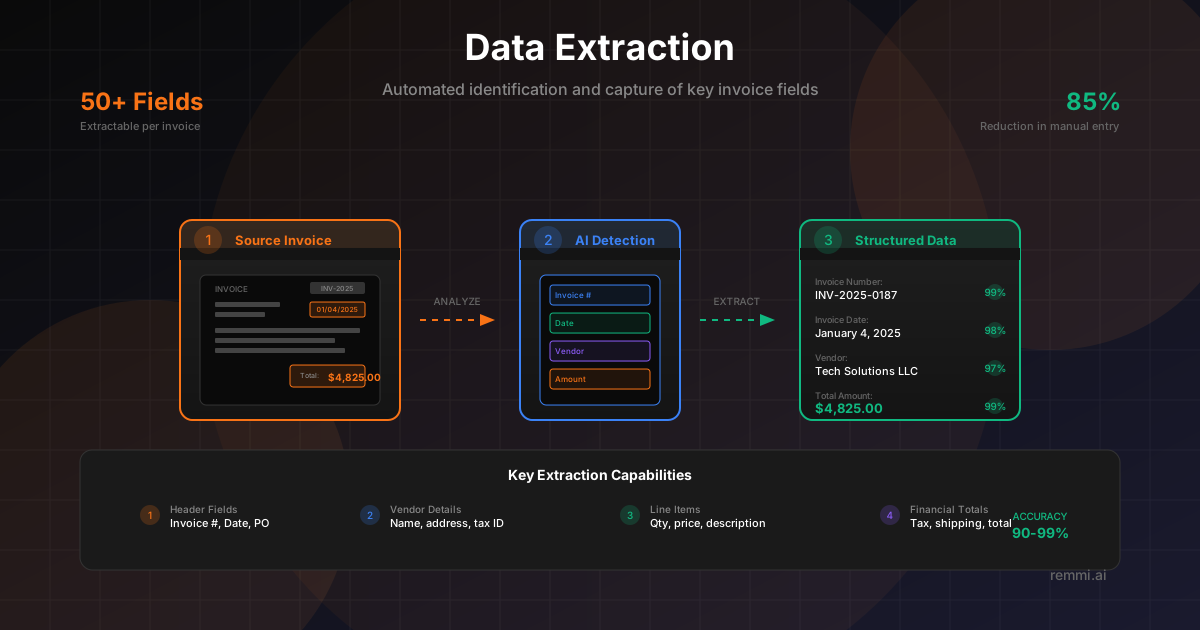
Understanding Data Extraction in Invoice Processing
Data extraction is the critical step that transforms a document image into usable business data. While OCR converts pixels to text, data extraction goes further—it understands what each piece of text represents and organizes it into structured fields your systems can process.
For accounts payable teams, effective data extraction means the difference between manual keying of every invoice field and automated capture that flows directly into your ERP. Modern AI-powered extraction can identify and capture dozens of fields across any invoice format, regardless of layout or vendor.
The technology has evolved significantly from simple template-based approaches to intelligent systems that understand document context. Today's data extraction can:
- Identify fields based on semantic understanding, not fixed positions
- Handle variations in terminology and formatting
- Extract complex line item tables with multiple columns
- Validate extracted data against business rules
- Learn and improve from corrections over time
This capability is foundational to AP automation, enabling touchless processing where invoices flow from receipt to payment with minimal human intervention.
How Data Extraction Works
1. Document Analysis
System analyzes the document structure:
- OCR converts image to text
- Layout analysis identifies regions
- Document classification
- Quality assessment
2. Field Identification
AI locates and classifies each field:
- Semantic field detection
- Label-value pairing
- Table structure recognition
- Context-aware interpretation
3. Data Structuring
Extracted values become structured data:
- Field normalization
- Data type formatting
- Confidence scoring
- Validation checks
Common Fields Extracted from Invoices
Header Fields
- -Invoice number and date
- -Due date and payment terms
- -Purchase order reference
- -Vendor name, address, tax ID
Financial Fields
- -Line item details (quantity, price, description)
- -Subtotal, tax, shipping amounts
- -Discounts and adjustments
- -Total amount and currency
Data Extraction Accuracy Factors
Overall field extraction accuracy
Header fields (invoice #, total)
Line item extraction accuracy
Accuracy depends on document quality, format complexity, and the sophistication of the extraction engine. AI-powered systems with confidence scoring ensure high-value fields are verified when accuracy is uncertain.
Data Extraction Workflow
Document Ingestion
Invoice arrives via email, API, scan, or upload and enters the extraction queue.
Pre-Processing
Image enhancement, deskewing, noise removal, and quality optimization.
OCR Processing
Text is extracted from the document image using optical character recognition.
Field Detection
AI identifies field labels and their corresponding values throughout the document.
Data Structuring
Extracted values are normalized, formatted, and organized into structured fields.
Validation & Scoring
Business rules validate data; confidence scores flag uncertain extractions for review.
Data Extraction Best Practices
Define Critical Fields
Identify which fields require 100% accuracy (amounts, bank details) vs. which can tolerate minor errors (descriptions).
Implement Validation Rules
Add business logic validation—date formats, amount checksums, vendor matching—to catch extraction errors.
Use Confidence Thresholds
Set appropriate confidence scores for auto-approval vs. manual review to balance efficiency and accuracy.
Enable Continuous Learning
Feed corrections back into AI models to improve extraction accuracy on your specific document types.
Optimize Source Quality
Encourage digital invoice delivery over scanned paper; native PDFs typically achieve higher extraction accuracy.
Common Data Extraction Mistakes to Avoid
- xSkipping validation — Extracted data should be validated against business rules before entering your ERP
- xIgnoring confidence scores — Low-confidence extractions need review; auto-approving everything increases error rates
- xNo feedback loop — Failing to correct errors and retrain models means accuracy never improves
- xOver-relying on templates — Template-based extraction fails when vendors change formats or new vendors appear
Template-Based vs AI-Powered Data Extraction
| Aspect | Template-Based | AI-Powered |
|---|---|---|
| New Vendors | Requires new template | Handles automatically |
| Format Changes | Breaks extraction | Adapts dynamically |
| Setup Time | Hours per vendor | Works out of box |
| Accuracy Over Time | Static | Improves with training |
| Best For | High-volume, single format | Variable vendors and formats |
Related Terms
OCR
Technology that converts images to machine-readable text
Invoice Capture
Converting invoice images into usable data
AP Automation
Technology that automates accounts payable workflows
Touchless Processing
End-to-end invoice automation without manual intervention
Intelligent Document Processing
AI-powered document understanding and extraction
Invoice Processing
The end-to-end workflow of handling vendor invoices