What is AP Automation?
Technology that transforms accounts payable from manual, paper-based processes into streamlined, digital workflows—saving time, reducing costs, and improving accuracy.
Quick Definition
AP automation (accounts payable automation) is the use of technology to streamline and automate the invoice-to-payment process. It captures invoice data, routes approvals, matches to POs, codes expenses, and schedules payments—with minimal human intervention.
- Reduces manual data entry by 80%+
- Cuts invoice processing costs by 60-80%
- Enables touchless straight-through processing
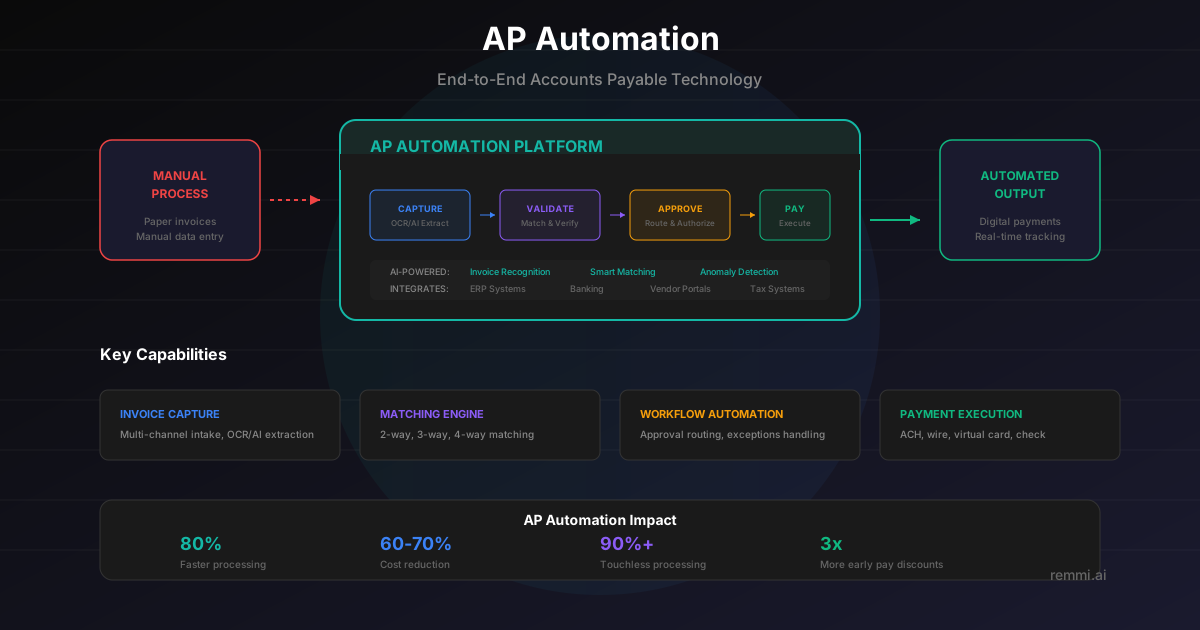
Understanding AP Automation
AP automation is the application of technology to transform traditional, paper-based accounts payable processes into efficient digital workflows. Instead of manually entering invoice data, chasing approvals, and cutting checks, automated systems handle these tasks with minimal human involvement.
Modern AP automation leverages artificial intelligence, machine learning, and OCR to capture invoice data automatically. Invoices arrive via email or portal, data is extracted instantly, and the system takes over—matching to POs, routing for approval, coding to GL, and scheduling payment.
Core capabilities of AP automation include:
- Invoice Capture — Automatically extracting data from any invoice format
- Validation & Matching — Verifying data and matching to POs/receipts
- Approval Workflow — Routing invoices to the right approvers
- GL Coding — Automatically assigning expense categories
- Payment Processing — Scheduling and executing payments
The goal is "touchless" processing—invoices that flow from receipt to payment without human intervention. Well-implemented automation achieves 60-80% touchless rates.
Key Features of AP Automation
AI-Powered Capture
Extract data from any invoice format—PDF, image, email—with high accuracy using OCR and AI.
Automated Matching
Automatically match invoices to POs and receipts, flagging exceptions for review.
Smart Workflows
Route approvals based on rules, with mobile access, reminders, and escalations.
Real-Time Visibility
Dashboards and analytics showing invoice status, cash flow, and performance metrics.
The ROI of AP Automation
Reduction in processing costs
Faster invoice processing
Fewer errors and exceptions
Organizations implementing AP automation typically see ROI within 6-12 months through cost savings, early payment discounts, and fraud prevention.
AP Automation Best Practices
Start with High-Volume Processes
Focus automation on your highest-volume, most repetitive tasks for maximum impact.
Aim for Touchless Processing
Configure rules and matching to achieve 60-80%+ straight-through processing rates.
Maintain Strong Controls
Automation should enhance controls, not bypass them. Keep approval thresholds and audit trails.
Capture Early Payment Discounts
Use faster processing to capture 2% early payment discounts (36% annualized savings).
Measure and Optimize
Track metrics like touchless rate, cycle time, and cost per invoice. Continuously improve.
Common Implementation Mistakes
- ×Automating bad processes — Fix broken workflows before automating them
- ×Ignoring change management — Users need training and support for adoption
- ×Over-configuring exceptions — Too many rules create bottlenecks instead of automation
- ×Neglecting vendor communication — Help vendors submit invoices in optimal formats
Related Terms
Invoice Processing
The workflow from invoice receipt to payment
Straight-Through Processing
Invoices processed without human touch
Accounts Payable
Department managing vendor invoices and payments
OCR
Optical character recognition for data extraction
Three-Way Match
Automated matching of PO, receipt, and invoice
ERP
Enterprise resource planning system integration