What is ERP?
Enterprise Resource Planning - the backbone system that centralizes business data across finance, procurement, and operations.
Quick Definition
ERP (Enterprise Resource Planning) is integrated business management software that centralizes data and processes across finance, procurement, HR, inventory, and other departments into a single system of record.
- Single source of truth for all business data
- Eliminates data silos between departments
- Foundation for AP automation integration
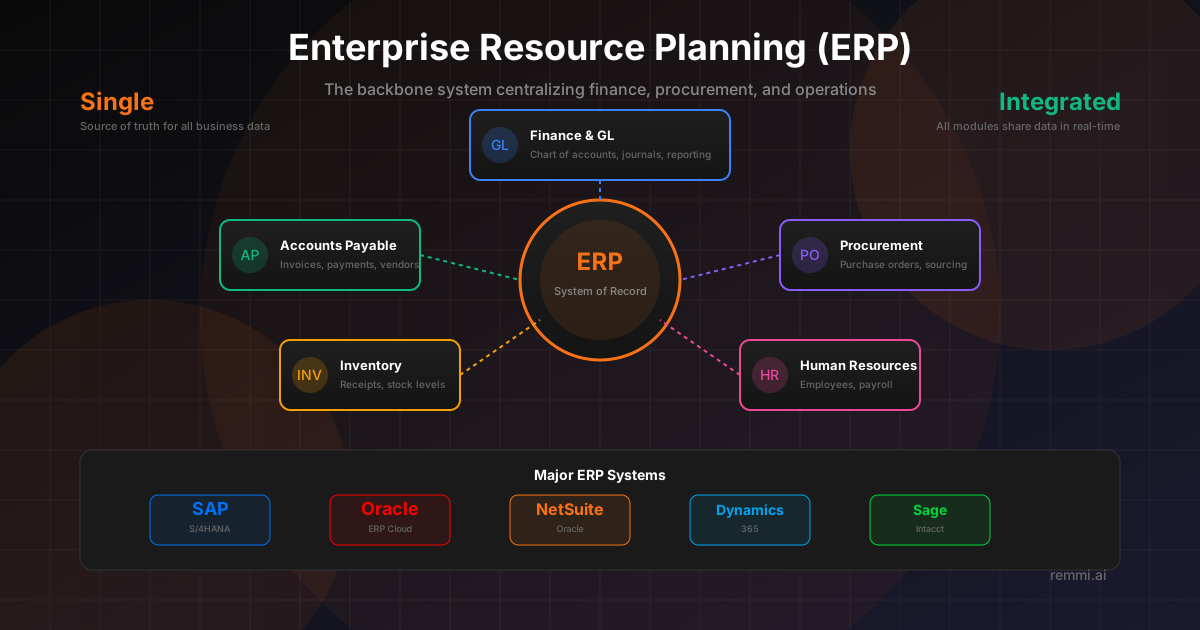
Understanding Enterprise Resource Planning
Enterprise Resource Planning (ERP) systems are the backbone of modern business operations. They're comprehensive software platforms that integrate all core business functions into a single, unified system—replacing the patchwork of disconnected applications that many organizations struggle with.
For accounts payable teams, the ERP is typically where:
- Vendor master data is stored and maintained
- Purchase orders are created and tracked
- Invoices are recorded and matched
- Payments are processed and posted
- Financial reporting pulls transaction data
While ERPs provide essential infrastructure, many organizations supplement their ERP's native AP capabilities with specialized AP automation tools that handle invoice capture, intelligent coding, and workflow management—then sync the processed data back to the ERP.
Major ERP Systems for AP
SAP S/4HANA
Enterprise-grade ERP dominant in large corporations:
- • In-memory database
- • Comprehensive AP module
- • Complex implementation
- • Strong for manufacturing
Oracle ERP Cloud
Comprehensive cloud solution for enterprises:
- • Cloud-native platform
- • Strong financials
- • AI/ML capabilities
- • Quarterly updates
NetSuite
Cloud ERP popular with growing companies:
- • Born in the cloud
- • Multi-subsidiary support
- • Faster implementation
- • Strong for mid-market
Key ERP Modules for Accounts Payable
Core Financial Modules
- •General Ledger (GL) - Chart of accounts, journal entries, financial statements
- •Accounts Payable - Invoice entry, matching, payment processing
- •Fixed Assets - Capital expenditure tracking and depreciation
- •Cash Management - Bank reconciliation, cash positioning
Supporting Modules
- •Procurement - Requisitions, POs, vendor management
- •Inventory - Goods receipts, stock management
- •Project Accounting - Project cost tracking and billing
- •Expense Management - Employee expense reports
ERP Master Data for AP
Master data is the foundational reference data that every transaction relies on. Poor master data quality causes invoice processing errors, payment issues, and reporting problems.
Vendor Master
- • Vendor name and legal entity
- • Remittance addresses
- • Payment terms (Net 30, 2/10 Net 30)
- • Bank account details for ACH/wire
- • Tax ID / W-9 information
- • Default GL coding
Financial Master
- • Chart of accounts (GL codes)
- • Cost centers / departments
- • Projects and work orders
- • Tax codes and rates
- • Currency configurations
- • Approval hierarchies
ERP Integration with AP Automation
Data sync between ERP and AP tools
API connections for instant updates
Manual data re-entry needed
Modern AP automation tools integrate seamlessly with ERPs, pulling master data and PO information while pushing back coded, approved invoices ready for payment. This eliminates duplicate data entry and ensures the ERP remains the system of record for financials.
How ERP Integration Works
Master Data Sync
Vendor records, GL codes, cost centers, and PO data sync from ERP to the AP automation tool.
Invoice Capture
AP automation captures invoices via email, scan, or portal—outside the ERP.
Intelligent Processing
AI extracts data, applies GL coding, matches to POs, and routes for approval.
Approval Workflow
Invoices route through approval chains based on amount, vendor, or GL code rules.
ERP Export
Approved invoices sync back to ERP with full coding, ready for payment batch.
Payment & Close
ERP processes payment, posts to GL, and status updates flow back to AP tool.
ERP Best Practices for AP Teams
Maintain Clean Master Data
Regularly audit vendor records, GL codes, and cost centers. Bad master data causes coding errors and payment issues downstream.
Use Native Integrations
Choose AP automation tools with pre-built ERP connectors rather than custom integrations that require ongoing maintenance.
Sync Data Frequently
Enable real-time or near-real-time sync for master data changes so invoice processing uses current information.
Standardize GL Coding
Create clear coding guidelines and use consistent account structures to simplify automation and reporting.
Leverage ERP Workflows
Use your ERP's built-in approval workflows where they make sense, but don't force complex AP routing through limited ERP tools.
Common ERP Challenges in AP
- ×Limited native AP automation — Most ERPs have basic invoice entry but lack intelligent capture and coding
- ×Rigid approval workflows — ERP workflows often can't handle complex, conditional routing rules
- ×Poor user experience — ERP interfaces designed for power users, not occasional approvers
- ×Integration complexity — Custom integrations break with ERP upgrades and require IT support
ERP Comparison for AP Needs
| ERP | Best For | AP Strength |
|---|---|---|
| SAP S/4HANA | Large enterprises, manufacturing | Deep functionality, strong 3-way matching |
| Oracle Cloud | Large enterprises, complex orgs | AI features, strong global capabilities |
| NetSuite | Mid-market, multi-subsidiary | Easy integrations, SuiteFlow automation |
| Dynamics 365 | Microsoft shops, mid-market | Power Platform integration, familiar UI |
| Sage Intacct | Finance-led orgs, services | Multi-entity, dimensional reporting |
Related Terms
AP Automation
Technology that automates accounts payable processes
Accounts Payable
Department managing vendor invoices and payments
ERP Integration
Connecting external systems to your ERP
GL Code
Account codes for categorizing transactions
Invoice Processing
The workflow from invoice receipt to payment
Procure-to-Pay
End-to-end purchasing and payment process