What is Procure-to-Pay (P2P)?
The complete procurement lifecycle from identifying a need to paying the vendor, covering every step in between.
Quick Definition
Procure-to-Pay (P2P), also known as Purchase-to-Pay, is the end-to-end business process covering the full cycle from identifying a need and creating a purchase requisition through receiving goods/services, processing invoices, and making payment to the vendor.
- Covers requisition, ordering, receiving, and payment
- Ensures spend control and compliance
- Foundation for procurement automation
Understanding Procure-to-Pay
Procure-to-Pay (P2P) represents the complete journey of acquiring goods and services for your organization. It's a critical business process that touches multiple departments—procurement, receiving, accounts payable, and treasury—and directly impacts cash flow, vendor relationships, and operational efficiency.
The P2P cycle begins when someone in your organization identifies a need for goods or services and ends when the vendor receives payment. Along the way, the process ensures proper authorization, accurate ordering, verified delivery, and correct payment—all while maintaining compliance and controlling costs.
A well-designed P2P process provides visibility into spending, enforces purchasing policies, prevents fraud, and creates an audit trail. When automated, it dramatically reduces manual effort, accelerates cycle times, and improves accuracy across the entire procurement workflow.
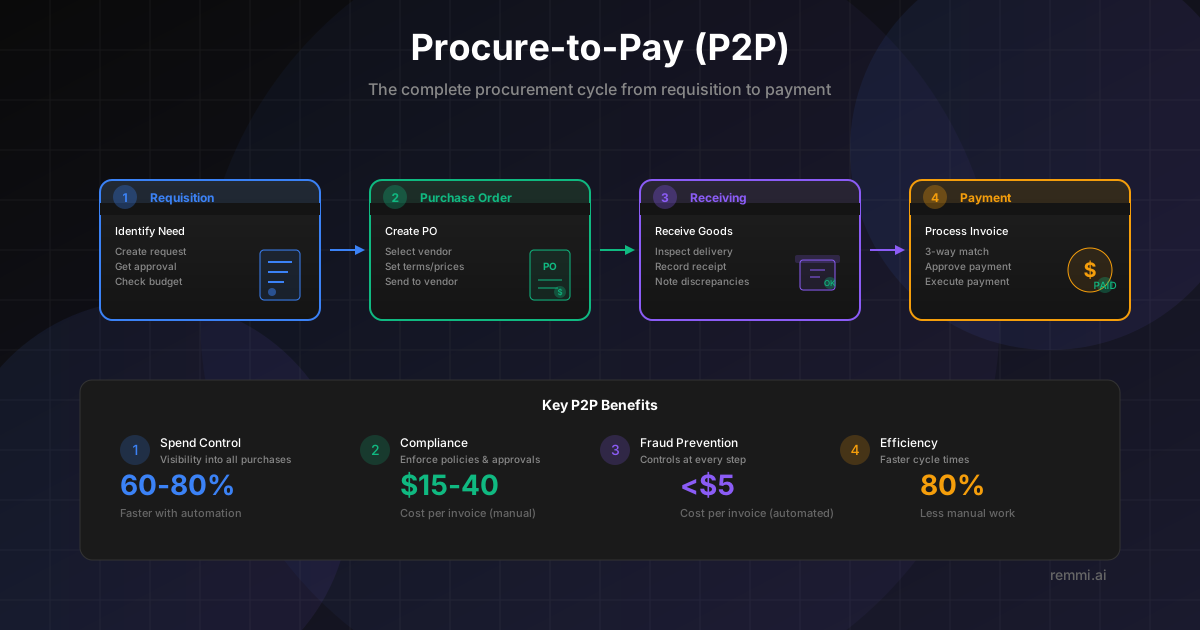
The P2P Cycle
1. Requisition
Identify need, request approval
2. Purchase Order
Create PO, send to vendor
3. Receiving
Receive goods, confirm delivery
4. Payment
Match, approve, pay vendor
The 8 Steps of Procure-to-Pay
Need Identification & Requisition
An employee identifies a need for goods or services and creates a purchase requisition specifying what's needed, quantity, and estimated cost.
Requisition Approval
The requisition routes through an approval workflow based on amount, category, or department. Budget availability may also be verified.
Purchase Order Creation
Upon approval, a formal purchase order is created with vendor details, pricing from contracts, delivery terms, and payment terms.
PO Transmission to Vendor
The PO is sent to the vendor via email, EDI, or vendor portal. The vendor acknowledges receipt and confirms they can fulfill the order.
Goods/Services Receipt
When goods arrive or services are delivered, receiving staff inspect and record what was received, noting any damages or discrepancies.
Invoice Receipt & Processing
The vendor sends an invoice. AP captures invoice data, either manually or through automation, and links it to the corresponding PO.
Three-Way Matching
The invoice is matched against the PO and receipt to verify quantities, prices, and that goods were received before approving payment.
Payment Execution
After approval, payment is scheduled based on terms and cash management. Payment is executed via check, ACH, wire, or virtual card.
Why Procure-to-Pay Matters
Faster processing with P2P automation
Cost per invoice without automation
Typical maverick spend without controls
A well-optimized P2P process is essential for controlling costs, ensuring compliance, and maintaining healthy vendor relationships. Organizations with mature P2P processes see significant improvements in efficiency, accuracy, and spend visibility.
P2P vs Source-to-Pay: What's the Difference?
| Aspect | Procure-to-Pay (P2P) | Source-to-Pay (S2P) |
|---|---|---|
| Scope | Requisition to payment | Sourcing through payment |
| Starting Point | Purchase requisition | Supplier identification |
| Includes | Ordering, receiving, invoicing, payment | + Sourcing, contracts, supplier management |
| Focus | Operational/transactional | Strategic + operational |
| Primary Users | AP, Procurement ops, Requesters | + Strategic sourcing, Category managers |
Benefits of P2P Automation
Faster Cycle Times
Reduce invoice processing from weeks to hours with automated data capture, matching, and routing.
Stronger Controls & Compliance
Enforce purchasing policies automatically, ensure proper approvals, and maintain complete audit trails.
Improved Accuracy
Eliminate manual data entry errors with AI-powered invoice capture and automated three-way matching.
Better Spend Visibility
Gain real-time insight into spending across categories, vendors, and departments for better decision-making.
Improved Vendor Relationships
Pay vendors on time, resolve disputes faster, and provide self-service visibility into payment status.
Common P2P Challenges to Address
- !Maverick spending — Purchases made outside the P2P process, bypassing controls and contracts
- !Invoice exceptions — Mismatches between PO, receipt, and invoice requiring manual resolution
- !Slow approval cycles — Bottlenecks in requisition or invoice approval workflows
- !Poor data quality — Inconsistent vendor master data, missing PO references, incomplete records
P2P Best Practices
Standardize Processes
Define clear P2P workflows and ensure all purchases follow the same path through requisition, approval, and payment.
Require POs for All Spend
Implement a "no PO, no pay" policy to ensure all invoices can be matched and spending is pre-approved.
Automate Where Possible
Use automation for invoice capture, matching, coding, and approval routing to reduce manual effort and errors.
Measure & Optimize
Track KPIs like cycle time, exception rate, and cost per transaction. Continuously improve based on data.
Related Terms
Purchase Order
Document authorizing a purchase from a vendor
Invoice
Document requesting payment for goods or services
Accounts Payable
Department managing vendor invoices and payments
Three-Way Match
Matching PO, receipt, and invoice before payment
Vendor
Supplier providing goods or services to your organization
ERP
Enterprise system managing business processes