What is Invoice Processing?
The complete workflow of handling vendor invoices from the moment they arrive until payment is made—a core function of accounts payable.
Quick Definition
Invoice processing is the complete workflow of handling vendor invoices from receipt through payment. It includes capturing invoice data, validating accuracy, routing for approval, coding to GL accounts, and executing payment.
- Averages 10-25 days manually, 3-5 with automation
- Costs $15-40 per invoice without automation
- Core function of accounts payable department
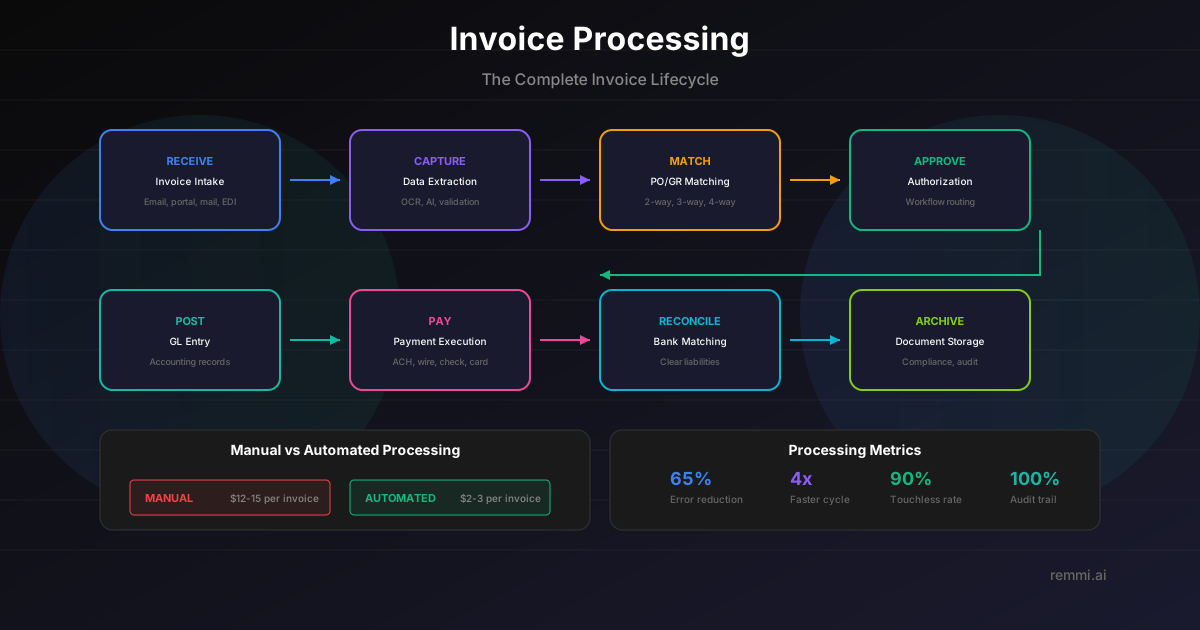
Understanding Invoice Processing
Invoice processing is the backbone of accounts payable operations. It's the complete journey an invoice takes from the moment it arrives until the vendor is paid. This seemingly simple process involves multiple steps, stakeholders, and systems—and is ripe with opportunities for optimization.
For most organizations, invoice processing is still surprisingly manual. Invoices arrive in various formats (paper, PDF, email), data is keyed in by hand, approvals chase people through email, and payment runs happen weekly or monthly. This approach is slow, error-prone, and expensive.
The invoice processing lifecycle includes:
- Receipt — Invoices arrive via email, mail, portal, or EDI
- Capture — Data is extracted from the invoice document
- Validation — Data is verified and matched to POs
- Approval — Invoice routes for authorization
- Coding — Expenses assigned to GL accounts
- Payment — Payment scheduled and executed
Each step is an opportunity for delay, error, or fraud. Optimizing invoice processing directly impacts cash flow, vendor relationships, and the bottom line.
The Invoice Processing Workflow
Receipt
Invoice arrives via email, mail, vendor portal, or EDI. It enters the AP queue for processing.
Capture
Invoice data is extracted through OCR/AI or manual entry. Key fields include vendor, amount, date, and line items.
Validation
Data is verified for accuracy, duplicates are checked, and invoice is matched to PO and receipt (2-way or 3-way match).
Approval
Invoice routes to appropriate approvers based on amount, department, or vendor. Approvers review and authorize.
Coding
Expenses are coded to correct GL accounts, cost centers, and projects for accurate financial reporting.
Payment
Approved invoice is scheduled for payment based on due date and cash strategy, then paid via appropriate method.
Invoice Processing by the Numbers
Cost per invoice (manual)
Average cycle time (manual)
Average error rate
With automation, costs drop to $2-5 per invoice, cycle time shrinks to 3-5 days, and errors become rare. The ROI case for automation is compelling.
Invoice Processing Best Practices
Automate Data Capture
Use OCR/AI to extract invoice data automatically. Eliminate manual data entry wherever possible.
Implement PO Matching
Require POs and use automated 2-way or 3-way matching to catch discrepancies early.
Set Approval SLAs
Define approval timeframes and escalation rules. Don't let invoices sit in queues.
Validate Before Processing
Check for duplicates, verify vendor info, and validate tax before entering the workflow.
Optimize Payment Timing
Balance early payment discounts against cash preservation. Pay on time, not early unless earning discounts.
Common Invoice Processing Problems
- ×Missing PO numbers — Invoices can't be matched, causing delays and exceptions
- ×Approval bottlenecks — Invoices stuck waiting for slow approvers
- ×Duplicate invoices — Same invoice entered twice, risking double payment
- ×No visibility — Can't answer vendor questions about invoice status
Related Terms
Accounts Payable
Department managing vendor invoices and payments
Invoice
Document requesting payment for goods or services
AP Automation
Technology to streamline invoice processing
Three-Way Match
Matching PO, receipt, and invoice before payment
OCR
Technology for extracting data from invoices
Approval Workflow
Routing invoices for authorization