What is an Approval Workflow?
The structured process that routes invoices through designated approvers to ensure proper authorization before payment.
Quick Definition
An approval workflow is a structured process that routes invoices through designated approvers based on predefined rules—such as amount thresholds, department, or expense type—before authorizing payment.
- Ensures proper oversight and authorization of spending
- Routes invoices to the right people automatically
- Creates audit trail of all approval decisions
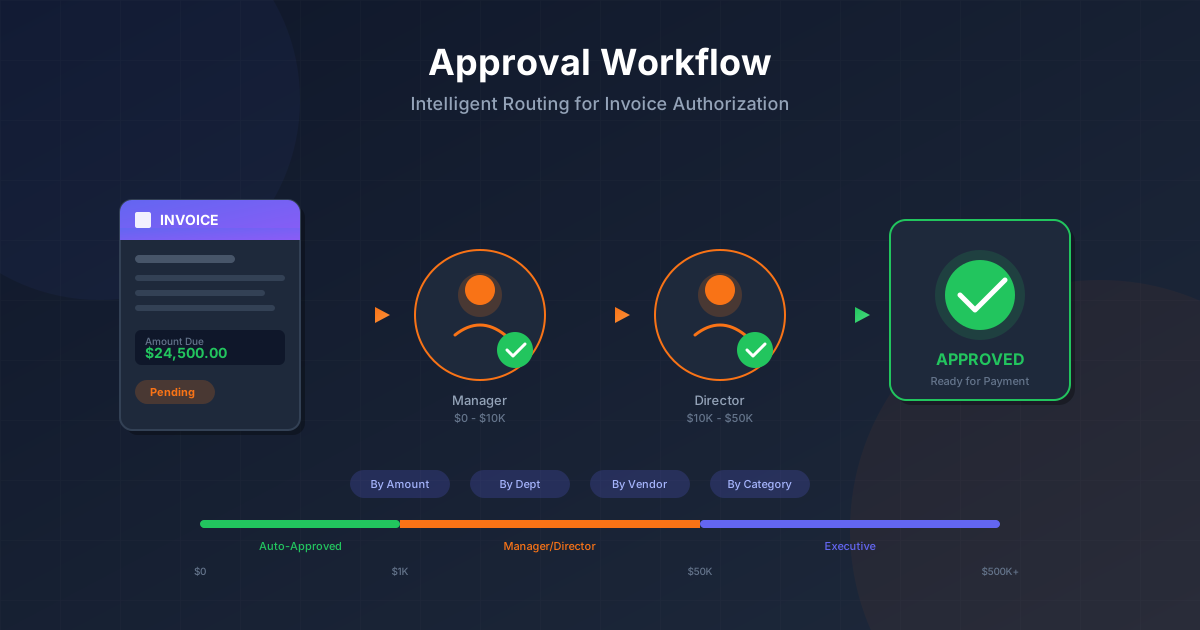
Understanding Approval Workflows
An approval workflow is one of the most critical components of accounts payable operations. It's the systematic process that ensures every invoice is reviewed and authorized by the appropriate people before your organization releases payment.
Without a well-designed approval workflow, organizations face significant risks: unauthorized spending, fraudulent payments, budget overruns, and compliance violations. The approval workflow serves as a critical control gate between receiving an invoice and issuing payment.
Modern approval workflows go far beyond simple "send to manager for approval." They incorporate intelligent routing based on multiple criteria, automatic escalation for urgent items, delegation for approver absences, and complete audit trails for compliance and analysis.
Types of Approval Routing
Hierarchical Routing
Sequential approval up the management chain:
- • Manager → Director → VP
- • Based on reporting structure
- • Higher amounts = higher levels
- • Clear chain of command
Parallel Routing
Multiple approvers review simultaneously:
- • All parties review at once
- • Faster overall approval time
- • Multiple stakeholder visibility
- • Requires all or majority approval
Conditional Routing
Routes based on invoice attributes:
- • Amount-based thresholds
- • Expense category rules
- • Vendor-specific approvers
- • Department or cost center
Matrix Routing
Combines multiple routing dimensions:
- • Department AND amount rules
- • Category AND vendor rules
- • Complex approval matrices
- • Enterprise-scale needs
Understanding Approval Thresholds
How Thresholds Work
Approval thresholds define the maximum amount each approver level can authorize. As invoice amounts increase, higher authority levels are required.
- $Up to $1,000: Auto-approved (if matched)
- $$$1,001 - $10,000: Manager approval
- $$$$10,001 - $50,000: Director approval
- $$$$Above $50,000: VP/Executive approval
Delegation Rules
Delegation ensures approvals continue when primary approvers are unavailable:
- Temporary assignment to qualified backup
- Time-limited delegation periods
- Full audit trail maintained
- Automatic expiration of delegation
Why Approval Workflows Matter
Of payment fraud involves lack of proper approval
Days average approval delay with manual workflows
Faster approvals with automated routing
Well-designed approval workflows balance control with efficiency. Too few controls increase fraud and error risk; too many create bottlenecks that delay payments, damage vendor relationships, and cause organizations to miss early payment discounts.
Manual vs Automated Approval Workflows
| Aspect | Manual Workflow | Automated Workflow |
|---|---|---|
| Routing | Email forwarding, paper trails | Rule-based automatic routing |
| Speed | Days to weeks | Hours to same-day |
| Visibility | Limited, status unknown | Real-time tracking dashboard |
| Escalation | Manual follow-up required | Automatic reminders & escalation |
| Audit Trail | Scattered, incomplete | Complete, timestamped log |
How an Approval Workflow Works
Invoice Received & Processed
Invoice is captured, data extracted, and validated for completeness. GL coding and matching occur.
Routing Rules Evaluated
System evaluates invoice attributes (amount, vendor, category, department) against workflow rules.
Approver(s) Identified
Based on rules, the appropriate approver(s) are identified. Delegation is checked if primary is unavailable.
Notification Sent
Approver receives notification via email, mobile app, or system queue with invoice details.
Review & Decision
Approver reviews invoice, supporting documents, and coding. They approve, reject, or request changes.
Next Step or Payment
If approved, routes to next approver (if multi-level) or proceeds to payment queue. Full audit trail recorded.
Approval Workflow Best Practices
Right-Size Your Approval Levels
Limit to 2-3 approval levels for most invoices. More levels create delays without proportionally increasing control.
Set SLAs and Escalation Rules
Define expected approval times (e.g., 24-48 hours) with automatic escalation or reminders for overdue items.
Always Have Backup Approvers
Configure delegation or backup approvers for every role to prevent workflow stalls during absences.
Automate Low-Risk Approvals
Use auto-approval for low-value, matched invoices from trusted vendors to reduce approval burden.
Maintain Segregation of Duties
Ensure approvers cannot approve their own expenses or invoices they initiated. Separate creation from approval.
Common Approval Workflow Mistakes
- ×Too many approval levels — Every level adds delay; most invoices need 1-2 approvers, not 5
- ×No backup approvers configured — Single points of failure cause invoices to stall for days
- ×Unclear routing rules — Invoices bouncing between approvers or going to wrong people wastes time
- ×No visibility or reminders — Approvers forget pending items; AP can't see where things are stuck
- ×Same person creates and approves — Violates segregation of duties and enables fraud
Related Terms
Accounts Payable
Department managing vendor invoices and payments
Invoice Processing
The complete lifecycle of handling vendor invoices
AP Automation
Technology that automates accounts payable tasks
Segregation of Duties
Separating responsibilities to prevent fraud
Authorization
Formal approval to proceed with a transaction
Internal Controls
Procedures to ensure accuracy and prevent fraud