What is a GL Code?
The essential identifier that categorizes every financial transaction for accurate expense tracking and reporting.
Quick Definition
A GL code (General Ledger code) is a unique alphanumeric identifier used to categorize and track financial transactions within a company's chart of accounts. GL codes enable accurate expense reporting, budget tracking, and financial analysis.
- Categorizes expenses by type, department, and purpose
- Enables accurate financial reporting and analysis
- Essential for budget management and cost control
Understanding GL Codes
A GL code (also called a general ledger code, account code, or GL account number) is the backbone of financial organization. Every transaction in your accounting system—from paying vendor invoices to recording sales—is assigned a GL code that determines where it appears in your financial statements.
Think of GL codes as a filing system for money. Just as you might organize physical documents into folders and cabinets, GL codes organize financial transactions into logical categories. This organization enables:
- Accurate financial statements — Expenses and revenues appear in the correct categories
- Budget tracking — Compare actual spending against budgets by category
- Cost analysis — Understand where money is being spent across the organization
- Tax compliance — Properly categorize deductible expenses and taxable items
In accounts payable, GL coding is one of the most important steps in invoice processing. The GL code assigned to each invoice line determines which expense account is charged, which department bears the cost, and how the expense is reported.
GL Code Structure
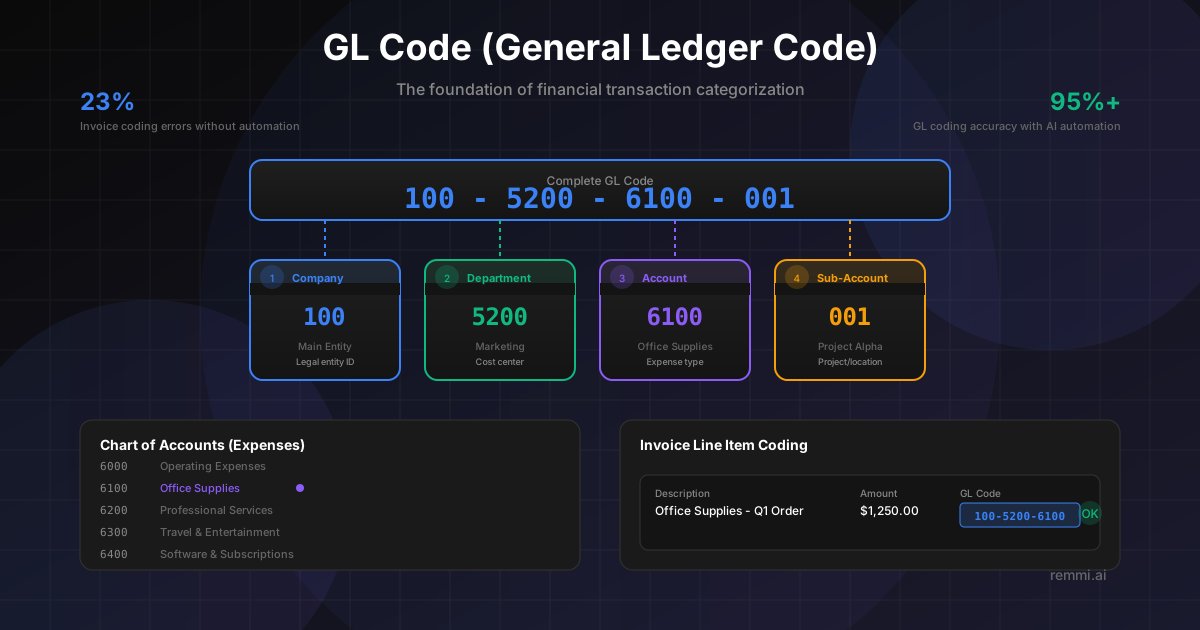
GL codes are typically structured with multiple segments, each representing a different dimension of the transaction:
Company / Entity
Identifies which legal entity in multi-company organizations
100Department / Cost Center
Which department or team incurred the expense
5200Account
The type of expense, asset, liability, or equity
6100Sub-Account / Project
Additional detail like project codes or locations
001Example Full GL Code:
100-5200-6100-001Company 100, Marketing Department, Office Supplies Account, Project 001
Common GL Account Categories
Expense Accounts (6000-6999)
- 6100Office Supplies
- 6200Professional Services
- 6300Travel & Entertainment
- 6400Software & Subscriptions
- 6500Utilities
Other Account Types
- 1000sAssets (Cash, AR, Inventory)
- 2000sLiabilities (AP, Loans)
- 3000sEquity (Retained Earnings)
- 4000sRevenue (Sales, Services)
- 5000sCost of Goods Sold
Why Accurate GL Coding Matters
Of invoices have coding errors without automation
Average cost to correct a miscoded invoice
Days added to close when fixing coding errors
Accurate GL coding is essential for reliable financial reporting. When invoices are miscoded, it affects budget tracking, departmental cost visibility, and the accuracy of financial statements. Errors often aren't discovered until month-end close, causing delays and rework.
How GL Coding Works in AP
Invoice Received
Invoice arrives and is captured into the AP system with line item details.
Expense Type Identified
Determine what was purchased: supplies, services, equipment, travel, etc.
Department Determined
Identify which department or cost center should bear the expense.
GL Code Assigned
Select the complete GL code including all required segments (company, dept, account, etc.).
Validation & Approval
GL code is validated against the chart of accounts and routed for approval.
Posted to Ledger
Once approved, the invoice is posted with the GL code to the general ledger.
GL Coding Best Practices
Maintain a Clear Chart of Accounts
Keep your chart of accounts organized with logical numbering and clear account names that make the right code easy to identify.
Use Default Coding Rules
Set up default GL codes by vendor, item category, or PO to reduce manual coding and improve consistency.
Code at the Line Level
Assign GL codes to individual invoice lines, not just the header, for accurate expense allocation across categories.
Review Coding Accuracy Regularly
Audit GL coding periodically to catch patterns of errors and provide feedback to improve accuracy.
Balance Detail with Simplicity
Use enough segments for meaningful reporting, but don't overcomplicate. Too many segments increase coding errors.
Common GL Coding Mistakes to Avoid
- xUsing catch-all accounts — "Miscellaneous Expense" obscures what was actually purchased
- xWrong department coding — Charging expenses to the wrong cost center distorts departmental budgets
- xCapital vs. expense confusion — Expensing items that should be capitalized (or vice versa) affects the balance sheet
- xInconsistent coding — Same expense type coded differently over time makes trend analysis impossible
GL Code vs. Related Concepts
| Term | Definition | Relationship to GL Code |
|---|---|---|
| GL Code | Full multi-segment account identifier | The complete code assigned to transactions |
| Chart of Accounts | Master list of all GL codes | Contains all valid GL codes for the organization |
| Cost Center | Department or unit that incurs costs | Often one segment within the GL code |
| Account Number | The natural account portion | The segment identifying expense type |
Related Terms
Accounts Payable
Department managing vendor invoices and payments
Invoice
Document requesting payment for goods or services
Chart of Accounts
Complete listing of all GL accounts used by a company
Expense Coding
Process of assigning GL codes to transactions
Cost Center
Department or unit that incurs costs but not revenue
Accounts Receivable
Money owed to a company by its customers