What is Touchless Processing?
The gold standard of AP automation—invoices that flow from receipt to payment without any human intervention.
Quick Definition
Touchless processing (also called no-touch or straight-through processing) is an AP automation capability where invoices are received, captured, validated, matched, coded, and approved for payment without any human intervention.
- Zero manual data entry or verification needed
- Invoices auto-match and route for payment
- Key metric for AP automation success
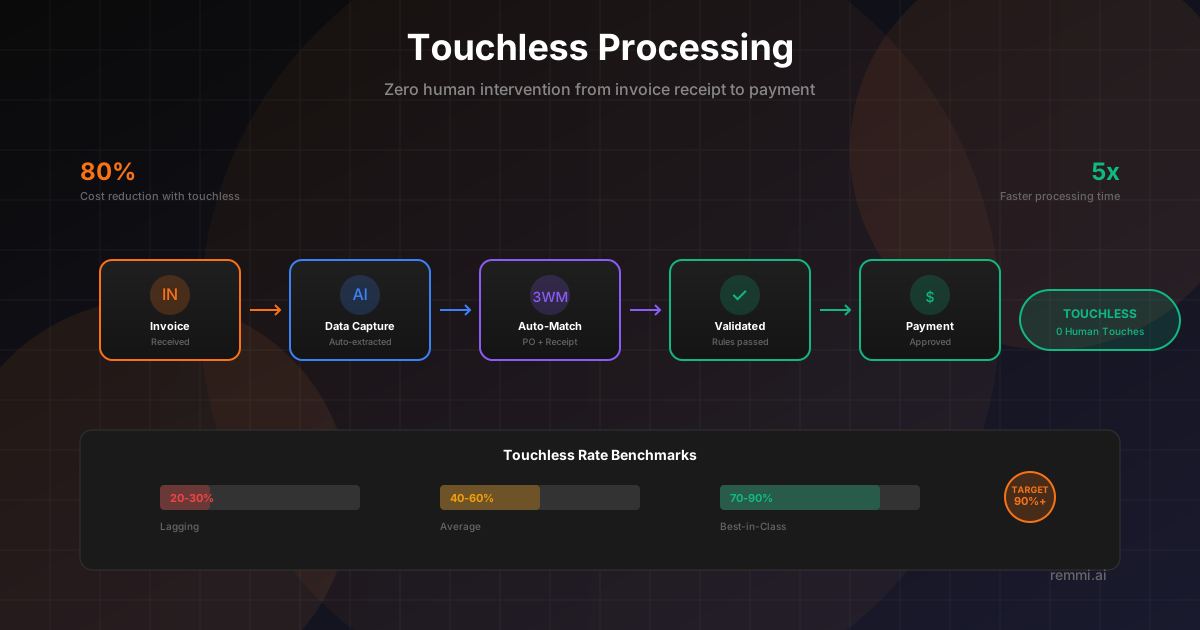
Understanding Touchless Processing
Touchless processing represents the ultimate goal of accounts payable automation. It describes invoices that complete their entire journey—from initial receipt to payment approval—without requiring any human intervention at any step.
In a touchless scenario, an invoice arrives via email or portal, gets automatically captured and extracted, matches against purchase orders and receipts, receives the correct GL coding, and routes for payment—all without a single person reviewing or approving it manually.
The touchless rate (percentage of invoices processed without human touch) has become a primary KPI for measuring AP automation success. Organizations with high touchless rates see dramatic reductions in processing costs, faster cycle times, and improved accuracy.
Touchless vs Traditional Processing
Traditional Processing
Manual steps at every stage slow processing:
- • Manual data entry from invoices
- • Human review of every invoice
- • Manual PO lookup and matching
- • Manual GL code assignment
- • Paper-based approval routing
Avg cost: $12-15 per invoice
Touchless Processing
Full automation from receipt to payment:
- • AI-powered data extraction
- • Automated validation rules
- • Auto-matching to PO and receipt
- • Intelligent GL coding
- • Automated approval workflows
Avg cost: $1-3 per invoice
How Touchless Processing Works
Automated Invoice Receipt
Invoices arrive via email, EDI, supplier portal, or API. System automatically captures and queues them for processing.
Intelligent Data Extraction
AI-powered OCR extracts header and line-item data: vendor, amounts, dates, PO numbers, quantities, and descriptions.
Validation & Matching
System validates extracted data, identifies the PO, and performs 2-way or 3-way matching against purchase order and receipt.
Automated GL Coding
For non-PO invoices, AI suggests or applies GL codes based on historical patterns, vendor, and invoice content.
Business Rule Evaluation
System checks approval thresholds, duplicate detection, budget availability, and other business rules.
Payment Authorization
Clean invoices passing all checks are automatically authorized for payment in the next payment run.
Touchless Rate Benchmarks
Lagging performers
Average performers
Best-in-class performers
PO-based invoices typically achieve higher touchless rates than non-PO invoices. Leading organizations see 80%+ touchless for PO invoices and 40-60% for non-PO invoices. The key is measuring and continuously improving your rates.
Technologies Enabling Touchless Processing
AI/ML Data Capture
Intelligent OCR that learns invoice formats, handles variations, and extracts data with 99%+ accuracy.
Automated Matching
Rule-based and AI-powered matching that handles line-item variations, partial matches, and tolerance-based approvals.
Workflow Automation
Configurable business rules, approval thresholds, and exception routing that enable hands-off processing.
Best Practices for Achieving Touchless AP
Maximize PO Coverage
PO-based invoices have much higher touchless potential. Work to increase PO usage for routine purchases.
Configure Smart Tolerances
Set appropriate price and quantity tolerances to allow minor variances through without exception.
Maintain Clean Master Data
Accurate vendor and item master data is essential for successful auto-matching and coding.
Train Your AI Models
Modern AI improves with feedback. Validate and correct extractions to improve future accuracy.
Monitor and Optimize Continuously
Track touchless rate by vendor, invoice type, and exception reason. Address root causes systematically.
Common Obstacles to Touchless Processing
- ×Poor invoice quality — Blurry images, handwritten notes, and non-standard formats break OCR
- ×Missing PO references — Vendors not including PO numbers forces manual lookup and matching
- ×Price and quantity variances — Frequent discrepancies from PO terms create exceptions
- ×Incomplete receiving — Late or missing goods receipts prevent 3-way matching
- ×Overly restrictive rules — Business rules that are too tight flag too many invoices for review
Touchless vs Related Terms
| Term | Meaning | Difference |
|---|---|---|
| Touchless Processing | Zero human intervention | The gold standard—completely automated |
| Straight-Through Processing | Same as touchless | Term from banking; identical concept |
| Low-Touch Processing | Minimal human intervention | 1-2 quick touches (e.g., approval click) |
| AP Automation | Technology enabling automation | Broader term; touchless is the outcome |
Related Terms
Straight-Through Processing
Another term for touchless, end-to-end automation
AP Automation
Technology automating accounts payable workflows
Invoice Processing
The workflow from invoice receipt to payment
OCR
Optical character recognition for data capture
Three-Way Match
Matching PO, receipt, and invoice for payment
Exception Rate
Percentage of invoices requiring manual review