What is a Credit Memo?
The essential document for processing returns, correcting overcharges, and reducing amounts owed between buyers and sellers.
Quick Definition
A credit memo (or credit memorandum) is a document issued by a seller to a buyer that reduces the amount owed on a previous invoice. It's commonly issued for returned merchandise, pricing errors, or overcharges.
- Reduces accounts payable balance for buyers
- Issued when goods are returned or billing errors occur
- Applied against open invoices to reduce payment
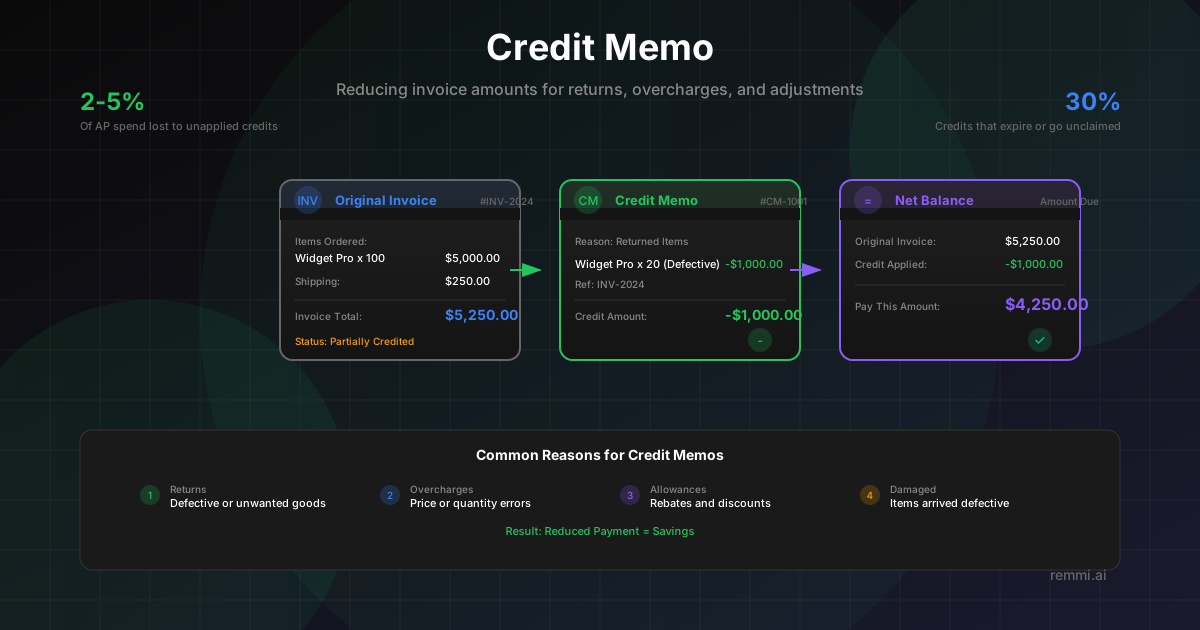
Understanding Credit Memos
A credit memo is a fundamental document in accounts payable and accounts receivable that adjusts the financial relationship between buyers and sellers. When a vendor needs to reduce what a customer owes—whether due to a product return, a billing mistake, or a negotiated price reduction—they issue a credit memo.
Think of a credit memo as the opposite of an invoice. While an invoice creates an obligation to pay, a credit memo reduces or eliminates that obligation. The credit memo references the original invoice and specifies the exact amount being credited back to the buyer.
For accounts payable teams, properly tracking and applying credit memos is essential. Failing to apply available credits means overpaying vendors—money that could have stayed in your organization. Conversely, accurate credit tracking ensures vendor relationships remain positive and accounting records stay clean.
Common Reasons for Credit Memos
Returns
Goods returned to the vendor for various reasons:
- • Defective merchandise
- • Wrong items shipped
- • Excess inventory
- • Order cancellation
Overcharges
Invoice amounts exceeding what was agreed:
- • Higher price than PO
- • Quantity billed > received
- • Duplicate charges
- • Incorrect tax applied
Allowances
Negotiated adjustments and discounts:
- • Volume rebates
- • Early payment discounts
- • Promotional allowances
- • Quality concessions
Credit Memo vs Debit Memo
Credit Memo
- -Reduces amount buyer owes to seller
- -Issued for returns, overcharges, allowances
- -Decreases seller's accounts receivable
- -Decreases buyer's accounts payable
Example: Vendor credits $500 for returned items
Debit Memo
- +Increases amount buyer owes to seller
- +Issued for undercharges, added fees
- +Increases seller's accounts receivable
- +Increases buyer's accounts payable
Example: Vendor charges $200 restocking fee
Why Credit Memo Management Matters
Of AP spend lost to unapplied credits
Average annual credits per mid-size company
Credits that expire or go unclaimed
Proper credit memo tracking prevents overpayments, maintains accurate vendor balances, and ensures your organization captures every dollar it's entitled to. Without systematic credit management, money slips through the cracks.
How to Process Credit Memos
Receive and Validate
Credit memo arrives from vendor. Verify it references a valid invoice and the credit reason is legitimate.
Record in System
Enter the credit memo into your AP system with the correct vendor, amount, and reference to the original invoice.
Match to Invoice
Link the credit memo to the corresponding open invoice(s). Prioritize applying to oldest invoices first.
Reduce Balance
Apply the credit to reduce the invoice balance. If credit exceeds invoice, carry forward to other open invoices.
Update Payment
When processing payment, remit only the net amount after credits. Include credit memo reference in remittance.
Reconcile and Close
Verify vendor statement matches your records. Close the credit memo once fully applied.
Credit Memo Best Practices
Track All Credits Centrally
Maintain a single system of record for all credit memos. Don't let credits hide in email inboxes or desk drawers.
Apply Credits Promptly
Don't let credits age. Apply them to invoices quickly to avoid paying more than necessary.
Automate Credit Matching
Use AP automation to automatically match credit memos to their corresponding invoices and apply them.
Reconcile Monthly
Compare your credit memo records against vendor statements monthly to catch any missing or misapplied credits.
Analyze Credit Patterns
High credit volumes from a vendor may indicate quality issues, pricing problems, or process breakdowns worth investigating.
Common Credit Memo Mistakes to Avoid
- ×Paying invoices before checking for credits — Always review available credits before processing payment
- ×Not requesting credits for returns — If you return goods, follow up until you receive the credit memo
- ×Letting credits expire — Some vendor credits have expiration dates; apply them before they're lost
- ×Poor documentation — Always note which invoice a credit applies to and why for audit purposes
Accounting Treatment
| Party | Account Debited | Account Credited |
|---|---|---|
| Seller (Issues Credit) | Sales Returns / Revenue | Accounts Receivable |
| Buyer (Receives Credit) | Accounts Payable | Inventory / Expense |
The accounting entries depend on the reason for the credit. Returns reduce inventory, while price adjustments reduce the related expense account.
Related Terms
Debit Memo
Document increasing the amount owed by a buyer
Invoice
Document requesting payment for goods or services
Accounts Payable
Department managing vendor invoices and payments
Vendor
Supplier providing goods or services to a business
Accounts Receivable
Money owed to a business by its customers
Purchase Order
Document authorizing a purchase from a vendor