What is an ACH Transfer?
The backbone of electronic payments in the US, moving trillions of dollars through batch-processed bank-to-bank transfers.
Quick Definition
An ACH transfer (Automated Clearing House transfer) is an electronic funds transfer between bank accounts processed through the ACH network. It enables batch-processed credits (pushing money) and debits (pulling money) for payments, payroll, and direct deposits.
- Low-cost alternative to wire transfers and checks
- Settles in 1-3 days (or same-day for priority)
- Processes over 30 billion transactions annually
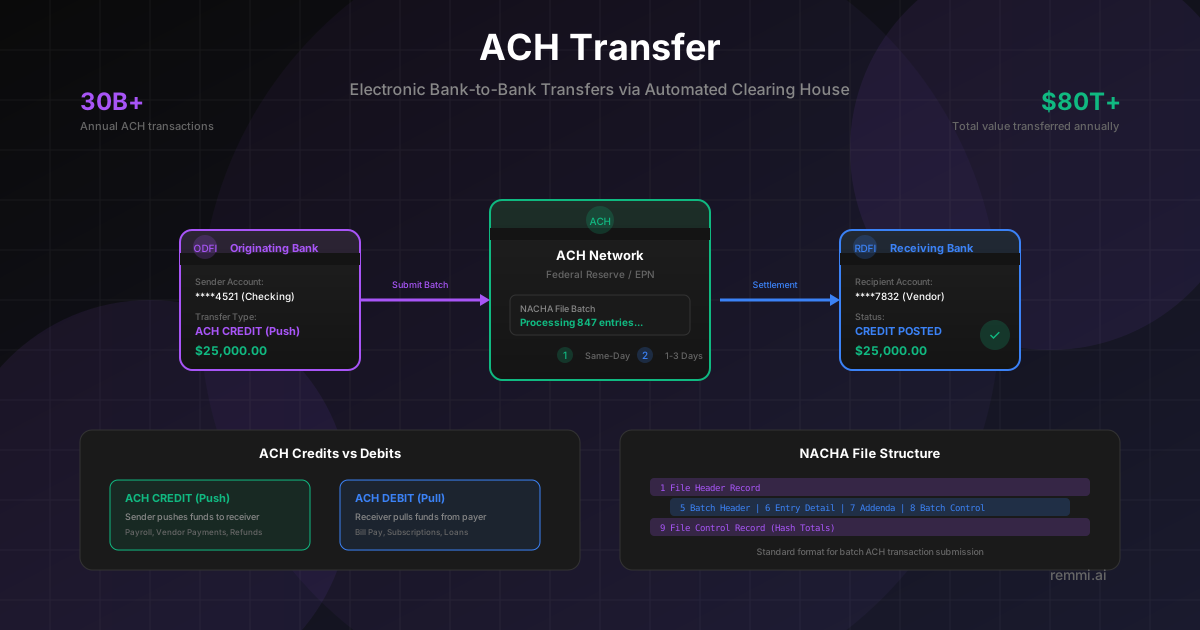
Understanding ACH Transfers
ACH transfers are the workhorse of electronic payments in the United States. Every time you receive a direct deposit paycheck, pay a bill online, or send money to a vendor, there's a good chance an ACH transfer is moving that money behind the scenes.
The Automated Clearing House is a network that connects all US banks and financial institutions. Unlike wire transfers that move money individually and instantly, ACH transfers are collected into batches and processed at scheduled intervals throughout the day. This batch processing is what makes ACH transfers so cost-effective.
For accounts payable teams, ACH transfers offer an ideal balance of speed, cost, and convenience for paying vendors. They're faster than checks, cheaper than wires, and more secure than both.
ACH Credits vs ACH Debits
ACH Credit (Push)
Money is pushed FROM the originator TO the receiver:
- • Direct deposit payroll
- • Vendor/supplier payments
- • Tax refunds
- • Government benefits
Sender initiates and controls the payment
ACH Debit (Pull)
Money is pulled FROM the receiver TO the originator:
- • Utility bill payments
- • Subscription charges
- • Loan/mortgage payments
- • Insurance premiums
Receiver initiates; requires payer authorization
How an ACH Transfer Works
ODFI
Originating bank collects transfers
Batch
Transactions grouped for processing
ACH Network
Fed or EPN routes transactions
RDFI
Receiving bank credits account
Understanding NACHA File Format
The NACHA file format is the standardized structure for transmitting ACH transactions. Understanding this format is essential for businesses that process payments in bulk.
File Header (1 Record)
Identifies the file, origin, and destination. Contains creation date and file ID.
Batch Header (Per Batch)
Groups related transactions. Contains company info, entry class code (PPD, CCD, WEB), and effective date.
Entry Detail (Per Transaction)
Individual transactions with routing number, account number, amount, and transaction code.
Addenda (Optional)
Additional information like payment remittance data or return reason codes.
Batch Control (Per Batch)
Summarizes the batch with entry count, total debits, and total credits.
File Control (1 Record)
Summarizes entire file with batch count, entry count, and hash totals for validation.
ACH Processing Windows
Settles within hours (up to $1M limit)
Settles next business day
Standard processing timeline
Same-day ACH has cutoff times throughout the day. Check with your bank for specific windows.
ACH Transfer vs Wire Transfer
| Feature | ACH Transfer | Wire Transfer |
|---|---|---|
| Speed | 1-3 days (same-day available) | Same day (hours) |
| Cost | $0 - $1 per transfer | $15 - $50 per transfer |
| Processing | Batch processed | Individual, real-time |
| Reversibility | Can be reversed/returned | Generally irreversible |
| Best For | Routine vendor payments, payroll | Urgent, high-value, international |
Why ACH Transfers Matter
Annual ACH transactions in the US
Total value transferred annually
Of US workers paid via direct deposit
ACH transfers have become the default payment method for B2B transactions, payroll, and recurring payments due to their low cost, reliability, and automation capabilities.
ACH Transfer Best Practices
Validate Bank Account Information
Use account validation services before sending to avoid returns and ensure funds reach the correct recipient.
Understand Cutoff Times
Know your bank's ACH submission deadlines for same-day, next-day, and standard processing windows.
Include Remittance Information
Use addenda records to include invoice numbers and payment details for easier reconciliation.
Batch Related Payments
Group payments by type (vendor, payroll) in separate batches for better tracking and reconciliation.
Monitor for Returns
Track ACH returns and NOCs (Notifications of Change) to maintain accurate banking information.
Common ACH Return Codes
- R01Insufficient Funds — Account doesn't have enough balance for the debit
- R02Account Closed — Bank account has been closed
- R03No Account — Account number doesn't exist at the receiving bank
- R04Invalid Account Number — Account number structure is invalid
Related Terms
ACH Payment
Electronic payment processed through the ACH network
Wire Transfer
Real-time electronic bank-to-bank money transfer
Electronic Payment
Digital money transfer without physical cash or checks
Payment Processing
Systems that facilitate financial transactions
Accounts Payable
Department managing vendor invoices and payments
Bank Reconciliation
Matching bank statements with internal records