What is RPA?
Software bots that automate repetitive, rule-based tasks in AP workflows—eliminating manual data entry, reducing errors, and enabling 24/7 invoice processing.
Quick Definition
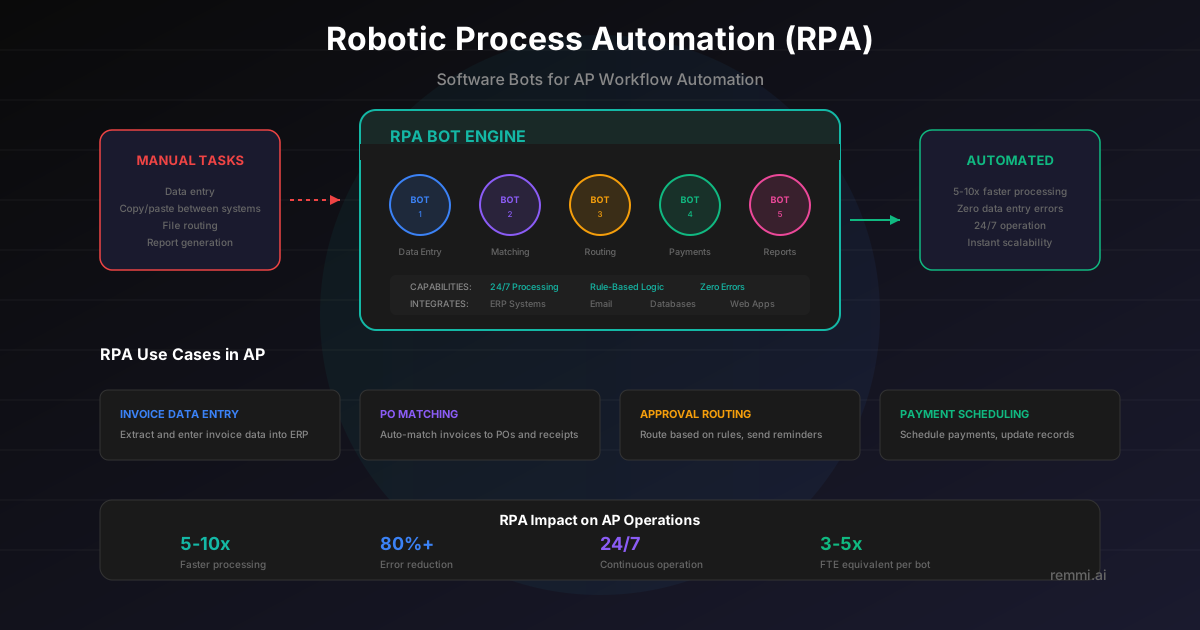
RPA (Robotic Process Automation) is software bots that automate repetitive, rule-based tasks in AP workflows. These digital workers handle data entry, invoice routing, PO matching, and payment scheduling without human intervention—working 24/7 with perfect accuracy.
- Automates rule-based, repetitive AP tasks
- Works 24/7 with near-zero errors
- Processes invoices 5-10x faster than humans
Understanding RPA in Accounts Payable
RPA (Robotic Process Automation) uses software bots to automate repetitive, rule-based tasks that previously required human effort. In accounts payable, these bots handle routine workflows like data entry, invoice routing, PO matching, and payment scheduling—executing them faster and more accurately than manual processing.
Unlike physical robots, RPA bots are software programs that interact with your existing systems just like a human would—clicking buttons, entering data, moving files, and triggering actions. The difference is they work 24/7, never make typos, and can process invoices at 5-10x human speed.
Key characteristics of RPA:
- Rule-Based — Follows predefined rules and logic exactly
- Repetitive Tasks — Best for high-volume, predictable workflows
- System Agnostic — Works across different applications and ERPs
- Non-Invasive — Operates on top of existing systems without deep integration
- Scalable — Easily add more bots as volume increases
While RPA excels at structured, predictable tasks, it has limitations. It cannot handle exceptions, make judgment calls, or process unstructured data. That's why modern AP automation combines RPA with AI: AI provides the intelligence to handle variability, while RPA executes routine workflows at scale.
RPA Use Cases in Accounts Payable
Invoice Data Entry
Extract data from invoices and enter it into ERP systems automatically, eliminating manual keying.
PO Matching
Automatically match invoices to purchase orders and receipts based on predefined tolerance rules.
Approval Routing
Route invoices to appropriate approvers based on amount, department, vendor, or other criteria.
Payment Scheduling
Schedule and execute payments based on due dates, payment terms, and cash flow optimization rules.
RPA Impact on AP Operations
Faster processing speed
Reduction in data entry errors
Continuous processing capability
RPA bots handle the high-volume, repetitive work while your team focuses on exceptions, vendor relationships, and strategic initiatives.
RPA Best Practices for AP
Start with High-Volume Processes
Target repetitive tasks with clear rules and high transaction volumes for maximum ROI.
Standardize Before Automating
Clean up processes and establish consistent rules before deploying RPA bots.
Plan for Exceptions
Build in exception handling so bots escalate unusual situations to humans appropriately.
Monitor Bot Performance
Track bot execution, success rates, and processing times to identify issues quickly.
Combine with AI for Intelligence
Use AI for unstructured data and decisions, RPA for executing routine workflows.
RPA Limitations to Consider
- ×Cannot handle exceptions — Bots follow rules exactly and break when encountering variations
- ×Fragile to changes — System updates or format changes can break bot workflows
- ×Limited to structured data — Cannot process handwritten notes or non-standard formats
- ×No learning capability — Unlike AI, RPA bots don't improve over time on their own
Related Terms
AP Automation
Technology that streamlines the invoice-to-payment process
Touchless Processing
Invoices processed without human intervention
Straight-Through Processing
End-to-end automation with no manual steps
Invoice Processing
The workflow from invoice receipt to payment