What is Electronic Data Interchange?
The standardized system for exchanging business documents electronically between organizations, enabling automated invoice and order processing.
Quick Definition
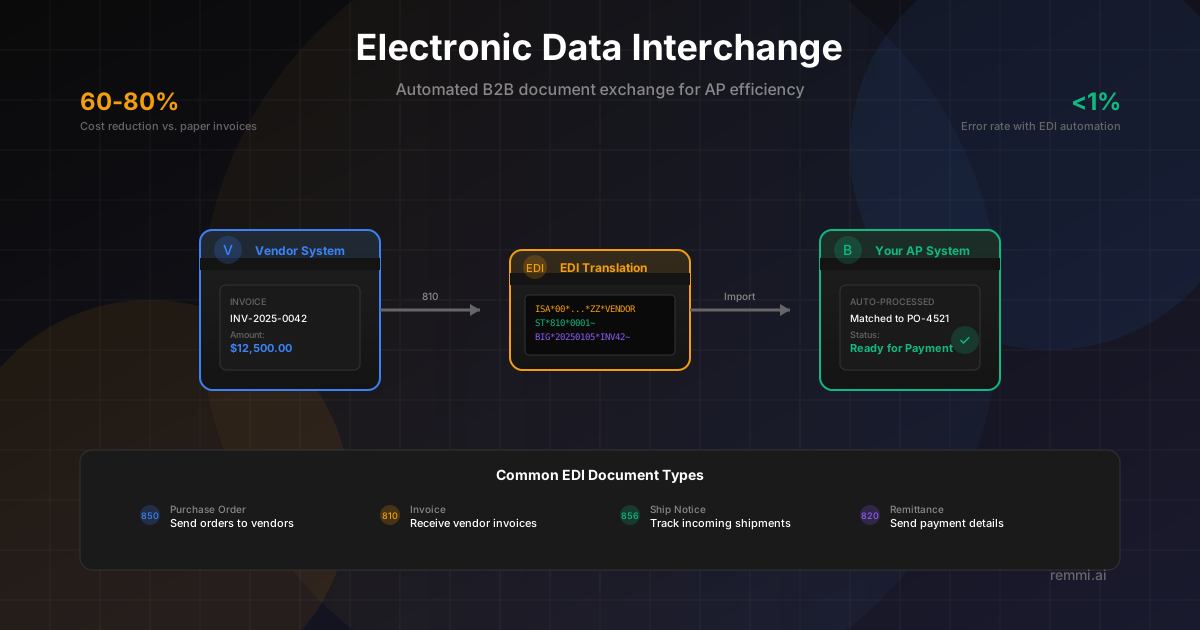
Electronic Data Interchange (EDI) is the computer-to-computer exchange of business documents in a standardized electronic format. In accounts payable, EDI enables automatic transmission of invoices, purchase orders, and payment information between companies without manual data entry.
- Eliminates manual data entry from paper documents
- Reduces errors and accelerates processing time
- Enables straight-through invoice processing
Understanding Electronic Data Interchange
Electronic Data Interchange, commonly known as EDI, revolutionized how businesses exchange information. Instead of mailing paper invoices, faxing purchase orders, or emailing PDFs that require manual processing, EDI enables computers to communicate directly with each other using standardized formats.
Think of EDI as a universal language for business documents. When your vendor sends an EDI invoice, it arrives in a structured format that your AP system can read and process automatically—no human needs to type in the vendor name, invoice number, line items, or amounts.
EDI has been around since the 1960s, originally developed for the transportation industry. Today, it's used across virtually every industry for exchanging purchase orders, invoices, shipping notices, payment information, and dozens of other document types. Major retailers, manufacturers, and enterprises often require EDI capability from their suppliers.
While newer technologies like APIs are emerging, EDI remains the backbone of B2B document exchange, with billions of transactions processed daily worldwide.
Key Components of EDI
EDI Standards
Standardized formats that define document structure. Common standards include ANSI X12 (North America), EDIFACT (international), and industry-specific formats.
Translation Software
Converts data between your internal format and EDI standards. Maps fields from your ERP to the proper EDI segments and elements.
Transmission Network
The communication method for sending EDI documents. Options include VANs (Value-Added Networks), AS2, SFTP, or direct connections.
Trading Partners
The businesses you exchange EDI documents with. Each partner relationship requires setup, testing, and ongoing management.
Common EDI Documents in Accounts Payable
| EDI Code | Document | Purpose |
|---|---|---|
| 850 | Purchase Order | Send orders to vendors electronically |
| 810 | Invoice | Receive vendor invoices for automatic processing |
| 856 | Advance Ship Notice | Get notified of incoming shipments before arrival |
| 820 | Payment Order/Remittance | Send payment details and remittance advice |
| 855 | PO Acknowledgment | Confirm receipt and acceptance of purchase orders |
Why EDI Matters for Accounts Payable
Cost reduction vs. paper invoice processing
Time saved per invoice in manual data entry
Error rate vs. 3-5% for manual entry
EDI transforms accounts payable from a manual, error-prone process into an automated workflow. When invoices arrive via EDI, they can be automatically matched to purchase orders and receipts, coded to the correct GL accounts, and routed for approval—all without anyone touching a keyboard.
How EDI Invoice Processing Works
Invoice Created
Vendor creates an invoice in their billing system with all line items, quantities, prices, and totals.
EDI Translation
Vendor's EDI software converts the invoice into standardized EDI 810 format with proper segments and elements.
Secure Transmission
The EDI document is transmitted via VAN, AS2, or SFTP to your organization's EDI system.
Inbound Translation
Your EDI translator converts the EDI document into your ERP or AP system's native format.
Automatic Matching
The invoice data is matched against PO and receipt records for three-way matching validation.
Exception or Approval
Clean matches proceed to payment; discrepancies are flagged for review. Acknowledgments sent back via EDI.
EDI Implementation Best Practices
Start with High-Volume Partners
Focus EDI implementation on vendors who send the most invoices first for maximum ROI.
Standardize Your Data
Clean up master data (vendor IDs, item codes) before EDI implementation to ensure smooth mapping.
Choose the Right VAN or Connection
Select a VAN or connection method that aligns with your trading partners' capabilities.
Automate Exception Handling
Build workflows for common EDI errors rather than manual investigation every time.
Monitor EDI Metrics
Track transmission success rates, error patterns, and processing times to optimize performance.
Common EDI Mistakes to Avoid
- xSkipping testing phases — Always thoroughly test with each trading partner before going live
- xIgnoring acknowledgments — Functional acknowledgments (997/999) confirm receipt and should be monitored
- xPoor master data management — Mismatched vendor or item codes cause mapping failures
- xNot planning for exceptions — EDI reduces errors but doesn't eliminate them; plan your exception process
EDI vs. Other Document Exchange Methods
| Method | Automation | Best For |
|---|---|---|
| EDI | Fully automated | High-volume, established trading partners |
| API Integration | Fully automated | Modern systems, real-time needs |
| Vendor Portal | Semi-automated | Mid-volume vendors without EDI |
| Email + OCR | Partially automated | Small vendors, varied formats |
| Paper Mail | Manual | Legacy vendors (avoid if possible) |
Related Terms
Invoice
Document requesting payment for goods or services
Purchase Order
Document authorizing a purchase from a vendor
Accounts Payable
Department managing vendor invoices and payments
Three-Way Match
Matching PO, receipt, and invoice before payment
Invoice Automation
Technology that automates invoice processing
Straight-Through Processing
Fully automated invoice-to-payment without manual steps