What is an Audit Trail?
A chronological record documenting every activity, transaction, and change within a system for compliance and accountability.
Quick Definition
An audit trail is a step-by-step record that traces the sequence of activities affecting any operation, procedure, or event. In accounts payable, it documents who created, modified, approved, or processed each invoice and payment.
- Tracks all user actions with timestamps
- Essential for regulatory compliance (SOX, GDPR, HIPAA)
- Enables fraud detection and investigation
Understanding Audit Trails
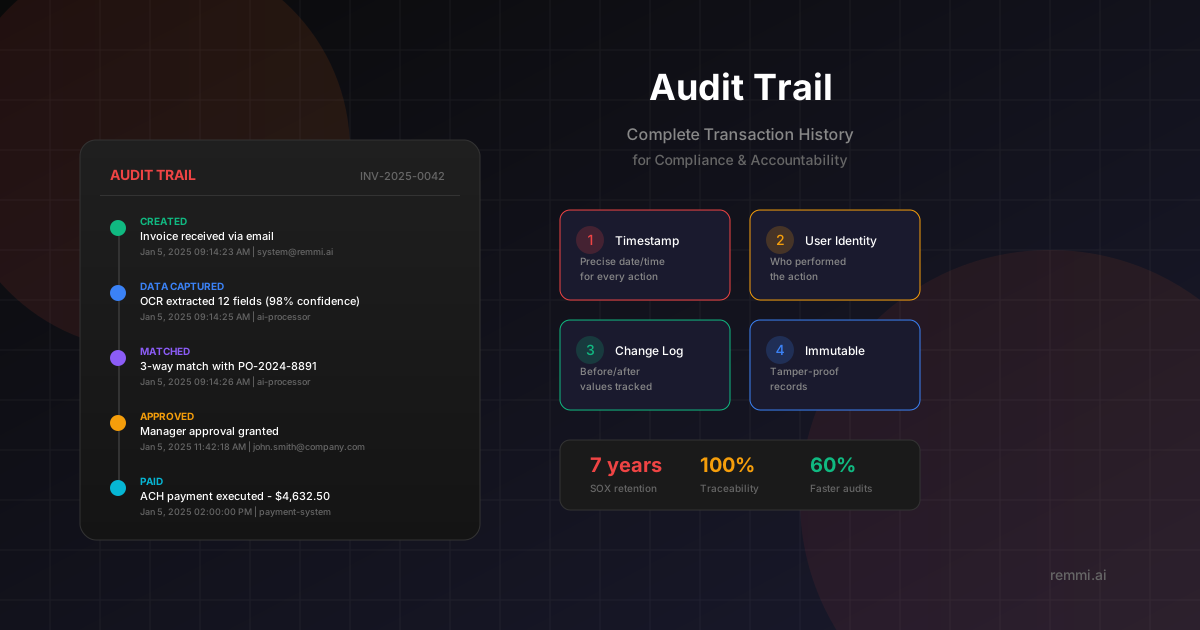
An audit trail is the backbone of organizational accountability. It provides a complete, tamper-evident record of everything that happens within a financial system — from the moment an invoice is received to when the payment clears the bank.
Think of an audit trail like a security camera for your data. Just as security footage lets you review what happened in a building, an audit trail lets you review what happened to any transaction, record, or document. This visibility is crucial for catching mistakes, detecting fraud, and proving compliance.
In accounts payable, audit trails capture every touchpoint of an invoice's journey:
- Receipt — When and how the invoice entered the system
- Data entry — Who captured the information and any changes made
- Approvals — The complete chain of who approved and when
- Payment — When payment was scheduled, executed, and confirmed
Modern AP automation platforms generate audit trails automatically, eliminating the manual documentation burden while providing far more comprehensive records than paper-based processes ever could.
Key Components of an Audit Trail
Timestamps
Precise date and time recording for every action, enabling chronological reconstruction of events and sequence verification.
User Identity
Recording of which user performed each action, establishing accountability and enabling responsibility tracking.
Change Details
Before and after values for any modifications, showing exactly what changed and enabling reversal if needed.
Immutability
Tamper-proof records that cannot be altered or deleted, ensuring the integrity of historical data for audits.
Why Audit Trails Matter
Of fraud is detected through tips or audit procedures
Minimum retention period required by SOX compliance
Faster audit completion with automated trails
Strong audit trails are not just about compliance — they're a critical business asset. They enable faster investigations when issues arise, provide evidence in disputes, support continuous improvement by revealing process bottlenecks, and demonstrate to stakeholders that proper controls are in place.
How Audit Trails Work in AP
Invoice Receipt Logging
When an invoice enters the system (email, scan, portal), the system logs the source, timestamp, and initial data.
Data Extraction Recording
OCR/AI extraction results are logged, including confidence scores and any manual corrections made.
Matching Documentation
PO matching attempts, results, and any exception handling are recorded with user decisions.
Approval Chain Capture
Each approval or rejection is logged with the approver, timestamp, comments, and delegation details if applicable.
GL Coding History
Account assignments and any coding changes are tracked with before/after values and reasons.
Payment Execution Log
Payment method, bank details, execution timestamp, and confirmation status are all recorded.
Archive and Retention
Complete trail is archived with the invoice, indexed for search, and retained per policy.
Audit Trail Best Practices
Automate Trail Generation
Use systems that automatically log all actions rather than relying on manual documentation.
Ensure Immutability
Implement write-once storage that prevents modification or deletion of historical records.
Enable Easy Retrieval
Index and organize trails for quick search by invoice number, vendor, date, or user.
Control Access
Limit who can view audit trails and log access to the trails themselves.
Define Retention Policies
Document how long trails are kept based on regulatory requirements and business needs.
Common Audit Trail Mistakes to Avoid
- ×Incomplete logging — Missing key events like approvals, rejections, or system access creates gaps
- ×Editable trails — Allowing modification of historical records destroys their evidentiary value
- ×Poor retention — Deleting trails before regulatory periods expire exposes the organization to risk
- ×No access controls — Allowing everyone to view sensitive audit data violates privacy and security
Related Terms
Internal Controls
Policies and procedures that safeguard assets and ensure accuracy
Segregation of Duties
Dividing responsibilities to prevent fraud and errors
Approval Workflow
The process of routing documents for authorization
Accounts Payable
The department managing vendor payments and invoices
Three-Way Match
Matching invoice, PO, and receipt before payment
Invoice
A document requesting payment for goods or services