What is Invoice Validation?
The verification process ensuring invoice data is accurate, complete, and complies with business rules before payment authorization.
Quick Definition
Invoice validation is an accounts payable process that verifies invoice data quality and compliance before payment. It checks that invoices have complete information, accurate calculations, and meet business rules.
- Ensures data accuracy before processing
- Catches errors, duplicates, and policy violations
- Precedes matching and approval workflows
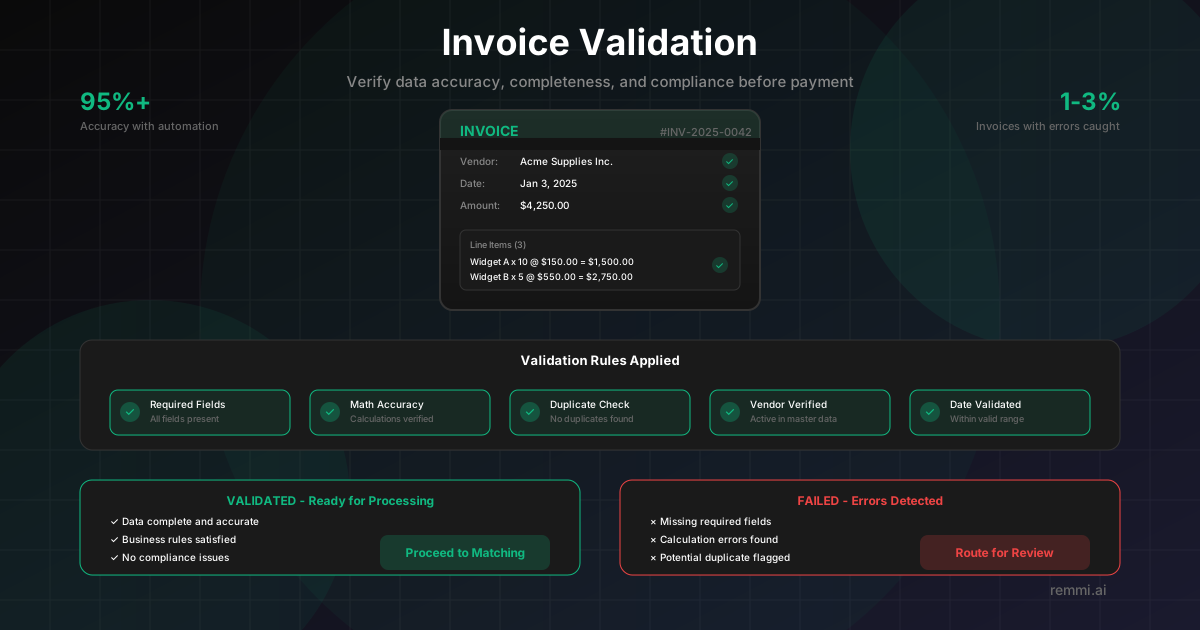
Understanding Invoice Validation
Invoice validation is the quality gate that ensures every invoice entering your accounts payable system meets your organization's standards for accuracy, completeness, and compliance. It's the critical checkpoint between data capture and downstream processes like matching and approval.
While invoice matching compares invoices to external documents (POs and receipts), validation focuses on the invoice itself. It answers fundamental questions about data quality:
- Is the invoice complete? — All required fields are present and populated
- Is the data accurate? — Calculations are correct and values are valid
- Does it comply with rules? — Format, dates, and amounts meet policy requirements
Invoices that pass validation proceed to matching and approval. Those that fail are flagged for review, preventing bad data from causing downstream problems like payment errors or audit issues.
Validation vs Matching: Key Differences
Invoice Validation
- -Checks the invoice data itself
- -Verifies completeness and accuracy
- -Applies business rules and policies
- -Detects duplicates and anomalies
Invoice Matching
- -Compares to external documents
- -Verifies against POs and receipts
- -Confirms authorized purchases
- -Validates delivery occurred
Both are essential: validation ensures good data quality, matching ensures the invoice corresponds to real business transactions.
Core Validation Rules
Required Field Checks
Ensures all mandatory fields are present: invoice number, date, vendor name/ID, billing address, line items with descriptions, quantities, and prices.
Mathematical Accuracy
Validates all calculations: line totals (qty x price), subtotal (sum of lines), tax calculations, discounts, and grand total accuracy.
Duplicate Detection
Checks if the same invoice number from the same vendor already exists in the system. Prevents duplicate payments from resubmitted or accidentally forwarded invoices.
Date Validation
Verifies invoice date is valid, not future-dated, and within acceptable age limits. Flags stale invoices that may indicate issues.
Vendor Validation
Confirms vendor exists in master data, is active, and invoice details (name, address, tax ID) match the approved vendor record.
Validation Outcomes
Validation Passed
- -All required fields present
- -Calculations are correct
- -No duplicate detected
- -Vendor verified in master data
Proceeds to matching and approval workflow
Validation Failed
- xMissing required fields
- xMathematical errors found
- xPotential duplicate flagged
- xVendor not found or inactive
Routed to exception queue for review
Common Validation Errors
Benefits of Automated Invoice Validation
Instant Verification
Validate invoices in seconds instead of minutes per invoice. Process thousands of invoices without manual review delays.
Consistent Rule Application
Every invoice checked against the same rules every time. Eliminates human inconsistency and oversight.
Fraud Prevention
AI detects anomalies, suspicious patterns, and potential fraud attempts that manual review might miss.
Reduced Exceptions
Intelligent validation reduces false positives by understanding context and applying smart tolerances.
Why Invoice Validation Matters
Of invoices contain errors that validation catches
Duplicate payment rate without proper validation
Accuracy rate with automated validation
Proper invoice validation prevents payment errors, catches duplicates before they become costly, and ensures clean data flows through your entire AP process.
Common Invoice Validation Mistakes
- xSkipping validation for "trusted" vendors — Every invoice needs validation, regardless of vendor relationship
- xRelying only on duplicate invoice number checks — Smart duplicates use different numbers for the same charge
- xNot validating against vendor master data — Fraudulent invoices often use slightly different vendor details
- xIgnoring validation for small invoices — Fraudsters often test with small amounts before larger schemes