What is Invoice Coding?
The critical step that assigns accounting dimensions to invoice line items for accurate expense tracking and financial reporting.
Quick Definition
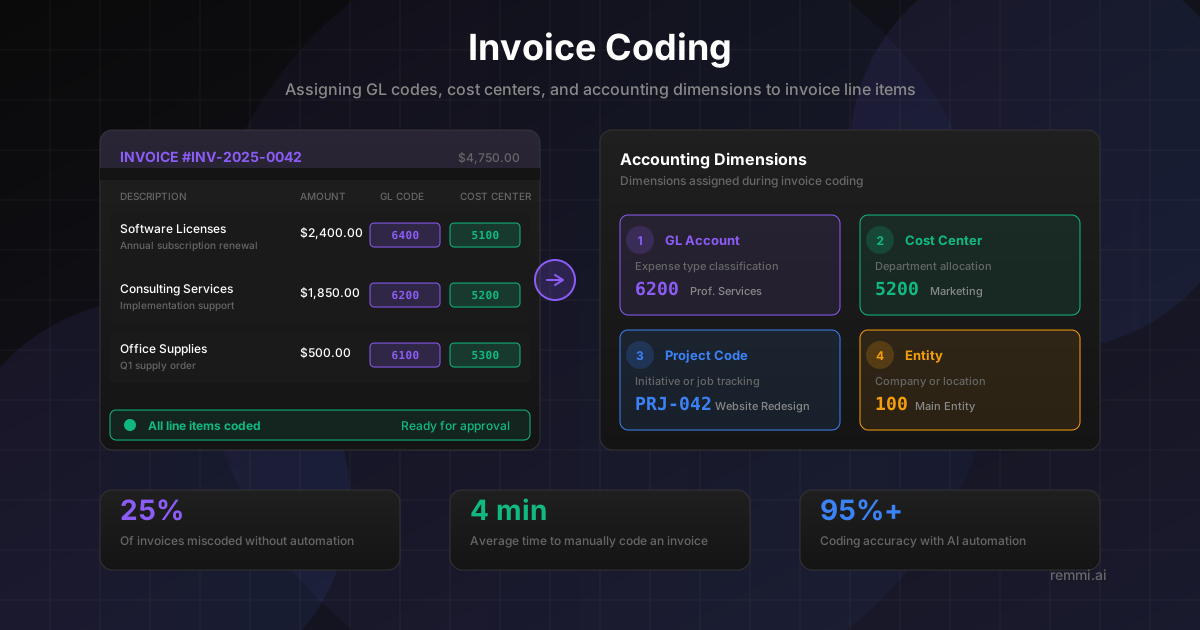
Invoice coding is the process of assigning GL codes, cost centers, and other accounting dimensions to invoice line items. This categorization ensures expenses are properly allocated to the right accounts, departments, and projects for accurate financial reporting.
- Assigns GL accounts to identify expense types
- Allocates costs to departments and cost centers
- Links expenses to projects, jobs, or other dimensions
Understanding Invoice Coding
Invoice coding is a fundamental accounts payable process where each invoice line item is assigned the appropriate accounting codes before posting to the general ledger. This step determines how expenses are categorized, which departments are charged, and how costs appear in financial reports.
Think of invoice coding as creating a complete "address" for each expense. Just as a physical address includes street, city, state, and zip code, an accounting address includes the GL account, cost center, project, and other dimensions that fully describe where the expense belongs in your financial structure.
Accurate invoice coding enables:
- Correct financial statements — Expenses appear in the right categories on the P&L
- Department accountability — Costs are charged to the teams that incurred them
- Project cost tracking — Job costing and project budgets reflect actual spend
- Budget variance analysis — Compare actual vs. budgeted spend by category
- Regulatory compliance — Proper categorization for tax and audit purposes
Common Accounting Dimensions
Invoice coding typically involves assigning values across multiple accounting dimensions:
GL Account
Identifies the type of expense (supplies, services, travel)
6100Cost Center
Department or team responsible for the expense
5200Project Code
Initiative, job, or grant the expense supports
PRJ-042Entity / Location
Company, subsidiary, or geographic location
100Example Fully Coded Invoice Line:
GL: 6200 | Dept: 5200 | Project: PRJ-042 | Entity: 100Professional Services expense for Marketing department on Project 042 in main entity
Why Invoice Coding Matters
Of invoices miscoded without automation
Average time to manually code an invoice
Cost to correct a miscoded invoice
Inaccurate invoice coding creates a cascade of problems: wrong departmental budgets, misleading financial reports, incorrect tax filings, and audit findings. Errors often aren't caught until month-end close, causing delays and requiring time-consuming journal entries to correct.
The Invoice Coding Process
Invoice Receipt & Capture
Invoice arrives and is captured into the AP system with header and line item details extracted.
Line Item Analysis
Each line item is reviewed to understand what was purchased and who requested it.
GL Account Assignment
The appropriate expense account is selected based on the nature of the purchase.
Cost Center Allocation
Expenses are assigned to the department or team that should bear the cost.
Additional Dimensions
Project codes, locations, and other required dimensions are added as needed.
Validation & Review
Coding is validated against the chart of accounts and routed for approval if required.
Invoice Coding Methods
Manual Coding
- -AP clerk reviews each invoice and selects codes
- -Time-consuming (3-5 minutes per invoice)
- -Error-prone, especially with complex CoA
- -Requires extensive training and guidelines
Automated Coding
- -AI suggests codes based on patterns and rules
- -Processes invoices in seconds
- -95%+ accuracy with continuous learning
- -Human review for exceptions only
Invoice Coding Best Practices
Set Up Vendor Defaults
Configure default GL codes and cost centers for recurring vendors to reduce manual coding and ensure consistency.
Code at the Line Level
Assign codes to individual line items, not just invoice headers. One invoice may span multiple expense categories.
Use Validation Rules
Implement system validation to catch invalid account combinations and require all mandatory dimensions.
Document Coding Guidelines
Create clear, accessible documentation for common expense types and edge cases to ensure consistent coding.
Monitor Coding Accuracy
Track coding error rates and patterns to identify training needs and process improvements.
Common Invoice Coding Mistakes to Avoid
- xUsing default accounts for everything — Defaulting to "Miscellaneous" obscures actual spending patterns
- xCoding to wrong cost center — Charging expenses to the wrong department distorts budgets and accountability
- xIgnoring line-level detail — Coding entire invoice to one account when items span multiple categories
- xInconsistent coding over time — Same vendor or expense type coded differently makes trend analysis impossible
Invoice Coding vs. Related Concepts
| Term | Definition | Relationship |
|---|---|---|
| Invoice Coding | Assigning accounting dimensions to invoice lines | The process of categorizing invoice expenses |
| GL Code | Identifier for expense type in chart of accounts | One dimension assigned during invoice coding |
| Cost Center | Department or unit that incurs costs | Another dimension assigned during coding |
| Chart of Accounts | Master list of all valid GL accounts | Defines valid coding options |
Related Terms
GL Code
Unique identifier for categorizing financial transactions
Invoice Processing
End-to-end workflow for handling vendor invoices
AP Automation
Technology that streamlines accounts payable processes
Chart of Accounts
Complete listing of all GL accounts used by a company