What is an API?
Application Programming Interface - the protocols that enable different software systems to communicate and share data.
Quick Definition
An API (Application Programming Interface) is a set of protocols and tools that enables different software systems to communicate and share data with each other.
- Enables real-time data sync between systems
- Eliminates manual data entry and re-keying
- Powers modern AP automation and ERP integrations
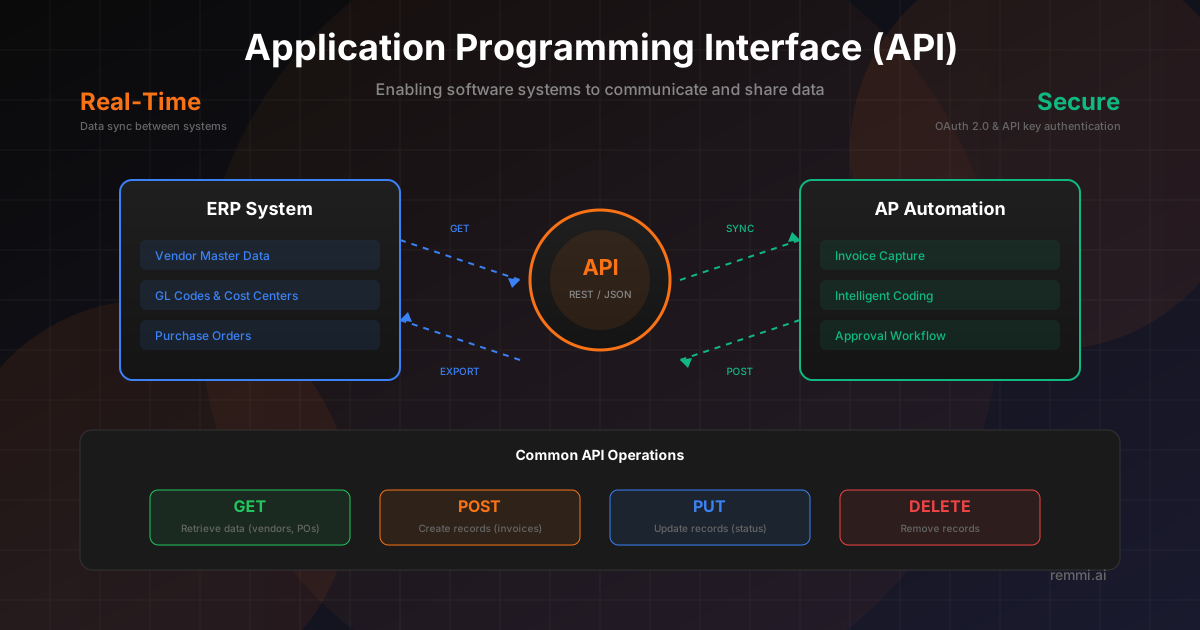
Understanding Application Programming Interfaces
An API (Application Programming Interface) is the foundation of modern software integration. It defines how different applications can request services and exchange data with each other, acting as a standardized contract between systems.
For accounts payable teams, APIs are what make automation possible:
- ERP connectivity - Pull vendor data, GL codes, and POs from SAP, Oracle, NetSuite
- Real-time sync - Push approved invoices to your ERP instantly
- Banking integration - Connect to payment platforms for ACH and wire transfers
- Document processing - Send invoices to AI extraction services
- Reporting - Pull transaction data into analytics dashboards
Without APIs, organizations would be stuck with manual data entry, file-based imports, or disconnected systems. Modern AP automation platforms use APIs extensively to create seamless workflows between invoice capture, approval, and payment.
Types of APIs
REST APIs
Most common for web integrations:
- • Uses HTTP methods (GET, POST, PUT)
- • JSON data format
- • Stateless requests
- • Easy to implement
GraphQL APIs
Flexible query language for APIs:
- • Request exactly what you need
- • Single endpoint
- • Strongly typed schema
- • Reduces over-fetching
Webhooks
Real-time event notifications:
- • Push-based (not polling)
- • Instant event delivery
- • Triggered by actions
- • Efficient for updates
How APIs Power AP Automation
Data Retrieved via API
- •Vendor master records - Names, addresses, payment terms
- •GL codes - Chart of accounts, cost centers
- •Purchase orders - PO details for matching
- •Goods receipts - For 3-way matching
Data Sent via API
- •Coded invoices - With GL and cost center assignments
- •Approval status - Workflow completion
- •Payment instructions - Ready for payment run
- •Document attachments - Invoice images, receipts
API Authentication Methods
Secure API access is critical when dealing with financial data. Understanding authentication methods helps ensure your integrations are properly protected.
API Keys
- • Unique token per application
- • Simple to implement
- • Passed in request headers
- • Good for server-to-server
- • Rotate keys regularly
OAuth 2.0
- • Industry standard authorization
- • Scoped access permissions
- • Token refresh mechanism
- • Delegated access support
- • Used by major ERPs
API Integration Flow in AP
Authentication
System authenticates using API keys or OAuth tokens to establish secure connection.
Master Data Sync
API pulls vendor records, GL codes, and PO data from ERP to AP automation tool.
Invoice Processing
Invoices are captured, extracted, and coded using the synced master data.
Approval Workflow
API may trigger notifications and update status as invoices move through approvals.
Export to ERP
API sends approved invoice data back to ERP with full coding for payment.
Status Updates
Webhooks or polling APIs receive payment status updates from ERP or bank.
API Best Practices for AP Teams
Secure Your Credentials
Never expose API keys in client-side code. Use environment variables and secure vaults for credential storage.
Implement Error Handling
Build retry logic for transient failures. Log errors for troubleshooting and set up alerts for critical failures.
Use Webhooks When Available
Webhooks provide instant notifications instead of polling. They reduce API calls and enable real-time updates.
Monitor API Usage
Track API call volumes, response times, and error rates. Most APIs have rate limits that need monitoring.
Choose Pre-Built Connectors
Use AP automation tools with native ERP connectors rather than building custom integrations that require ongoing maintenance.
Common API Integration Challenges
- ×Rate limiting — APIs restrict call volume; exceeding limits causes failures and delays
- ×Version changes — API updates can break integrations if not monitored and updated
- ×Data mapping — Field formats and structures differ between systems requiring transformation
- ×Authentication expiration — OAuth tokens expire and require automatic refresh handling
API vs EDI: When to Use Each
| Aspect | API | EDI |
|---|---|---|
| Speed | Real-time | Batch (often scheduled) |
| Format | JSON, XML (flexible) | X12, EDIFACT (standardized) |
| Best For | Internal system integration | B2B trading partner transactions |
| Implementation | Developer-friendly | Specialized knowledge needed |
| Use Case | ERP to AP automation | Supplier PO and invoice exchange |