What is Vendor Onboarding?
The structured process of registering, validating, and setting up new vendors in the accounts payable system before they can receive payments.
Quick Definition
Vendor onboarding is the process of registering, validating, and setting up new vendors in the AP system. This includes collecting tax forms (W-9), verifying bank details, screening against sanctions lists, and creating the vendor master record.
- Collects and verifies vendor tax and banking information
- Prevents fraud through identity and bank verification
- Ensures compliance with sanctions and regulatory requirements
Understanding Vendor Onboarding
Vendor onboarding is a critical control point in the accounts payable process. Before a new vendor can receive any payments, they must be properly registered in your system with verified information. This protects your organization from fraud, ensures tax compliance, and enables accurate payment processing.
A well-designed onboarding process balances security with efficiency. Too many steps or manual processes can delay procurement and frustrate business users. Too few controls can expose your organization to fraud and compliance risks.
The key components of vendor onboarding include:
- Information Collection — Gathering essential data including legal name, address, tax ID, and banking details
- Document Collection — Obtaining W-9 forms, insurance certificates, and other required documentation
- Verification — Validating the vendor's identity, tax ID, and bank account ownership
- Compliance Screening — Checking against sanctions lists, denied parties databases, and other watchlists
- System Setup — Creating the vendor master record with accurate, verified information
Modern organizations are increasingly automating vendor onboarding to reduce cycle times, improve accuracy, and strengthen fraud prevention controls.
The Vendor Onboarding Process
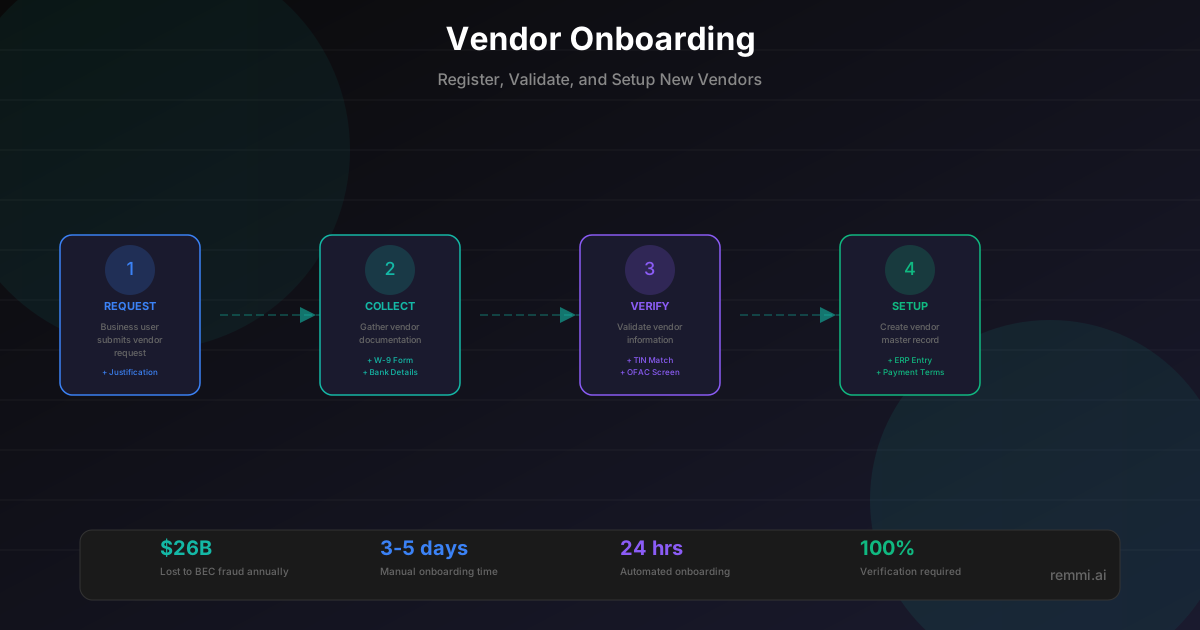
1. Request Initiation
Business user submits vendor request:
- * Business justification
- * Vendor contact information
- * Expected spend category
- * Urgency and timeline
2. Document Collection
Vendor provides required documentation:
- * W-9 or W-8 tax form
- * Bank account details
- * Insurance certificates
- * Business registration
3. Verification & Screening
Validate vendor information:
- * TIN matching with IRS
- * OFAC sanctions screening
- * Bank account verification
- * Duplicate vendor check
4. System Setup
Create vendor master record:
- * Enter verified data in ERP
- * Set payment terms
- * Configure approval workflows
- * Activate for payments
Onboarding Documentation Checklist
Required Documents
- +W-9 form (or W-8 for foreign vendors)
- +Bank account information (ACH details)
- +Legal business name and address
- +Primary contact information
- +Payment remittance address
Optional/Situational
- +Certificate of insurance (COI)
- +Business license or registration
- +Diversity certifications (MBE, WBE, etc.)
- +Credit references or financial statements
- +Signed master service agreement (MSA)
Why Vendor Onboarding Matters
Lost annually to BEC/vendor fraud
Typical manual onboarding time
Automated onboarding time
Proper vendor onboarding is your first line of defense against payment fraud. Fraudsters frequently target the onboarding process to insert fake vendors or redirect payments to fraudulent accounts. A robust onboarding process with verification controls protects against these threats while ensuring tax compliance and data accuracy.
Vendor Verification Methods
TIN Matching
Verify the tax ID and business name match IRS records to ensure 1099 accuracy and prevent fake vendor schemes.
Sanctions Screening
Check against OFAC, denied parties lists, and other government watchlists to ensure compliance with trade regulations.
Bank Account Verification
Confirm bank account ownership through micro-deposits, bank APIs, or callback verification to prevent payment misdirection.
Duplicate Detection
Search vendor master for existing records using fuzzy matching on names, TINs, and addresses to prevent duplicate entries.
Business Verification
Confirm the business exists and is in good standing through Secretary of State lookups or business registry checks.
Vendor Onboarding Best Practices
Standardize the Process
Use a consistent onboarding form and checklist for all vendors to ensure no steps are missed and data is collected uniformly.
Verify Before Activating
Never activate a vendor for payments until all verification steps are complete, including bank account validation.
Check for Duplicates First
Always search the vendor master before creating new records to prevent duplicates that lead to payment errors.
Validate Banking Details
Use bank verification services or micro-deposits to confirm account ownership before making the first payment.
Segment by Risk Level
Apply enhanced due diligence for high-value or high-risk vendors while streamlining low-risk onboarding.
Common Onboarding Mistakes
- xSkipping bank account verification — Opens the door to business email compromise and payment fraud
- xNot checking for duplicates — Creates split vendor records, complicates reporting, and increases fraud risk
- xAccepting expired W-9 forms — W-9s should be current; stale forms may have outdated information
- xRushing onboarding under pressure — Urgency is a common fraud tactic; maintain process discipline
Manual vs. Automated Onboarding
| Aspect | Manual Process | Automated Platform |
|---|---|---|
| Time to Complete | 3-5 business days | 24-48 hours |
| Document Collection | Email back-and-forth | Self-service portal |
| TIN Verification | Manual IRS lookup | Instant API check |
| Bank Verification | Phone callback | Automated verification |
| Duplicate Detection | Manual search | Fuzzy matching algorithm |
| Error Rate | Higher (data entry) | Lower (validated input) |
Related Terms
Vendor Management
Managing supplier relationships, data, and performance
Vendor
External party providing goods or services to your organization
W-9
IRS form for collecting taxpayer identification information
Accounts Payable
Department managing vendor invoices and payments