Vendor Statement Reconciliation: Automated Matching for Accurate Balances
Monthly vendor statements arrive like clockwork, but reconciling them against your AP ledger remains one of the most tedious yet critical tasks in accounts payable. Automated reconciliation transforms this manual burden into a streamlined exception-handling process.
Ryan Shugars
Director of Product
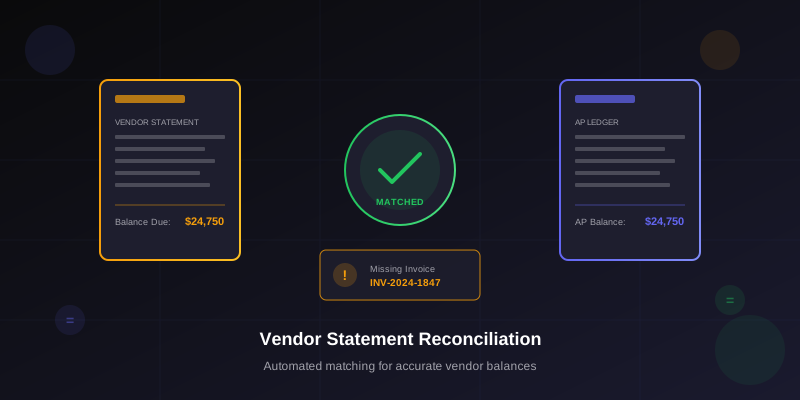
Vendor statement reconciliation is the unsung hero of accounts payable accuracy. While invoice processing gets all the automation attention, the monthly ritual of comparing vendor statements to AP balances often remains a manual, spreadsheet-driven exercise that consumes hours of staff time and still leaves discrepancies unresolved for weeks.
The challenge is clear: vendors send statements showing what they believe you owe, but that balance rarely matches your AP ledger exactly. Missing invoices, unapplied payments, timing differences, and data entry errors all contribute to discrepancies that require investigation. Without systematic reconciliation, these discrepancies compound over time, leading to payment disputes, damaged vendor relationships, and audit findings.
Organizations that manually reconcile vendor statements typically process only their top 20-30 vendors monthly, leaving hundreds of smaller vendor relationships unreconciled. This selective approach misses the reality that discrepancies exist across the vendor base, not just among high-volume suppliers. Automated reconciliation changes this equation entirely, making it practical to reconcile every statement received.
The Anatomy of Statement Reconciliation
Understanding what statement reconciliation actually involves helps clarify why automation delivers such significant benefits. The process seems simple on the surface but contains hidden complexity.
The Reconciliation Challenge
What the vendor believes you owe based on their AR records
What your system shows as outstanding to this vendor
Invoices and credits that appear in both systems with matching amounts
Items that differ between systems requiring research and resolution
Common Discrepancy Types
Statement reconciliation typically uncovers several categories of discrepancies, each requiring different resolution approaches:
- Missing invoices: Vendor shows invoices you haven't recorded in AP
- Unapplied payments: You paid but vendor hasn't applied the payment
- Amount variances: Same invoice recorded with different amounts
- Timing differences: Cutoff date variations between statement and ledger
- Duplicate invoices: Same invoice recorded multiple times in either system
- Unapplied credits: Credits or returns not properly applied
- Invoice number mismatches: Same invoice recorded with different reference numbers
Each discrepancy type has different root causes and resolution paths. Missing invoices might indicate a receiving or data entry problem in your organization. Unapplied payments usually require contacting the vendor to investigate their cash application process. Understanding these patterns enables systematic resolution rather than ad-hoc troubleshooting.
The Hidden Cost of Unreconciled Statements
Organizations that don't regularly reconcile vendor statements often discover discrepancies only during audits or vendor disputes. By then, supporting documentation may be unavailable, making resolution difficult or impossible. Proactive reconciliation catches issues while evidence is still fresh and resolution is straightforward.
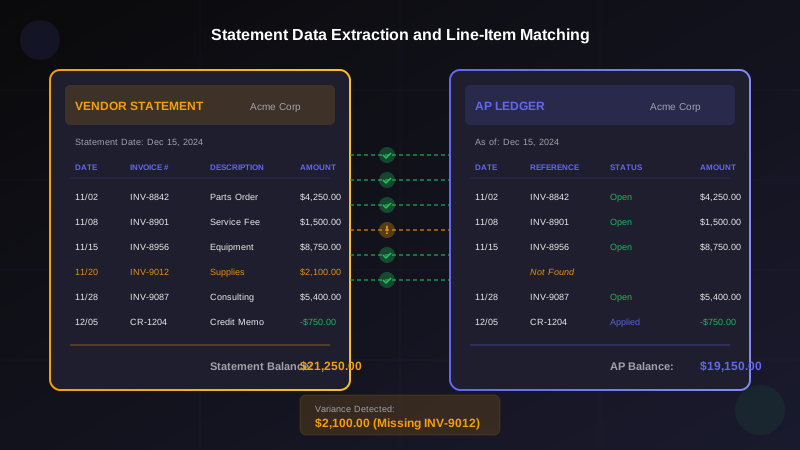
AI-powered extraction enables line-by-line matching between vendor statements and AP records
Building an Automated Reconciliation System
Effective statement reconciliation automation requires capabilities that go beyond basic invoice processing. The system must handle diverse statement formats, perform intelligent matching, and manage the exception resolution workflow.
Step 1: Statement Capture and Data Extraction
Vendor statements arrive in countless formats, from structured PDF reports to plain-text emails to portal downloads. Unlike invoices with relatively standardized fields, statements vary dramatically in layout and content organization.
Critical Statement Data Points
Header Information
Vendor name, statement date, account number, statement period
Line Item Details
Invoice numbers, dates, descriptions, amounts, running balances
Payment References
Check numbers, payment dates, applied amounts, credits
Aging Buckets
Current, 30-day, 60-day, 90+ day aging categories
Step 2: Vendor Matching and Identification
Before comparing line items, the system must correctly identify which vendor master record corresponds to each statement. This seems trivial but presents challenges when vendor names on statements don't exactly match master data.
Intelligent vendor matching considers multiple factors:
- Vendor name variations and DBA names
- Account numbers referenced on the statement
- Address and contact information
- Historical statement patterns
- Invoice numbers that link to known vendors
Vendor Master Integration
Automated reconciliation works best when integrated with a well-maintained vendor master. Cross-referencing statement vendor identifiers with master data ensures accurate matching and enables historical trend analysis across reconciliation periods.
Step 3: Line-Item Matching Logic
The core of reconciliation is matching each line item on the vendor statement to corresponding records in your AP ledger. This matching must be intelligent enough to handle common variations while flagging true discrepancies.
Effective matching algorithms consider:
- Exact matches: Invoice number and amount match precisely
- Fuzzy invoice matching: Similar invoice numbers that may have formatting differences
- Amount-based matching: When invoice numbers differ but amounts and dates align
- Partial payment matching: When payments have been partially applied
- Credit memo matching: Linking credits to original invoices
- Date range tolerance: Accounting for invoice date variations
Step 4: Discrepancy Classification and Routing
After matching completes, unmatched items represent discrepancies requiring investigation. Automated classification routes each discrepancy to appropriate resolution workflows based on type and characteristics.
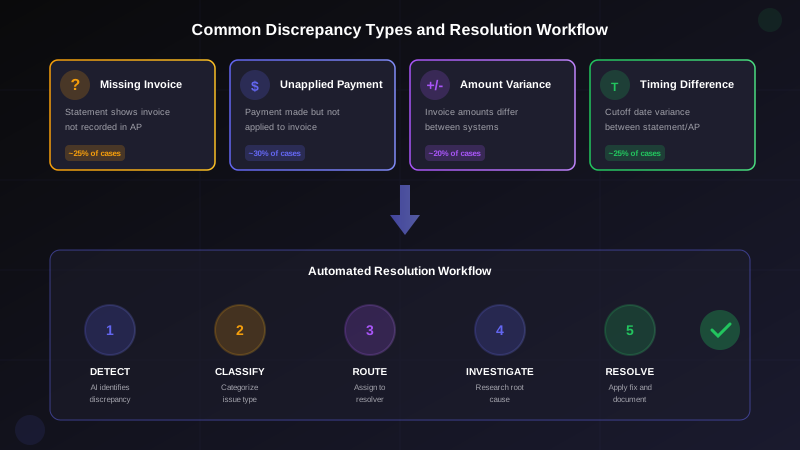
Automated workflows classify discrepancies and route them through appropriate resolution paths
Resolution Workflows by Discrepancy Type
Each discrepancy type benefits from tailored resolution processes that leverage automation while involving human judgment where necessary.
Resolution Strategies by Type
Missing Invoices
- Search email archives automatically
- Check receiving records for goods receipt
- Request invoice copy from vendor
- Investigate AP inbox for unprocessed invoices
Unapplied Payments
- Provide payment details to vendor
- Send remittance advice copy
- Verify check was cashed or ACH completed
- Request vendor AR team to investigate
Amount Variances
- Compare original invoice images
- Check for partial payments or credits
- Verify tax and discount calculations
- Identify data entry errors
Timing Differences
- Compare statement cutoff dates
- Identify in-transit payments
- Note for next period reconciliation
- Document as timing variance, not error
Automated Communication with Vendors
Many discrepancies require vendor communication for resolution. Automated systems can generate and send standard inquiry templates, track responses, and escalate unresolved items. This systematizes vendor communication rather than relying on ad-hoc emails that may go unanswered.
Self-Healing Reconciliation
Many discrepancies resolve themselves in subsequent periods. Missing invoices arrive, payments get applied, and timing differences clear. Automated systems track open discrepancies across periods, automatically clearing items when matching documents appear in future reconciliations. This reduces manual research on transient issues.
Measuring Reconciliation Effectiveness
Tracking the right metrics helps evaluate reconciliation process effectiveness and identify improvement opportunities.
Key Performance Indicators
Auto-Match Rate
Percentage of line items matched without manual review
Target: 90%+
Resolution Time
Average days from discrepancy identification to resolution
Target: 5-7 days
Statement Coverage
Percentage of received statements reconciled
Target: 100%
Recurring Discrepancy Rate
Percentage of discrepancies with the same vendor across periods
Target: Under 10%
Trend Analysis and Root Cause Identification
Beyond individual discrepancy resolution, reconciliation data reveals patterns that indicate systemic issues. Consistent discrepancies with specific vendors may indicate their billing problems or your receiving process gaps. Recurring discrepancy types across vendors may point to AP process improvements needed.
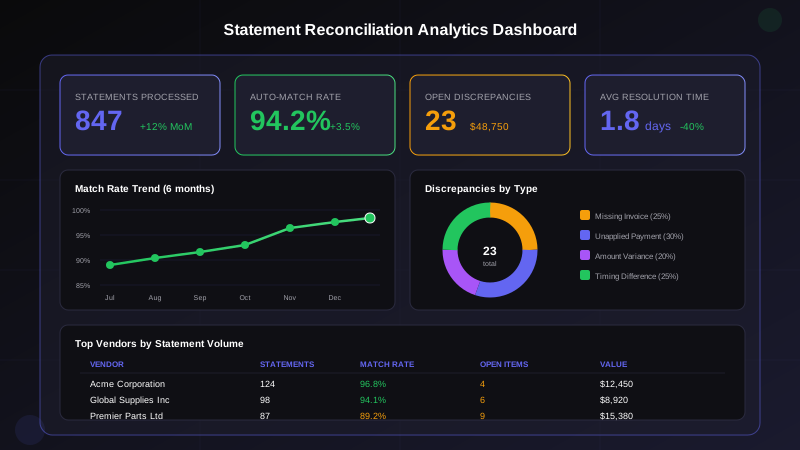
Analytics dashboards provide visibility into reconciliation performance and vendor trends
Implementation Best Practices
Successfully implementing automated statement reconciliation requires careful planning and phased rollout. Consider these proven strategies for effective implementation.
Implementation Roadmap
Phase 1: Foundation
- - Standardize statement receipt process
- - Clean vendor master data
- - Document current reconciliation procedures
- - Identify high-volume vendors
Phase 2: Automation
- - Configure statement templates
- - Define matching rules and tolerances
- - Establish exception workflows
- - Train team on new processes
Starting with High-Value Vendors
Begin automation with your highest-volume vendors where discrepancies have the greatest financial impact. These vendors typically send consistent statement formats and have established relationships that facilitate communication when issues arise. Success with top vendors builds confidence and provides templates for extending automation to the broader vendor base.
Setting Appropriate Match Tolerances
Match tolerances determine when the system considers items matched versus flagging them as discrepancies. Tolerances that are too tight generate excessive false positives requiring unnecessary investigation. Tolerances that are too loose miss legitimate discrepancies. Most organizations start with tolerance ranges and refine based on experience.
- Amount tolerance: Typically 1-2% or $5-$25 absolute
- Date tolerance: Usually 3-5 days for invoice dates
- Invoice number matching: Fuzzy matching to handle formatting variations
The Strategic Value of Statement Reconciliation
Beyond operational efficiency, automated statement reconciliation delivers strategic benefits that compound over time.
Strategic Benefits
Vendor Relationship Health
Proactive reconciliation prevents payment disputes and demonstrates professionalism to suppliers.
Audit Readiness
Documented reconciliation provides evidence of internal controls for auditors.
Balance Sheet Accuracy
Catching discrepancies ensures AP liabilities reflect actual obligations.
Process Visibility
Reconciliation patterns reveal opportunities for upstream process improvement.
The Bottom Line
Vendor statement reconciliation has traditionally been treated as a necessary evil, something to be done when time permits rather than systematically. This approach leaves organizations exposed to growing discrepancies, vendor disputes, and audit findings.
Automation transforms reconciliation from a periodic fire drill into a continuous process that catches issues early and resolves them quickly. When every statement is reconciled promptly, discrepancies never grow large enough to become disputes, and vendor balances in your AP ledger reflect reality rather than assumptions.
The investment in automated reconciliation pays dividends beyond time savings. Improved accuracy, better vendor relationships, and enhanced audit readiness all contribute to a more professional, controlled AP operation. For organizations still reconciling statements manually, or worse, not reconciling at all, automation offers a clear path to better financial control.
Start with Historical Cleanup
Before implementing ongoing automation, consider running a historical reconciliation for your top vendors. This cleanup identifies long-standing discrepancies that may have been forgotten, providing a clean baseline for automated reconciliation going forward. Many organizations discover thousands of dollars in overlooked credits or disputed charges during this initial cleanup exercise.
Ryan Shugars
Director of Product
Ryan has spent 15 years as a Systems Architect, building enterprise solutions that transform how organizations manage their financial operations.