Paper to Digital: Complete Guide to Invoice Digitization and Going Paperless
The transition from paper invoices to digital processing is no longer optional for modern finance teams. Organizations clinging to paper-based processes face mounting inefficiencies, compliance risks, and competitive disadvantages. Here's your complete roadmap to successful invoice digitization.
Ryan Shugars
Director of Product
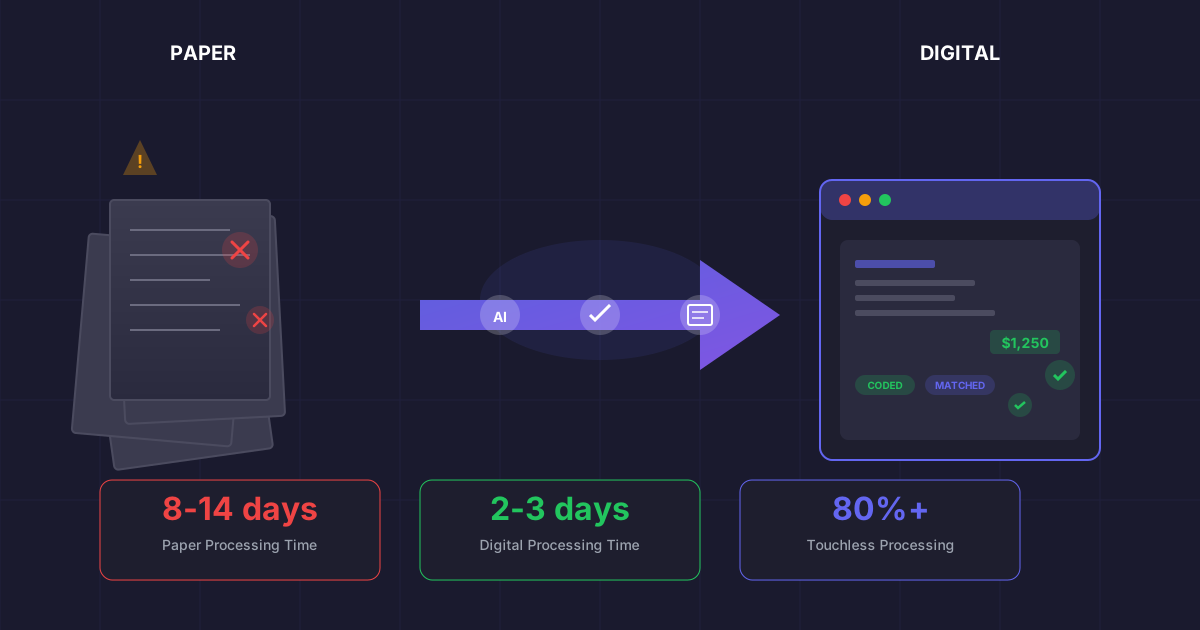
In an age where nearly every business function has embraced digital transformation, accounts payable remains stubbornly paper-bound in many organizations. According to the Institute of Finance and Management, over 40% of invoices still arrive as paper documents, and many companies that receive electronic invoices still print them for processing. This paper dependency creates bottlenecks that ripple throughout the organization, affecting cash flow visibility, vendor relationships, and strategic decision-making.
The good news is that invoice digitization has never been more accessible. Modern AI-powered solutions can transform paper invoices into structured, actionable data with accuracy rates exceeding 98%. The question is not whether to go paperless, but how to execute the transformation effectively.
The True Cost of Paper-Based Invoice Processing
Before mapping the path forward, it is essential to understand what paper-based processing is actually costing your organization. The expenses extend far beyond the obvious costs of printing and storage.
The Hidden Costs of Paper Invoices
Average cost to process a single paper invoice manually
Average processing time for paper invoices vs 2-3 days digital
Invoice error rate with manual data entry from paper
Annual physical storage costs for mid-sized organizations
Beyond these quantifiable costs, paper invoices create invisible drags on your organization. Finance teams spend countless hours hunting for misplaced documents, responding to vendor payment inquiries, and reconciling discrepancies that digital systems would have caught automatically. The opportunity cost of this wasted effort compounds over time, diverting skilled staff from strategic analysis to clerical firefighting.
The Five Stages of Invoice Digitization
Successful transformation from paper to digital does not happen overnight. Organizations that try to flip a switch often face user resistance, process breakdowns, and disappointing results. Instead, the most effective approach follows five progressive stages that build capability and confidence incrementally.
Stage 1: Invoice Capture and Conversion
The foundation of digitization is converting paper invoices into digital format. This seemingly simple step presents several technology choices, each with distinct tradeoffs.
Basic scanning creates image files (PDF, TIFF, or JPEG) that preserve the visual appearance of invoices but offer no data extraction. While better than filing cabinets, image-only digitization still requires manual data entry.
OCR (Optical Character Recognition) extracts text from scanned images, converting visual characters into machine-readable data. Traditional OCR works well for structured, template-based invoices but struggles with varied formats and handwritten elements.
Intelligent Document Processing (IDP) represents the current state of the art. Combining machine learning with computer vision, IDP systems can understand invoice layouts, extract relevant fields regardless of format, and learn from corrections to improve over time.
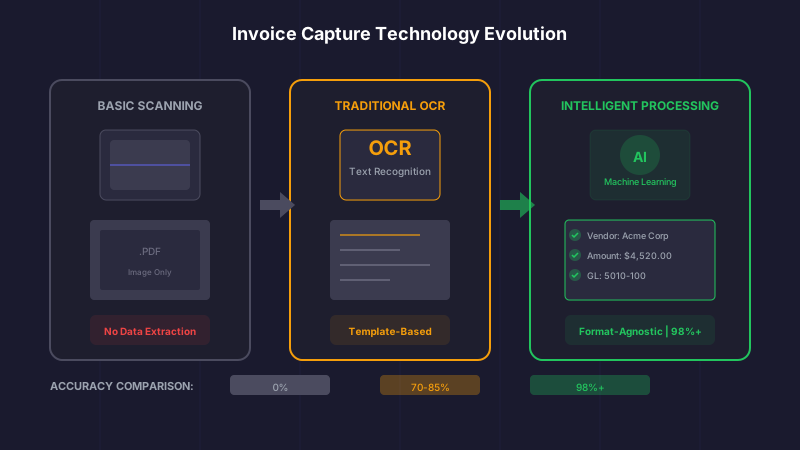
The evolution of invoice capture: from basic scanning to AI-powered intelligent document processing
Capture Technology Checklist
- Can it handle varied invoice formats without template creation?
- What is the field-level accuracy rate on your actual invoices?
- Does it extract line-item detail, not just header information?
- How does it handle poor quality scans, faxes, and photographs?
- Can it learn from corrections to improve over time?
Stage 2: Data Validation and Enrichment
Capturing invoice data is only the beginning. Raw extracted data must be validated against your master data and enriched with context before it can flow into your financial systems.
Vendor matching ensures invoices are correctly attributed to existing vendors in your master file. Good systems handle name variations, multiple addresses, and common data entry discrepancies automatically.
GL coding assigns extracted line items to the correct general ledger accounts. AI-powered systems learn from historical patterns to suggest coding, reducing manual review to exception cases only.
PO matching links invoices to purchase orders and receiving documents for 2-way and 3-way matching. Modern systems can match at the line level, handle partial shipments, and flag variances that exceed tolerance thresholds.
Stage 3: Workflow Automation
With clean, validated data, the next stage addresses approval workflows. Paper-based approvals create bottlenecks as documents sit in inboxes, travel between offices, and occasionally disappear entirely. Digital workflows solve these challenges while adding visibility and control.
Effective workflow automation includes:
- Rule-based routing that directs invoices to appropriate approvers based on amount, department, vendor category, or expense type
- Escalation paths that prevent invoices from languishing when approvers are unavailable
- Mobile approval capabilities that enable action from anywhere
- Audit trails that document every touch for compliance and dispute resolution
- Delegation rules for vacation coverage and organizational changes
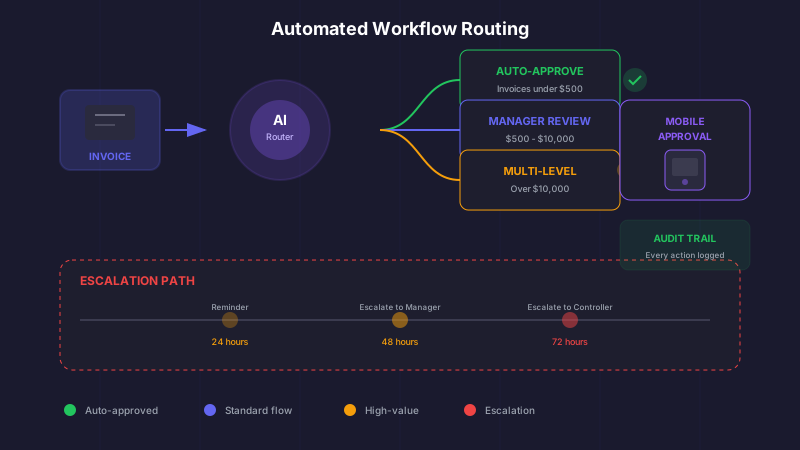
Automated workflows route invoices intelligently and prevent approval bottlenecks
Stage 4: ERP Integration
Digitized invoice data must ultimately flow into your financial systems. Seamless integration with your ERP or accounting software eliminates duplicate data entry and ensures your books reflect the most current liability information.
Integration considerations include:
- Field mapping between AP automation and ERP schemas
- Real-time vs batch sync depending on volume and timing requirements
- Two-way communication for payment status and vendor updates
- Error handling for rejected transactions and validation failures
- Archive access for supporting documentation linked to ERP records
Stage 5: Continuous Optimization
Going paperless is not a destination but a journey. The final stage focuses on continuous improvement through analytics, feedback loops, and expanding automation coverage.
Digitization Maturity Metrics
Electronic Invoice Rate
% of invoices received electronically
Target: > 80%
Touchless Processing Rate
% of invoices requiring no manual intervention
Target: > 70%
First-Pass Coding Accuracy
% of invoices coded correctly by AI on first attempt
Target: > 95%
Average Cycle Time
Days from receipt to payment approval
Target: < 3 days
Building Your Paperless Roadmap
With the five stages understood, the next question is how to plan your organization's specific journey. The optimal path depends on your current state, volume, complexity, and strategic priorities.
Assess Your Current State
Before selecting technology or setting timelines, take an honest inventory of your current invoice processing reality:
- What percentage of invoices arrive as paper, PDF, or structured electronic formats?
- How many unique invoice formats do you receive from your vendor base?
- What is your current processing cost per invoice (including labor, errors, and penalties)?
- Where are the biggest bottlenecks in your approval workflow?
- What integrations exist between your current systems?
- What compliance requirements affect your document retention?
Define Success Criteria
Digitization initiatives without clear success metrics often drift or stall. Establish specific, measurable goals that align with business value:
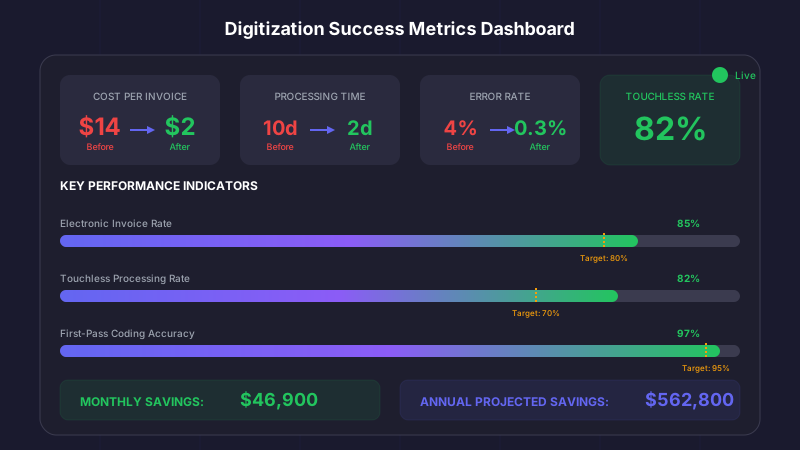
Tracking key metrics ensures your digitization initiative delivers measurable business value
Sample Success Criteria
- Reduce cost per invoice from $15 to $3 within 12 months
- Achieve 85% touchless processing rate by end of year
- Eliminate 100% of paper invoice storage within 18 months
- Reduce average processing time from 10 days to 2 days
- Capture 90% of available early payment discounts
Plan Your Technology Selection
The market offers numerous solutions for invoice digitization, from standalone OCR tools to comprehensive AP automation platforms. Your selection criteria should include:
- Accuracy: Request proof-of-concept testing on your actual invoices
- Integration: Verify compatibility with your ERP and existing systems
- Scalability: Ensure the solution can grow with your business
- Security: Confirm SOC 2 compliance and data protection measures
- Support: Evaluate implementation assistance and ongoing support quality
- Total cost: Consider implementation, licensing, and operational costs
Overcoming Common Digitization Obstacles
Every paperless transformation encounters resistance and challenges. Anticipating these obstacles improves your chances of success.
Vendor Cooperation
Not all vendors will immediately embrace electronic invoicing. A phased approach works best: start with high-volume vendors who benefit most from faster payments, then expand coverage progressively. Offering early payment incentives for electronic submission accelerates adoption.
Internal Resistance
Staff accustomed to paper processes may resist change. Invest in training that emphasizes how digitization makes their jobs easier, not how it replaces them. Celebrate early wins and recognize staff who embrace new processes.
Common Pitfalls to Avoid
- Underestimating change management requirements
- Choosing technology before understanding processes
- Attempting to digitize broken processes instead of fixing them first
- Ignoring exception handling in automation planning
- Failing to establish baseline metrics for comparison
Data Quality Challenges
Poor vendor master data undermines digitization efforts. Plan for data cleansing as part of your initiative, addressing duplicate vendors, outdated information, and inconsistent formatting before they contaminate your digital processes.
The Business Case for Immediate Action
Every month of continued paper processing represents measurable value destruction. Consider a mid-sized organization processing 3,000 invoices monthly:
Cost of Delay: Monthly Impact
Paper Processing (Current)
Digital Processing (Target)
Monthly Savings Potential: $46,900
Every month of delay costs your organization nearly $50,000
Your First 90 Days: A Practical Timeline
Ready to begin? Here is a practical timeline for launching your digitization initiative:
Days 1-30: Foundation
- Complete current state assessment and document baseline metrics
- Define success criteria and build business case
- Evaluate and select technology platform
- Identify pilot vendor group and initial scope
Days 31-60: Implementation
- Configure capture rules and validation logic
- Build ERP integration and test data flow
- Design approval workflows and user roles
- Train pilot group users
Days 61-90: Optimization
- Launch pilot with selected vendors and invoice types
- Monitor accuracy and exception rates daily
- Refine rules based on observed patterns
- Plan expansion to broader vendor and invoice coverage
The Bottom Line
Paper-based invoice processing is a relic of a pre-digital age that no longer serves modern finance teams. The technology to eliminate paper has matured to the point where implementation risk is minimal and ROI is rapid. Organizations that embrace digitization gain efficiency, visibility, and strategic agility. Those that delay continue to pay the hidden taxes of manual processing while falling further behind digitally-enabled competitors.
The transformation from paper to digital is not merely a technology upgrade. It is a fundamental shift in how your AP function creates value. Paper handling is overhead. Digital processing is strategy-enabling infrastructure. The choice between them has never been clearer.
The question is not whether your organization will go paperless. It is whether you will lead the transformation or be forced into it by competitive pressure. The best time to start was years ago. The second best time is today.
Ryan Shugars
Director of Product
Ryan has spent 15 years as a Systems Architect, building enterprise solutions that transform how organizations manage their financial operations.