Month-End Close Automation: How AP Teams Are Cutting Close Time by 50%
The monthly close is a pressure cooker for AP teams. Late invoices, manual accruals, reconciliation nightmares—it all compounds into stressful deadlines and potential errors. Here's how leading organizations are transforming their close process with automation.
Ryan Shugars
Director of Product

A Ventana Research study found that 62% of organizations take longer than six business days to complete their monthly close. For many, it stretches to two weeks or more. Every extra day represents delayed financial visibility, increased error risk, and overworked staff. Yet organizations with automated AP processes are achieving close times of three days or less—a 50%+ improvement over manual processes.
The difference isn't just technology—it's a fundamental shift in how AP teams approach the close. Rather than treating month-end as a frantic sprint, automation enables a "continuous close" model where work flows steadily throughout the month, leaving only final reconciliation for the closing period.
Why Traditional Close Processes Break Down
Before exploring solutions, let's understand why the traditional month-end close creates so much friction for AP teams:
Top Month-End Close Bottlenecks
Vendors submit invoices after cutoff, requiring accrual estimates and subsequent reversals
Spreadsheet-based accrual calculations prone to errors and time-consuming to prepare
Differences between AP subledger and GL requiring investigation
Invoices stuck in approval queues as approvers are unavailable or overwhelmed
These issues compound exponentially. A late invoice triggers an accrual estimate. The actual invoice arrives next month, requiring a reversal. If the estimate was wrong, you have variance to explain. If coding was inconsistent, reconciliation fails. Each problem creates more work downstream.
The Continuous Close Model
The most significant shift in modern AP operations is moving from a "batch" close mentality to continuous processing. In a continuous close model:
- Invoices are processed daily rather than batched for month-end
- Matching and coding happen automatically as invoices arrive
- Exceptions are resolved immediately rather than accumulated
- Accruals are calculated dynamically based on actual receipt and invoice data
- Reconciliation runs continuously with real-time variance alerts
The result is that month-end becomes a verification step rather than a marathon of catch-up work. Teams spend their time validating that everything is correct rather than scrambling to process a backlog.
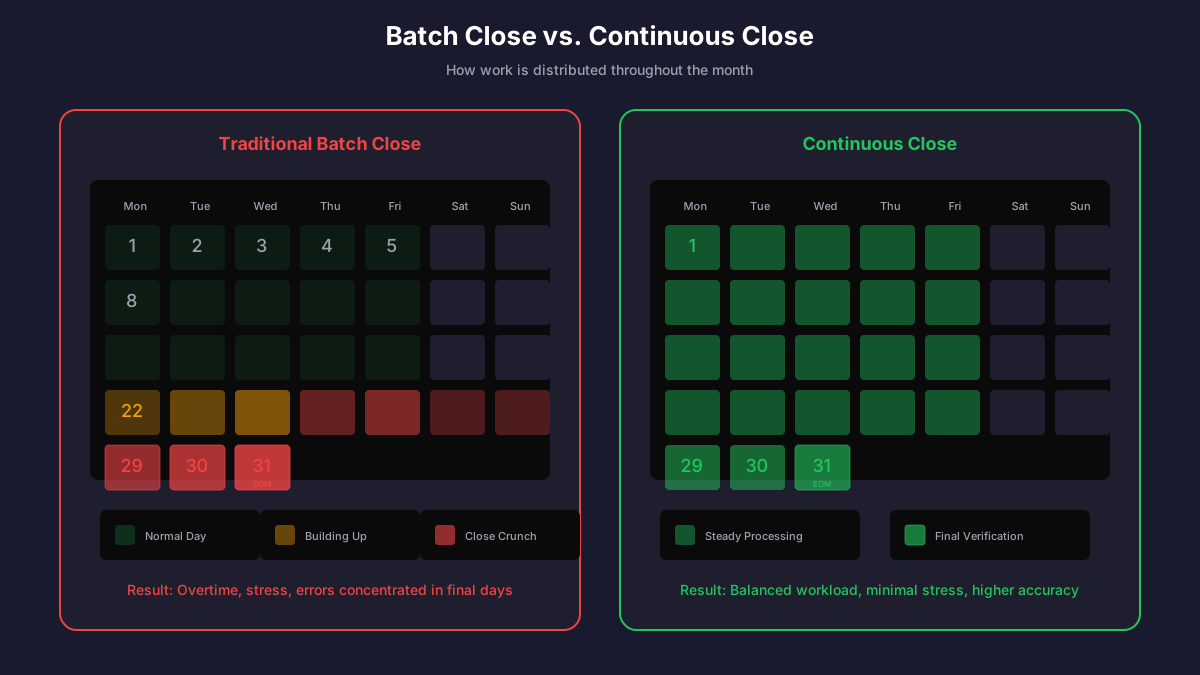
Continuous close distributes work evenly, eliminating the month-end crunch
Five Automation Strategies That Transform the Close
1. Intelligent Invoice Capture and Coding
The foundation of a faster close is eliminating the invoice processing backlog. AI-powered capture extracts invoice data automatically, applies GL coding based on historical patterns, and routes for approval—all within minutes of receipt.
Speed Metrics
Organizations using AI invoice capture report 80% of invoices processed same-day compared to 20% with manual processing. This alone can cut 3-4 days from the close timeline.
2. Automated 3-Way Matching
Manual matching of invoices to POs and receipts is tedious and error-prone. Automated matching systems compare line items, quantities, and prices in real-time, flagging only genuine discrepancies for human review.
The key benefits for month-end close include:
- Invoices matched to receipts can be accrued accurately with confidence
- Unmatched items are visible immediately, not discovered during close
- Price variances are captured at transaction time rather than month-end
- Receiving departments are prompted to complete receipts promptly
3. Dynamic Accrual Management
Traditional accrual processes rely on spreadsheets and estimates. AP teams spend hours calculating what's been received but not yet invoiced, what's been invoiced but not yet received, and what payments are in transit.
Automated accrual management leverages real-time data:
- Receipt accruals: System knows exactly what's been received against open POs
- Invoice accruals: Unprocessed invoices are tracked in real-time
- Historical patterns: AI predicts likely late invoices based on vendor behavior
- Automatic reversals: Prior month accruals reverse automatically when invoices post

Automated accruals eliminate spreadsheet errors and provide audit-ready documentation
4. Real-Time Reconciliation
Waiting until month-end to reconcile the AP subledger to the general ledger is a recipe for unpleasant surprises. Real-time reconciliation identifies discrepancies as they occur, allowing immediate investigation.
Reconciliation Checkpoints
Subledger to GL Balance
AP control account ties to subledger total
Vendor Statement Matching
Balance per vendor ties to statements
Cleared Check Reconciliation
Payments matched to bank transactions
Intercompany Matching
AP/AR balances tie across entities
5. Intelligent Approval Routing
Approval bottlenecks are a leading cause of close delays. Smart routing ensures invoices reach the right approvers immediately, with escalation paths for unresponsive reviewers and delegation rules for out-of-office situations.
Effective approval automation includes:
- Mobile approval capability so approvers can act from anywhere
- Automatic escalation after defined SLA thresholds
- Delegation management for vacations and coverage
- Bulk approval for routine, low-risk invoices
- Close-period reminders and aging reports to approvers
Building Your Close Automation Roadmap
Transforming the month-end close doesn't happen overnight. Here's a practical phased approach:
Phase 1: Foundation (Months 1-2)
- • Deploy automated invoice capture for all incoming invoices
- • Establish digital approval workflows with SLAs
- • Create dashboards for real-time processing visibility
- • Document current close procedures and pain points
Phase 2: Optimization (Months 3-4)
- • Implement automated 3-way matching
- • Deploy AI-powered GL coding
- • Establish continuous reconciliation processes
- • Automate receipt-based accrual calculations
Phase 3: Advanced Automation (Months 5-6)
- • Enable predictive accruals using historical patterns
- • Implement vendor statement auto-matching
- • Deploy close calendar with automated task management
- • Create self-service close dashboards for stakeholders
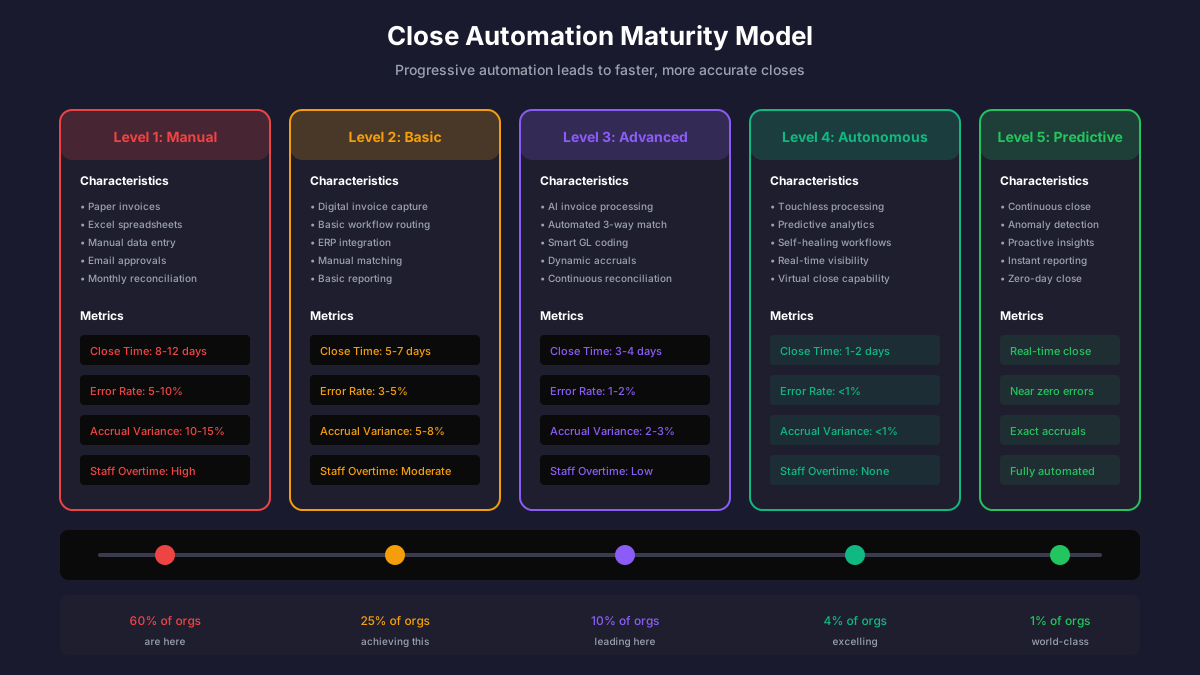
Progressive automation maturity leads to faster, more accurate closes
Measuring Close Performance
Track these metrics to measure your close transformation progress:
Close Performance KPIs
Days to Close
Business days from period end to books closed
Target: ≤ 3 days
Invoice Processing Backlog
Invoices pending at period end
Target: < 5% of monthly volume
Accrual Accuracy
Variance between accrual and actual
Target: ≤ 2% variance
Reconciliation Exceptions
Items requiring manual investigation
Target: < 10 items monthly
Common Pitfalls to Avoid
Organizations that struggle with close automation often fall into these traps:
- Automating broken processes: Fix the underlying workflow before adding technology
- Ignoring change management: Staff need training and support, not just new tools
- Setting unrealistic timelines: Start with achievable goals and build momentum
- Neglecting data quality: Automation is only as good as the data it processes
- Insufficient stakeholder alignment: Approvers and departments must buy in to new processes
The CFO Perspective
For finance leadership, faster close isn't just about efficiency—it's about decision-making velocity. Every day saved in the close process is a day of additional visibility into financial performance. It's time to act on insights rather than waiting for reports.
Modern CFOs are pushing for what analysts call a "virtual close"—the ability to see an accurate financial picture at any point in the month, not just after a lengthy close process. AP automation is a critical enabler of this vision.
Taking the First Step
The journey to a faster, more accurate close begins with honest assessment of your current state. Where are the bottlenecks? What causes the most rework? Which vendors consistently submit late invoices?
Start with the highest-impact, lowest-effort improvements. Often, simply digitizing invoice intake and establishing clear approval workflows can shave days off the close. Build from there, adding automation capabilities progressively as your team adapts.
The organizations achieving 3-day closes didn't get there overnight. But they did start somewhere. And the competitive advantage they've built in financial agility is worth the investment many times over.
Ryan Shugars
Director of Product
Ryan has spent 15 years as a Systems Architect, building enterprise solutions that transform how organizations manage their financial operations.