Maximizing Invoice OCR Accuracy: Advanced Techniques for Error-Free Data Capture
The difference between 95% and 99% OCR accuracy might seem small, but for AP teams processing thousands of invoices monthly, that 4% gap translates to hundreds of manual corrections. Here's how modern AI-powered systems achieve near-perfect data extraction and what it means for your AP operations.
Ryan Shugars
Director of Product
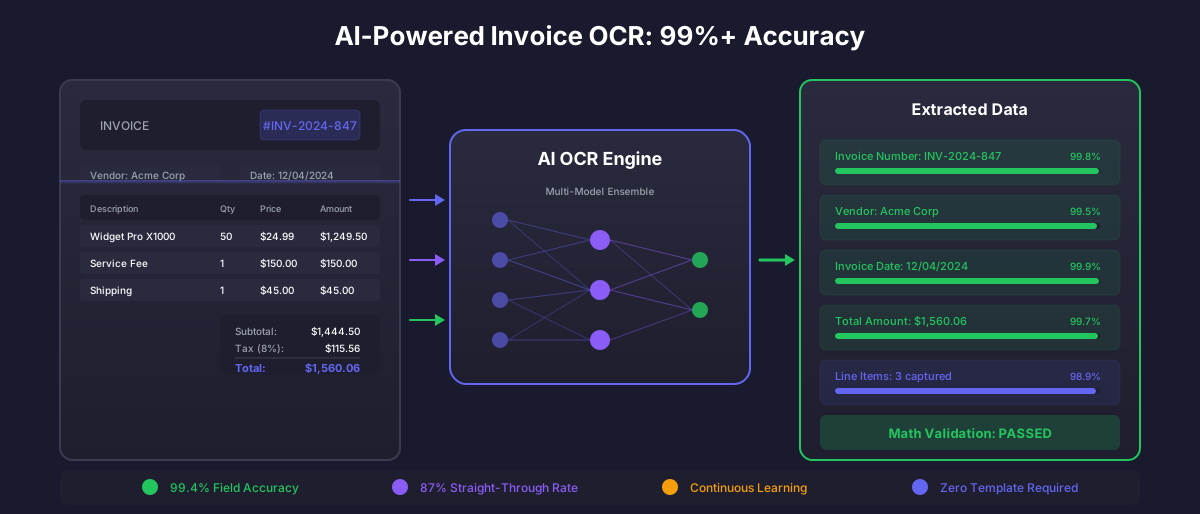
Invoice processing has evolved dramatically over the past decade. What once required armies of data entry clerks now happens in milliseconds through optical character recognition (OCR) and artificial intelligence. Yet not all OCR is created equal. According to IOFM research, organizations still spend an average of 25% of AP staff time correcting data capture errors from legacy OCR systems.
The promise of automated invoice processing hinges on one critical factor: accuracy. When your OCR system misreads an invoice number, captures the wrong amount, or fails to identify the vendor, the downstream consequences ripple through your entire AP operation. Manual verification queues grow. Payment cycles extend. Staff frustration mounts. The efficiency gains from automation evaporate.
Modern AI-powered OCR systems are changing this equation. By combining multiple recognition techniques with machine learning validation, these platforms routinely achieve 99%+ accuracy on invoice data extraction. Understanding how they accomplish this helps you evaluate solutions and optimize your own capture processes.
Understanding OCR Accuracy Metrics
Before diving into optimization techniques, it's essential to understand how OCR accuracy is measured. Not all accuracy claims are created equal, and the metrics matter for your business case.
Key OCR Accuracy Metrics
Percentage of individual characters correctly recognized. A 99% rate means 1 error per 100 characters on average.
Percentage of complete data fields extracted correctly. More meaningful for AP workflows where partial fields are unusable.
Percentage of invoices processed without manual intervention. The true measure of automation effectiveness.
System's self-assessed certainty in extraction results. Enables intelligent routing of low-confidence items for review.
The most meaningful metric for AP operations is the straight-through processing rate: what percentage of invoices flow from receipt to approval without human touch? Best-in-class systems achieve 80-90% straight-through rates, with human review focused only on legitimate exceptions rather than OCR corrections.
The Evolution from Template-Based to AI-Native OCR
Traditional OCR systems relied on templates and zones. For each vendor, an administrator would define exactly where on the invoice to find the invoice number, date, amount, and other fields. This approach worked reasonably well for high-volume vendors with consistent formats but created significant challenges:
- Template maintenance burden: Every format change required manual template updates
- New vendor onboarding: First invoices from new vendors required template creation
- Format variations: Even small layout changes could break extraction
- Multi-page documents: Templates struggled with varying page counts and line item tables
AI-native OCR takes a fundamentally different approach. Instead of rigid templates, these systems use machine learning models trained on millions of invoice documents. They understand what an invoice looks like conceptually, not just positionally.
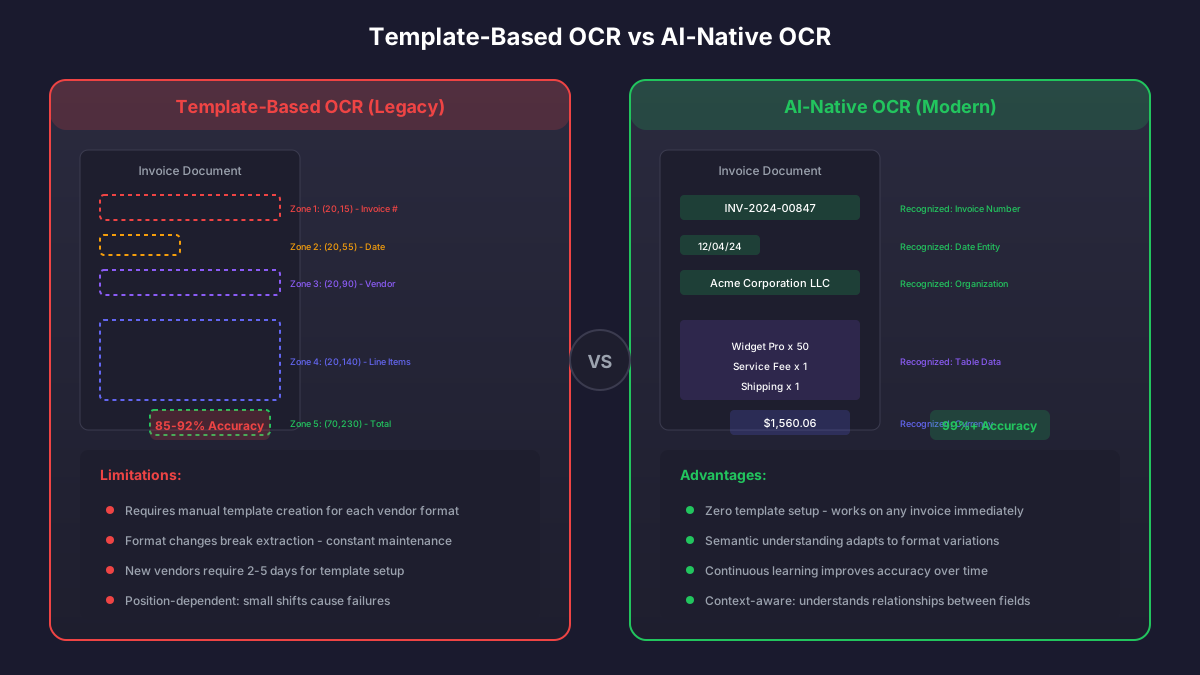
AI-native OCR understands document structure semantically, adapting to any invoice format
Seven Techniques That Drive 99%+ Accuracy
Modern AI OCR systems combine multiple techniques to achieve exceptional accuracy. Understanding these approaches helps you evaluate vendors and optimize your own implementation.
1. Multi-Model Ensemble Processing
Rather than relying on a single OCR engine, advanced systems run multiple recognition models in parallel and compare results. When models agree, confidence is high. When they disagree, the system can either select the most likely result or flag the field for review.
This ensemble approach catches errors that any single model would miss. Different OCR engines have different strengths and weaknesses. One might excel at handwriting while another handles low-resolution scans better. Combining them produces accuracy greater than any individual component.
2. Contextual Validation
Raw character recognition is just the first step. AI systems apply business logic validation to catch errors that pass OCR perfectly but fail real-world tests:
- Does the invoice date fall within a reasonable range?
- Do the line item quantities and prices multiply to the extended amounts?
- Does the tax calculation match expected rates for the vendor location?
- Does the invoice total equal line items plus tax minus discounts?
- Is the invoice number format consistent with previous invoices from this vendor?
The Power of Math Validation
One of the most effective accuracy boosters is simple arithmetic. When the system extracts line items that don't add up to the stated total, it knows something is wrong. By comparing what it extracted against mathematical relationships on the invoice, the system catches and corrects errors that pure OCR would miss. Organizations report a 40% reduction in post-extraction errors from math validation alone.
3. Vendor-Specific Learning
While AI OCR doesn't require templates, it still benefits from vendor-specific knowledge. As the system processes invoices from each vendor, it learns their particular formats, field positions, and data patterns.
This continuous learning means accuracy improves over time without manual intervention. The first invoice from a new vendor might achieve 95% accuracy. By the tenth invoice, the system has learned that vendor's quirks and achieves 99%+.
4. Pre-Processing and Image Enhancement
Invoice images arrive in various conditions: skewed scans, poor lighting, fax artifacts, low resolution. Before OCR even begins, sophisticated pre-processing improves the raw image quality:
- Deskewing: Correcting rotation and alignment
- Noise reduction: Removing scanner artifacts and background patterns
- Contrast enhancement: Improving text-background separation
- Resolution upscaling: AI-powered enhancement of low-resolution images
- Binarization: Converting to clean black-and-white for OCR optimization
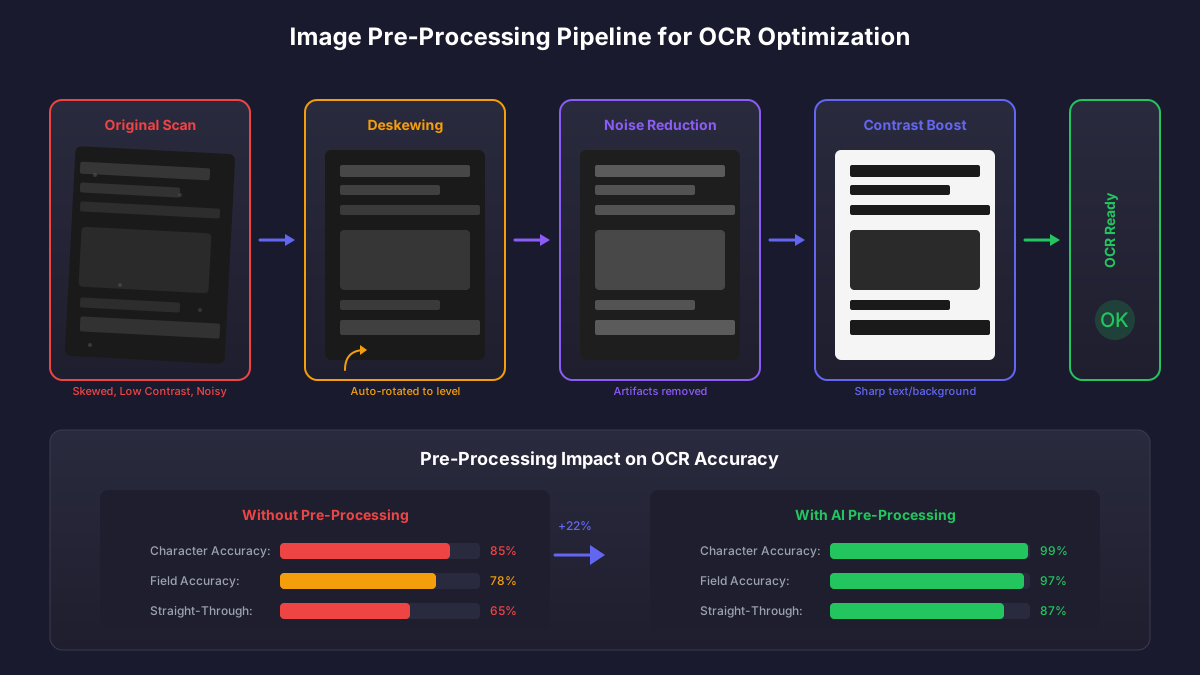
Pre-processing transforms poor-quality scans into OCR-optimized images
5. Named Entity Recognition (NER)
Beyond reading text, AI systems understand what each piece of text represents. Named Entity Recognition identifies whether extracted text is a company name, address, dollar amount, date, or other specific entity type.
This semantic understanding enables intelligent field mapping. When the system sees "Invoice #12345" and "PO #67890" on the same document, it correctly maps each to the appropriate field rather than confusing the two.
6. Confidence-Based Routing
Not every extraction requires the same handling. AI systems assign confidence scores to each extracted field, enabling intelligent routing:
Confidence-Based Processing Tiers
High Confidence (95%+)
Auto-process without review
Straight-through processing
Medium Confidence (80-95%)
Quick visual verification
Expedited review queue
Low Confidence (<80%)
Full manual data entry
Exception handling
7. Human-in-the-Loop Feedback
The most sophisticated AI systems learn from every correction. When a human reviewer fixes an extraction error, that correction feeds back into the model, improving future accuracy.
This creates a virtuous cycle: the system gets smarter with use, requiring progressively less human intervention. Organizations typically see a 15-20% improvement in straight-through rates over the first year as the system learns from corrections.
Common OCR Accuracy Killers (And How to Avoid Them)
Even the best AI OCR systems can be undermined by poor input quality or process issues. Understanding common accuracy killers helps you achieve optimal results:
Top OCR Accuracy Challenges
Low-Resolution Scans
Documents scanned below 300 DPI produce fuzzy text that challenges any OCR system.
Solution: Configure scanners for 300+ DPI
Multi-Generation Faxes
Each fax transmission degrades quality. By the third generation, text becomes nearly illegible.
Solution: Request PDF or email submission
Handwritten Elements
Handwriting recognition has improved but remains challenging, especially for quantity adjustments.
Solution: Request typed invoices from vendors
Non-Standard Formats
Creative invoice designs with unusual layouts, rotated text, or overlapping elements.
Solution: Vendor portal with standard templates
Measuring ROI on OCR Accuracy Improvements
The business case for OCR accuracy optimization is straightforward to calculate. Each percentage point improvement in straight-through processing translates to measurable savings:
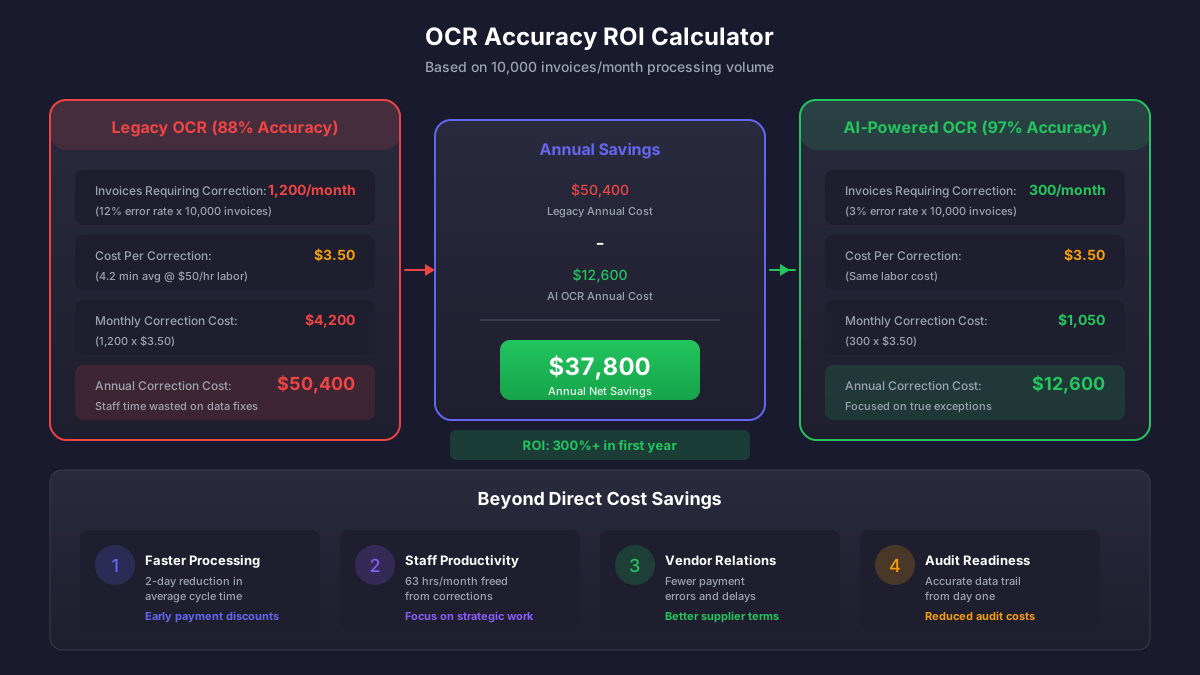
Every percentage point of accuracy improvement delivers measurable cost savings
OCR Accuracy ROI Benchmarks
Average cost per manual invoice correction
Average time to verify and correct OCR errors
Typical error rate requiring correction with legacy OCR
Error rate with modern AI-powered OCR systems
For an organization processing 10,000 invoices per month, moving from 88% to 97% straight-through processing means 900 fewer manual interventions monthly. At $3.50 per correction, that's over $37,000 in annual savings. The productivity gains allow AP staff to focus on strategic work rather than data entry corrections.
Best Practices for OCR Accuracy Optimization
Maximizing OCR accuracy requires attention to both technology selection and operational practices. Here's a comprehensive approach:
Technology Selection Criteria
- Verify the vendor's accuracy claims with a pilot using your actual invoices
- Evaluate performance across your vendor mix, not just clean samples
- Test with challenging documents: low-resolution, handwritten, unusual formats
- Assess confidence scoring and exception handling capabilities
- Confirm continuous learning from corrections
Operational Best Practices
- Configure scanners for 300+ DPI resolution
- Encourage vendors to submit electronic invoices rather than paper
- Establish vendor portal with standardized submission formats
- Train staff on proper correction procedures to maximize learning
- Monitor accuracy metrics and investigate declining performance
The Future of Invoice Data Capture
OCR technology continues to advance rapidly. Emerging capabilities include:
- Zero-shot learning: Accurate extraction from completely new document types without any training
- Multi-language support: Seamless handling of invoices in any language
- Structured data extraction: Direct extraction from PDF/XML invoices without OCR
- Anomaly detection: Identifying invoices that deviate from vendor patterns
- Real-time validation: Instant verification against ERP master data
The trajectory is clear: manual invoice data entry is becoming obsolete. Organizations that invest in AI-powered OCR today position themselves for increasingly automated AP operations as the technology matures.
The Bottom Line
Invoice OCR accuracy isn't just a technical metric. It directly impacts AP efficiency, staff satisfaction, vendor relationships, and financial close timelines. The difference between adequate OCR (90% accuracy) and excellent OCR (99%+ accuracy) transforms AP from a cost center focused on corrections to a strategic function managing exceptions by policy rather than by error.
Modern AI-powered OCR systems achieve this transformation through sophisticated techniques: ensemble processing, contextual validation, continuous learning, and intelligent routing. When combined with operational best practices around document quality and vendor management, these systems deliver the straight-through processing rates that make true AP automation possible.
The question isn't whether to upgrade from legacy OCR. It's how quickly you can capture the efficiency gains that modern AI systems deliver.
Ryan Shugars
Director of Product
Ryan has spent 15 years as a Systems Architect, building enterprise solutions that transform how organizations manage their financial operations.