Invoice Data Quality: Ensuring Accuracy Throughout the AP Lifecycle
Poor invoice data quality is a hidden tax on your AP operations. Every error at capture compounds downstream: wrong GL codes, failed matches, duplicate payments, and audit findings. Here is how to implement data quality controls that prevent problems before they start.
Ryan Shugars
Director of Product
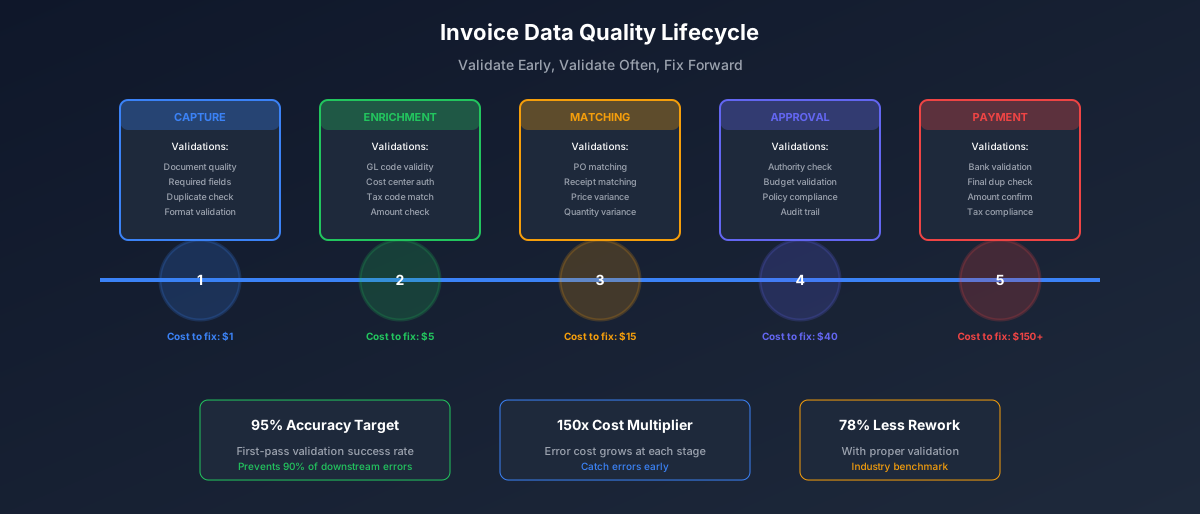
Data quality in accounts payable is like air quality in a building: when it is good, nobody notices. When it is bad, everything suffers. The difference between high-performing AP teams and struggling ones often comes down to how rigorously they manage invoice data quality from the moment an invoice arrives.
This guide covers the complete data quality lifecycle: what to validate, when to validate it, how to prevent common errors, and how to measure and continuously improve your data quality over time.
The True Cost of Poor Invoice Data Quality
Before investing in data quality controls, it helps to understand what poor data quality actually costs. The direct costs are obvious: rework, corrections, and duplicate payments. The indirect costs are often larger and harder to see.
The Hidden Costs of Data Quality Issues
Organizations with mature data quality programs report 95% fewer audit findings and 78% less time spent on exception handling. The investment in prevention pays exponential returns.
The Data Quality Validation Framework
Effective data quality management requires validation at multiple points in the invoice lifecycle. Catching errors earlier is always cheaper than catching them later.
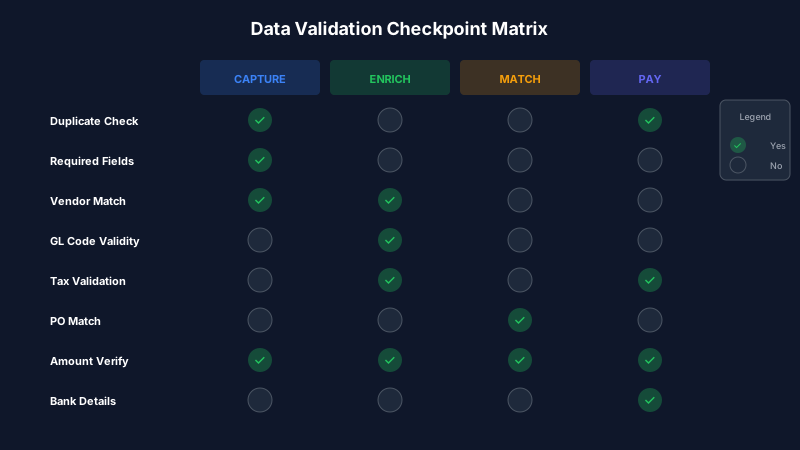
Earlier validation catches errors when they cost the least to fix
Layer 1: Capture Validation
The moment an invoice is captured, whether by email, scan, or portal upload, initial validation should occur. This is your first line of defense.
Capture-Time Validations
- Document quality: Is the invoice readable? Are all pages present?
- Required fields: Does it contain invoice number, date, amount, vendor info?
- Duplicate detection: Have we seen this invoice number from this vendor before?
- Format validation: Are dates in valid format? Are amounts numeric?
- Vendor recognition: Can we match this to a known vendor?
AI-powered capture systems like Remmi perform these validations automatically, flagging issues for human review rather than allowing bad data to enter the system. Manual capture processes should include checklist verification at this stage.
Layer 2: Data Enrichment Validation
After initial capture, invoice data is enriched with GL codes, cost centers, tax codes, and approval routing. Each enrichment step introduces potential errors.
Critical enrichment validations include:
- GL code validity: Does this account code exist and is it active?
- Cost center authorization: Is this vendor approved for this cost center?
- Tax code matching: Does the tax code match vendor tax status?
- Amount reasonableness: Is this amount within normal range for this vendor?
- Historical consistency: Does the coding match how we have coded similar invoices?
Layer 3: Matching Validation
For PO-backed invoices, the three-way match between purchase order, goods receipt, and invoice provides powerful data quality validation.
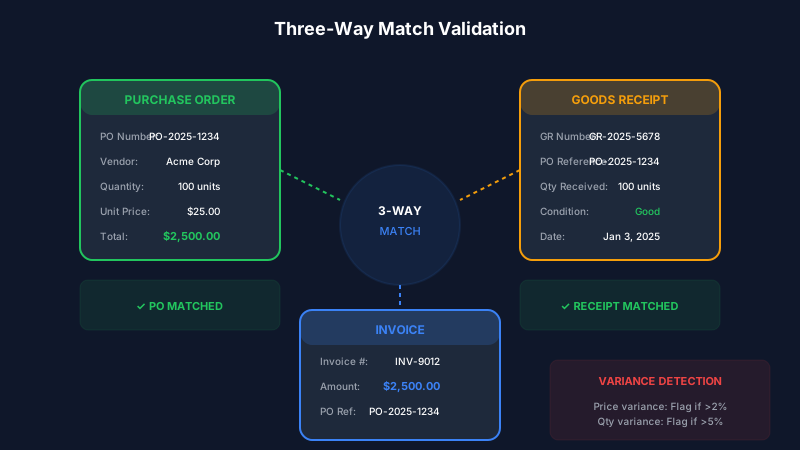
Three-way matching catches discrepancies across documents
Match validation catches issues that single-document validation cannot:
- Price variance: Invoice price differs from PO price
- Quantity variance: Invoiced quantity exceeds received quantity
- Unit of measure mismatch: Invoice uses different UOM than PO
- Line item mapping: Invoice items do not correspond to PO lines
- Overbilling detection: Cumulative invoices exceed PO total
Layer 4: Pre-Payment Validation
The final validation gate before payment execution catches any issues that slipped through earlier layers.
- Bank account validation: Is the payment going to verified vendor bank details?
- Duplicate payment check: Final check against payment history
- Currency and amount verification: Does payment match approved invoice?
- Approval completeness: Are all required approvals in place?
- Tax compliance: Have tax withholding requirements been met?
Common Data Quality Issues and Prevention Strategies
Top 10 Invoice Data Quality Issues
Prevention: Real-time duplicate detection at capture using invoice number, vendor, and amount matching
Prevention: AI-suggested coding based on historical patterns with human verification
Prevention: Vendor master validation and fuzzy matching for vendor recognition
Prevention: Automated tax validation against vendor tax status and jurisdiction rules
Prevention: OCR confidence scoring with human review of low-confidence extractions
Building a Data Quality Monitoring Program
Data quality is not a one-time project; it requires ongoing monitoring and continuous improvement. Here is how to build a sustainable program.
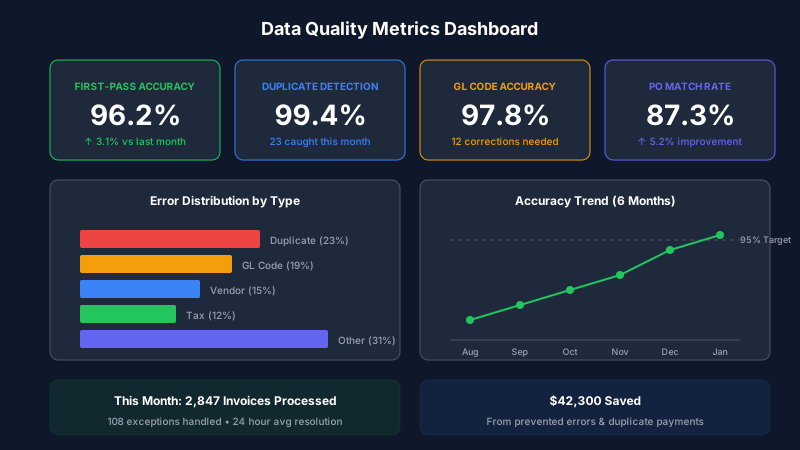
Track data quality metrics to identify issues before they become problems
Key Data Quality Metrics
Track these metrics weekly or monthly to understand your data quality trends:
Data Quality Scorecard
Root Cause Analysis Process
When data quality issues occur, systematic root cause analysis prevents recurrence:
- Identify the issue: What specific data quality problem occurred?
- Trace the source: Where in the process did the error originate?
- Understand the cause: Was it a system issue, process gap, or human error?
- Implement controls: Add validation rules or process checks to prevent recurrence
- Verify effectiveness: Monitor to confirm the fix works
Leveraging AI for Data Quality
Modern AI systems transform data quality management from reactive correction to proactive prevention.
AI-Powered Data Quality Capabilities
- Intelligent extraction: AI reads and interprets invoice formats automatically
- Confidence scoring: Each extracted field receives a confidence score for human review
- Pattern recognition: System learns from corrections to improve over time
- Anomaly detection: Flags unusual amounts, vendors, or patterns for review
- Auto-correction: Suggests fixes based on historical data and business rules
Remmi's AI achieves 98% extraction accuracy out of the box and improves continuously as it learns your specific vendors and invoice formats. This dramatically reduces the manual validation burden while improving overall data quality.
Building Your Data Quality Roadmap
Implementing comprehensive data quality controls does not happen overnight. Here is a phased approach:
Phase 1: Foundation (Weeks 1-4)
- Implement duplicate detection at capture
- Add required field validation
- Establish baseline metrics
- Document current error rates
Phase 2: Enhancement (Weeks 5-8)
- Add GL code validation rules
- Implement vendor master matching
- Set up three-way matching
- Create exception handling workflows
Phase 3: Automation (Weeks 9-12)
- Deploy AI-assisted validation
- Implement confidence scoring
- Enable auto-correction rules
- Set up anomaly detection
Phase 4: Optimization (Ongoing)
- Monitor quality metrics weekly
- Conduct root cause analysis
- Refine validation rules
- Continuous AI model improvement
The Bottom Line
Invoice data quality is not just about preventing errors; it is about enabling the automation and efficiency that modern AP operations require. You cannot automate a process that runs on bad data.
The organizations achieving the highest levels of AP automation all share one characteristic: rigorous attention to data quality. They validate early, validate often, and continuously improve their quality controls based on measured outcomes.
Start with the fundamentals: duplicate detection and required field validation at capture. Build from there, adding layers of validation as your processes mature. Leverage AI to automate what humans cannot do at scale, while keeping human judgment in the loop for exceptions.
The payoff is an AP operation that runs smoothly, with minimal exceptions, high automation rates, and confidence in the accuracy of your financial data. That is worth the investment.
Ryan Shugars
Director of Product
Ryan has spent 15 years as a Systems Architect, building enterprise solutions that transform how organizations manage their financial operations.