Mobile Invoice Approval: Keeping AP Moving When Approvers Are on the Go
In today's distributed workforce, invoice approvers are rarely at their desks. They're in meetings, traveling between locations, working from home, or on the factory floor. Without mobile approval capabilities, every time an approver steps away from their computer, your AP process grinds to a halt.
Ryan Shugars
Director of Product
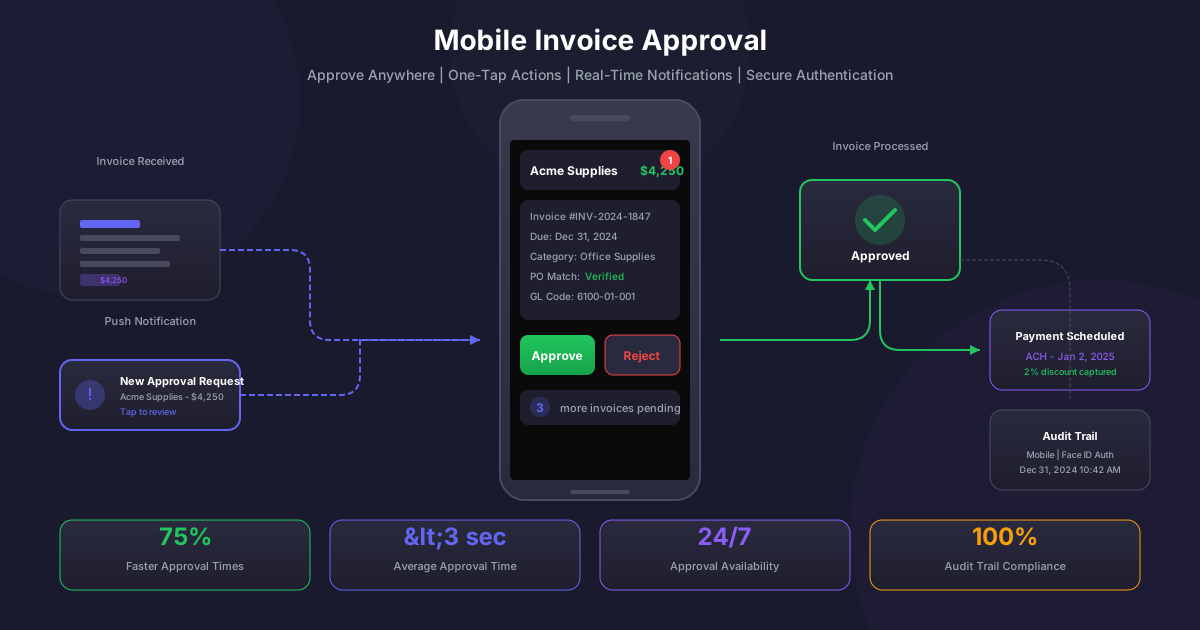
The average invoice approval takes 8.3 days in organizations relying on desktop-only approval workflows. That number drops to 2.1 days with mobile-enabled approvals. The difference isn't just about convenience; it's about eliminating the single biggest bottleneck in the accounts payable process and unlocking millions in early payment discounts, improved vendor relationships, and reduced processing costs.
Modern AP leaders recognize that approval bottlenecks are the silent killer of AP efficiency. You can have perfect invoice capture, flawless data extraction, and intelligent coding, but if invoices sit waiting for approval, all that upstream efficiency is wasted. Mobile approval strategies aren't just nice to have; they're essential for any organization serious about AP performance.
The Hidden Cost of Desktop-Only Approvals
Before diving into mobile strategies, it's worth understanding just how much desktop-only approval workflows cost your organization:
The Approval Bottleneck Problem
- Average 5-10 days stuck in approval queues
- Approvers check email only 2-3 times daily
- Vacation and travel create multi-day gaps
- Meeting-heavy schedules delay responses
- Lost early payment discounts (2% typical)
- Late payment penalties (1.5-2% monthly)
- Strained vendor relationships
- AP staff time chasing approvals
- 68% of approvers work remotely at least part-time
- Executives average 23 hours in meetings weekly
- Field workers rarely access desktop systems
- Multi-site employees constantly traveling
- Approval available 24/7 from any location
- Push notifications for immediate awareness
- Sub-minute approval times become possible
- No training required; familiar interface
Organizations processing 10,000 invoices annually with an average value of $5,000 and typical 2/10 net 30 terms are leaving approximately $100,000 in early payment discounts on the table when approval delays cause them to miss discount windows. That's money that goes straight to the bottom line with mobile-enabled approvals.
Core Elements of Effective Mobile Approval
Not all mobile approval implementations are created equal. The most effective strategies share several key characteristics that maximize adoption and efficiency while maintaining appropriate controls:
Frictionless User Experience
The number one factor determining mobile approval success is user experience. Approvers are busy people who will abandon any tool that adds friction to their day. Effective mobile approvals must be:
- One-Tap Actions: Approve or reject with a single tap. No navigating through multiple screens or logging in repeatedly.
- Instant Load: Invoice details must appear immediately. Approvers won't wait for slow-loading documents.
- Smart Summaries: Present the most important information first: vendor name, amount, what it's for, and any exceptions.
- Offline Capability: Allow approvals to queue when connectivity is poor and sync automatically when restored.
The 3-Second Rule
The best mobile approval experiences allow users to complete an approval decision in under 3 seconds from notification to confirmed approval. This includes opening the notification, reviewing key details, and tapping approve. Anything longer, and adoption rates plummet as approvers defer to their "desktop time."
Intelligent Push Notifications
Push notifications are the engine that drives mobile approval velocity, but they must be implemented thoughtfully to avoid notification fatigue:
- Priority-Based Alerts: Urgent invoices (near payment deadlines, high amounts, critical vendors) trigger immediate notifications. Routine approvals can batch into daily digests.
- Smart Timing: Learn approver behavior patterns and deliver notifications when they're most likely to act, not at 3 AM.
- Escalation Awareness: Notify approvers when invoices are approaching escalation thresholds to encourage timely action.
- Customizable Preferences: Let approvers control notification frequency and types. Some want everything; others want only exceptions.
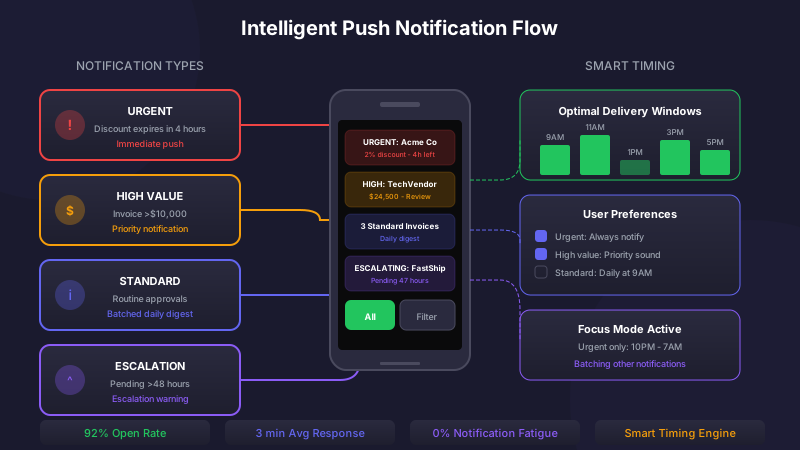
Intelligent notifications deliver actionable alerts without overwhelming approvers
Security Without Friction
One of the most common objections to mobile approval is security. How can you maintain appropriate controls when approvers are tapping approve on their personal phones? The key is implementing security measures that protect without impeding:
Authentication Strategies
- Biometric Authentication: Face ID and fingerprint recognition provide strong authentication without password friction. Approvers unlock their phone once and can approve multiple invoices.
- Device Binding: Register approved devices to ensure approvals only come from known, trusted sources.
- Session Management: Implement reasonable session timeouts that balance security with usability. 24-hour sessions with biometric re-authentication work well for most organizations.
- Risk-Based Authentication: Routine approvals proceed with standard authentication. High-risk approvals (large amounts, new vendors, unusual patterns) trigger additional verification.
Mobile Security Architecture
Device Registration
One-time secure device binding
Biometric Authentication
Face ID or fingerprint for app access
Standard Approvals
Single-tap approval for routine invoices
High-Value Approvals (>$50K)
Additional PIN or biometric confirmation
Exception/Override Approvals
Mandatory reason code and secondary auth
Maintaining Audit Trails
Mobile approvals must generate the same comprehensive audit documentation as desktop approvals. Modern mobile approval platforms capture:
- Precise Timestamps: Exact date and time of approval action, synchronized to server time
- Device Information: Device ID, operating system version, and app version for each approval
- Location Data: Optional geolocation to document where approvals occurred (useful for compliance in some industries)
- Authentication Method: How the approver verified their identity for each action
- Decision Details: Approved, rejected, or delegated, with any comments or reason codes
Delegation and Escalation Strategies
Even with mobile access, approvers sometimes can't act on invoices promptly. Effective mobile approval strategies include robust delegation and escalation capabilities:
Self-Service Delegation
Empower approvers to manage their own delegations directly from their mobile devices:
- One-Tap Vacation Mode: A single setting that routes all approvals to a designated backup for a specified period
- Selective Delegation: Delegate specific vendor categories, departments, or amount ranges while retaining others
- Real-Time Handoff: Immediately delegate a specific invoice to someone better positioned to approve it
- Delegation Visibility: See who has delegated to you and what invoices are waiting in your delegated queue
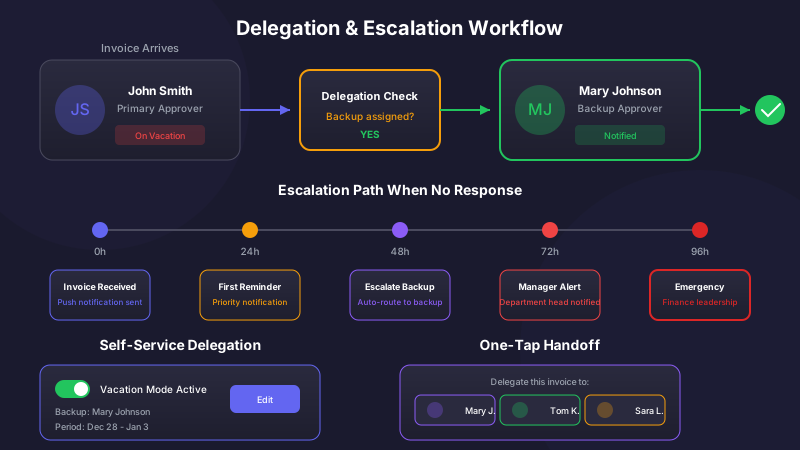
Intelligent delegation ensures invoices never stall waiting for unavailable approvers
Automated Escalation Rules
When approvers don't act within defined timeframes, invoices should automatically escalate to prevent bottlenecks:
Escalation Best Practices
Configure escalation paths based on invoice characteristics:
- Standard invoices: Escalate after 48 hours to backup approver, then to manager after 72 hours
- Discount-eligible: Escalate after 24 hours to capture early payment opportunities
- Critical vendors: Escalate after 24 hours to maintain supplier relationships
- High-value (>$100K): Notify finance leadership if pending more than 48 hours
Driving Mobile Adoption
Implementing mobile approval technology is only half the battle. Driving adoption among busy approvers requires a thoughtful change management approach:
Executive Sponsorship
When the CFO and other executives visibly use mobile approvals, adoption follows. Executive champions should:
- Use mobile approvals publicly and share their experience
- Communicate expectations for approval response times
- Recognize teams and individuals with strong mobile adoption
- Include approval velocity in performance discussions
Frictionless Onboarding
The first experience with mobile approval determines whether an approver will adopt it. Ensure onboarding is seamless:
- Zero Training Required: The app should be intuitive enough that approvers can start using it immediately
- Guided First Approval: Walk new users through their first mobile approval with contextual tips
- Quick Reference Cards: Provide one-page guides covering the most common actions
- In-App Support: Enable approvers to get help without leaving the mobile experience
Mobile Approval Adoption Metrics
Measuring Mobile Approval Success
Track these key metrics to ensure your mobile approval strategy delivers expected benefits:
- Mobile Approval Rate: Percentage of approvals completed on mobile devices versus desktop. Top performers see 70%+ mobile.
- Approval Cycle Time: Time from invoice receipt to approval completion. Mobile should reduce this by 60-80%.
- Discount Capture Rate: Percentage of available early payment discounts captured. Should increase significantly with faster approvals.
- Escalation Rate: Frequency of escalations due to approval delays. Should decrease as mobile adoption increases.
- Approver Satisfaction: Regular feedback on the mobile experience to identify friction points.
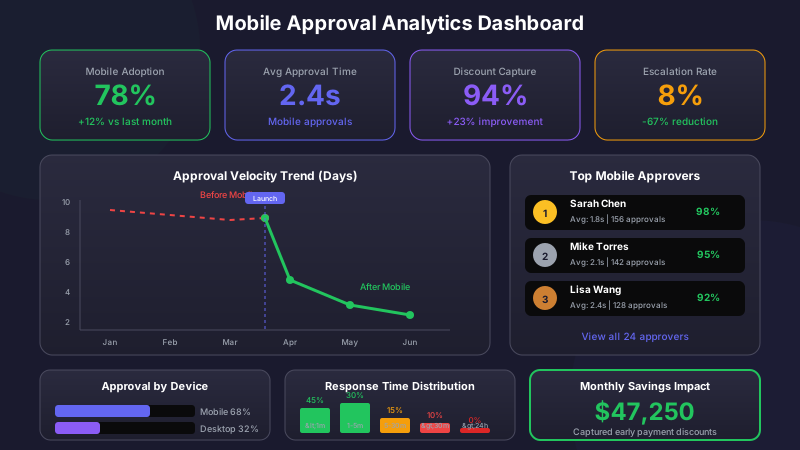
Real-time analytics track mobile adoption and approval velocity improvements
Common Implementation Pitfalls
Avoid these common mistakes when implementing mobile approvals:
- Requiring Too Much Information: Mobile screens are small. Don't force approvers to scroll through pages of detail. Show what matters and make full details accessible if needed.
- Ignoring Offline Scenarios: Approvers are often in areas with poor connectivity: airplanes, basements, rural sites. Queue approvals offline.
- Over-Notifying: Sending notifications for every invoice quickly leads to notification fatigue. Be strategic about what triggers alerts.
- Neglecting Android: Many organizations focus on iOS first. Ensure Android users have an equally excellent experience from day one.
- Weak Desktop Integration: Some approvers will still prefer desktop for complex reviews. Ensure seamless handoff between mobile and desktop.
The Future of Mobile AP
Mobile approval capabilities continue to evolve rapidly. Forward-looking organizations are already exploring:
- Voice-Activated Approvals: Approve invoices through smart speakers or voice assistants while multitasking
- Smartwatch Integration: Review and approve simple invoices directly from your wrist
- AR-Enhanced Review: Use augmented reality to visualize invoice data in context, such as viewing an invoice while touring a job site
- Predictive Approvals: AI that predicts which invoices will be approved and pre-stages them for one-tap confirmation
Getting Started with Mobile Approvals
Ready to eliminate approval bottlenecks? Here's a practical roadmap:
- Assess Current State: Measure your current approval cycle times and identify where delays occur
- Select the Right Platform: Evaluate AP automation solutions with strong mobile-native capabilities, not desktop systems with mobile afterthoughts
- Start with Power Users: Pilot with a group of approvers who process high volumes and will benefit most
- Configure Security Appropriately: Balance protection with usability based on your organization's risk profile
- Drive Adoption Actively: Don't just deploy and hope. Actively promote, train, and track adoption
- Measure and Optimize: Track key metrics and continuously refine the experience based on user feedback
The organizations winning at AP efficiency have recognized a fundamental truth: you can't optimize what happens after invoice receipt if invoices sit waiting for approval. Mobile approval isn't a nice-to-have feature; it's the key that unlocks the full potential of your AP automation investment. Every day without mobile approvals is another day of missed discounts, strained vendor relationships, and frustrated finance teams.
Ryan Shugars
Director of Product
Ryan has spent 15 years as a Systems Architect, building enterprise solutions that transform how organizations manage their financial operations.