AP System Integration: Connecting Invoice Processing with ERP, Procurement, and Treasury
The true value of AP automation is not realized until your invoice processing system speaks fluently with your ERP, procurement platform, and treasury systems. Here is how to design integrations that eliminate data silos and unlock end-to-end process efficiency.
Ryan Shugars
Director of Product

Modern accounts payable does not operate in isolation. Every invoice that enters your organization carries data that originates from procurement decisions, impacts treasury cash positions, and ultimately flows into your ERP for financial reporting. Yet in many organizations, these systems remain disconnected islands, requiring manual data entry at each handoff point.
This guide explores the integration architecture that transforms AP from a standalone function into the connected hub of your procure-to-pay ecosystem. When done right, these integrations eliminate duplicate data entry, enable real-time visibility, and unlock automation capabilities that simply are not possible with siloed systems.
The Integration Imperative: Why Connected AP Matters
Before diving into technical architectures, let us examine why integration is not optional for organizations seeking to modernize their AP operations.
The Cost of Disconnected Systems
Organizations with fully integrated AP systems report 73% faster invoice cycle times and 89% reduction in data entry errors compared to those with manual system handoffs. The integration investment pays for itself many times over.
The AP Integration Architecture: Four Critical Connections
Effective AP integration requires connecting four distinct system categories, each serving different roles in the procure-to-pay process.

The four critical integration points for modern AP automation
1. ERP Integration: The Financial Foundation
Your ERP system is the financial system of record. Every invoice ultimately needs to post to the general ledger, update vendor balances, and contribute to financial reporting. ERP integration is not optional; it is foundational.
Key data flows for ERP integration include:
- Chart of Accounts sync: GL account codes, cost centers, and dimensions must stay synchronized
- Vendor master data: Payment terms, addresses, tax status, and banking details
- Invoice posting: Approved invoices create AP vouchers with full coding
- Payment confirmation: Treasury payments update invoice status and clear liabilities
- Period status: Respect accounting period open/close for proper cutoff
Modern integration approaches favor real-time APIs over batch file transfers. Real-time integration ensures that GL coding validation happens at invoice capture, not days later when batch import fails.
2. Procurement Integration: Upstream Visibility
Procurement systems hold the context that makes invoice processing intelligent: purchase orders, contracts, receiving data, and negotiated terms. Without this upstream connection, AP operates blind.
The Three-Way Match Advantage
Organizations with integrated PO data achieve 85% straight-through processing rates on PO-backed invoices, compared to just 23% for non-PO invoices. The integration enables automatic matching at line-item level, catching quantity and price variances before payment.
Essential procurement data for AP integration:
- Purchase orders: Line items, quantities, unit prices, and delivery schedules
- Goods receipts: What was actually received, when, and in what condition
- Contract terms: Negotiated pricing, volume discounts, and payment terms
- Catalog data: Standard pricing and descriptions for validation
- Approval workflows: Budget holder and requisitioner information
3. Treasury Integration: Cash Flow Visibility
Treasury needs real-time visibility into payment obligations to manage cash positions, forecast liquidity, and optimize payment timing. Without AP integration, treasury operates with stale data and conservative buffers.
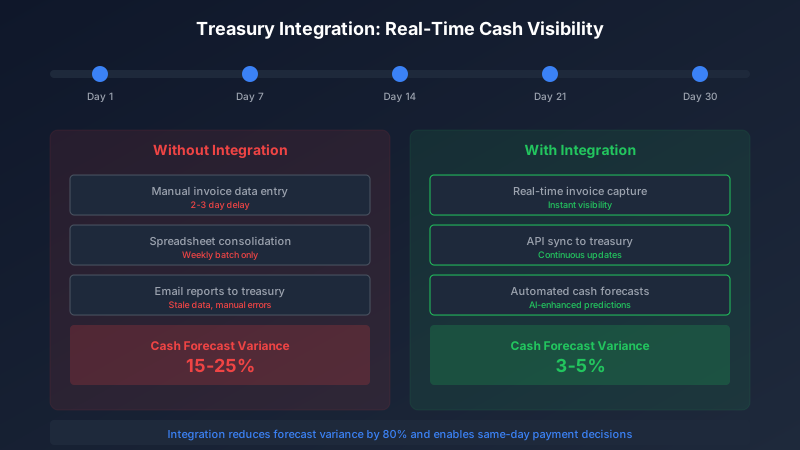
Real-time AP data transforms treasury cash forecasting accuracy
Critical treasury integration data points:
- Payment obligations: Approved invoices with due dates and amounts
- Payment timing: Early discount opportunities and late penalty risks
- Currency exposure: Foreign currency invoices for FX management
- Payment method mix: ACH, wire, check, and virtual card forecasts
- Vendor payment preferences: Fastest and preferred payment methods
4. Banking Integration: Payment Execution
The final integration closes the loop: executing payments and reconciling bank transactions. Modern banking APIs enable same-day payments and real-time reconciliation that was impossible with file-based batch processing.
Banking integration capabilities:
- Payment initiation: ACH, wire, and virtual card payment files or APIs
- Positive pay: Check fraud prevention through payment verification
- Bank statement import: Automated reconciliation of cleared payments
- Real-time balance: Current account positions for cash management
- Payment status: Confirmation and failure notifications
Integration Architecture Patterns
Choosing the right integration pattern depends on your systems landscape, data volumes, and real-time requirements. Three patterns dominate modern AP integrations.
Integration Pattern Comparison
Real-Time API Integration
Best for: ERP posting, PO validation, payment initiation
Event-Driven Webhooks
Best for: Status updates, approvals, notifications
Scheduled Batch Sync
Best for: Master data sync, large volume transfers, legacy systems
Most organizations employ a hybrid approach: real-time APIs for transaction processing, webhooks for status updates, and scheduled batch sync for master data that changes infrequently.
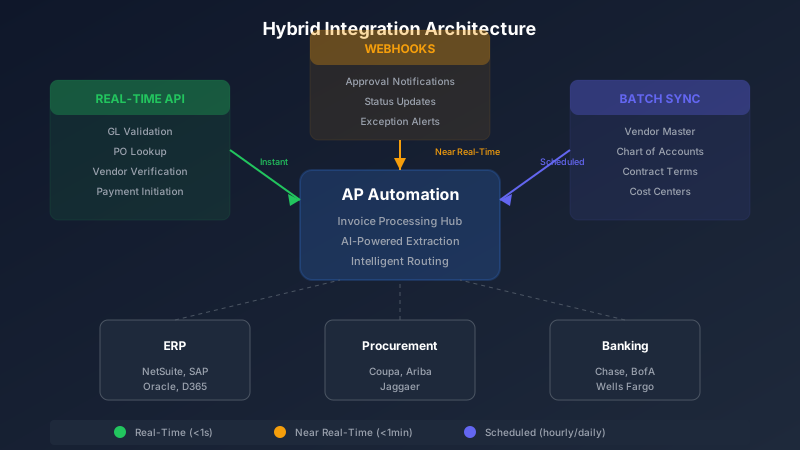
Hybrid integration architecture combines real-time and batch approaches
Common Integration Challenges and Solutions
Challenge 1: Master Data Synchronization
Vendor records exist in multiple systems: your ERP, procurement platform, banking system, and AP automation tool. Keeping these synchronized is a constant challenge.
Solution: Establish a single source of truth (typically the ERP) and implement one-way sync to downstream systems. Use vendor identifiers that work across all systems, and implement automated duplicate detection.
Challenge 2: GL Code Mapping
Different systems may use different GL account structures. Your procurement categories do not map 1:1 to your ERP chart of accounts.
Solution: Build and maintain explicit mapping tables. AI-powered systems like Remmi can learn these mappings from historical data and suggest codes based on invoice content, but the mappings must be validated and maintained.
Challenge 3: Error Handling and Recovery
Integration failures are inevitable. Network timeouts, validation errors, and system unavailability will occur. The question is how gracefully your integration handles them.
Integration Failure Best Practices
- Implement retry logic with exponential backoff
- Queue failed transactions for manual review
- Alert operations teams on repeated failures
- Maintain audit logs of all integration attempts
- Design for eventual consistency, not immediate consistency
Building Your Integration Roadmap
Integration projects can feel overwhelming. Here is a phased approach that delivers value incrementally while building toward a fully connected ecosystem.
Integration Implementation Phases
Phase 1: ERP Foundation (Weeks 1-4)
Chart of accounts sync, vendor master sync, basic invoice posting. This enables AP automation to function with your financial system of record.
Phase 2: PO Matching (Weeks 5-8)
Purchase order sync, goods receipt integration, automated three-way matching. This unlocks the highest-value automation for PO-backed invoices.
Phase 3: Payment Integration (Weeks 9-12)
Payment file generation, bank reconciliation, positive pay. Closes the loop from invoice receipt to payment completion.
Phase 4: Treasury Optimization (Ongoing)
Cash forecasting feeds, payment timing optimization, early discount capture. Maximizes the strategic value of AP data.
Measuring Integration Success
How do you know if your integrations are delivering value? Track these key metrics before and after implementation:
- Straight-through processing rate: Percentage of invoices requiring no manual intervention
- Invoice cycle time: Days from receipt to payment-ready status
- Data entry time: Hours spent on manual data entry per week
- Exception rate: Percentage of invoices requiring exception handling
- Reconciliation effort: Hours spent reconciling system discrepancies
- Cash forecast accuracy: Variance between forecast and actual payments
The Bottom Line
AP system integration is not a technical project; it is a business transformation. When your invoice processing system connects seamlessly with ERP, procurement, treasury, and banking systems, you unlock automation capabilities that fundamentally change how your finance organization operates.
The investment in integration pays dividends across multiple dimensions: faster processing, fewer errors, better cash visibility, and a finance team freed from manual data shuffling to focus on strategic work.
Start with the foundation: ERP integration that establishes your financial system of record. Then expand upstream to procurement for intelligent matching, and downstream to treasury and banking for complete payment visibility. Each integration layer compounds the value of those before it.
The question is not whether to integrate, but how quickly you can build the connected ecosystem that modern finance operations require.
Ryan Shugars
Director of Product
Ryan has spent 15 years as a Systems Architect, building enterprise solutions that transform how organizations manage their financial operations.