Single Sign-On for AP Systems: Balancing Security and User Convenience
Your AP team manages sensitive financial data across multiple systems every day. SSO implementation can dramatically improve both security and productivity, but only if done right. Here is how to achieve the perfect balance.
Ryan Shugars
Director of Product

The average enterprise employee juggles 27 different applications daily. For accounts payable professionals, many of those applications handle sensitive financial data: ERP systems, banking portals, invoice processing platforms, and expense management tools. Each one traditionally requires its own username and password, creating a perfect storm of security vulnerabilities and user frustration.
This password proliferation leads to predictable behaviors. Employees reuse passwords across systems, write credentials on sticky notes, or choose simple passwords they can remember. IT teams spend countless hours resetting forgotten passwords. And when an employee leaves, deprovisioning access across a dozen systems becomes a manual, error-prone nightmare.
Single Sign-On (SSO) addresses these challenges by allowing users to authenticate once and access all connected applications seamlessly. For AP departments handling millions of dollars in payments, SSO is not just a convenience feature but rather a critical security control that reduces risk while improving productivity.
Understanding SSO in the AP Context
Before diving into implementation strategies, it is essential to understand how SSO works and why it matters specifically for accounts payable operations.
Identity Provider (IdP)
The central authentication system that verifies user identity. Common examples include Okta, Azure AD, and Google Workspace. Users authenticate once with the IdP, which then provides credentials to connected applications.
Service Provider (SP)
The application that relies on the IdP for authentication. Your AP automation platform, ERP system, and banking portal are all service providers. They trust the IdP to verify user identity rather than managing their own credentials.
SAML and OAuth/OIDC
The protocols that enable secure communication between IdP and SP. SAML 2.0 is the enterprise standard for SSO, while OAuth/OIDC provides additional flexibility for API access and modern applications.
Just-In-Time Provisioning
Automatic user account creation when someone first accesses an application through SSO. This eliminates manual account setup and ensures user attributes stay synchronized with the IdP.
For AP teams, the applications that need SSO protection typically include invoice processing platforms, approval workflow systems, ERP financial modules, banking and payment portals, expense management tools, and vendor management systems. Each represents a potential attack surface if credentials are compromised.
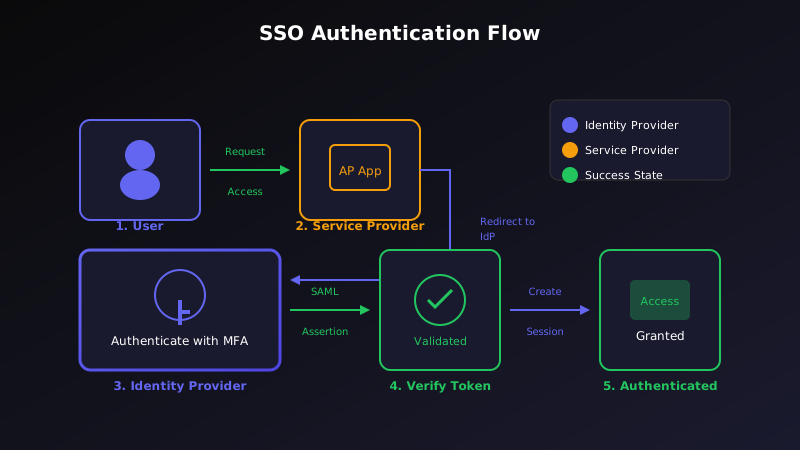
SSO centralizes authentication while providing seamless access to all connected AP applications
The Security Benefits of SSO for AP
Implementing SSO for AP systems delivers substantial security improvements that go far beyond password convenience. Here are the key benefits that matter most for financial operations:
Centralized Access Control
With SSO, user access is managed in a single location. When an AP clerk is promoted to supervisor, their permissions can be updated once in the IdP rather than across every individual system. When someone leaves the company, disabling their IdP account immediately revokes access to all connected applications.
Access Control Advantages:
- Single point of control for all application access
- Immediate deprovisioning when employees leave
- Role-based access management synchronized across systems
- Reduced risk of orphaned accounts in financial systems
Stronger Authentication
SSO enables organizations to implement multi-factor authentication (MFA) once at the IdP level rather than configuring it separately for each application. This means your AP team benefits from enterprise-grade authentication for every financial system they access.
Authentication Enhancements:
- Unified MFA across all connected applications
- Support for hardware tokens, mobile authenticators, and biometrics
- Conditional access policies based on location, device, and risk signals
- Passwordless authentication options for improved security and convenience
Comprehensive Audit Trails
Every authentication event flows through the IdP, creating a centralized audit log of who accessed what and when. This simplifies compliance reporting and provides forensic capabilities if a security incident occurs.
SSO Impact: By the Numbers
80%
Reduction in password-related help desk tickets
50%
Decrease in time spent on access management
99%
Reduction in credential-based attack surface
3x
Faster employee onboarding to financial systems
The User Experience Benefits
While security drives SSO adoption, user experience keeps it successful. AP professionals appreciate SSO because it removes friction from their daily work.
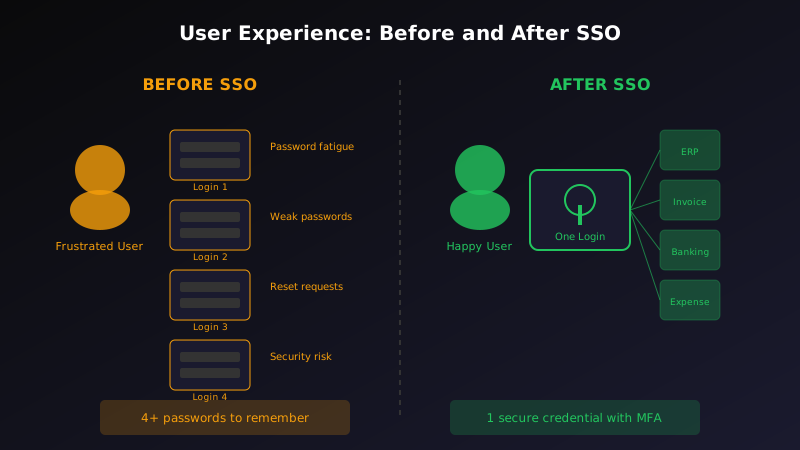
SSO transforms the user experience from multiple logins to seamless application access
Eliminating Password Fatigue
Users no longer need to remember multiple complex passwords or cycle through variations until they find the right one. They authenticate once at the start of their day and access every connected system without additional prompts.
Faster Application Access
Without SSO, switching between an invoice processing system and an ERP requires a separate login each time. With SSO, transitions are instant. For AP teams processing hundreds of invoices daily, these seconds add up to hours of recovered productivity.
Reduced Support Burden
Password reset requests typically account for 20-50% of IT help desk tickets. SSO dramatically reduces this volume, freeing IT resources for more strategic work and eliminating frustrating delays for AP staff locked out of critical systems.
The Productivity Multiplier
Research from Okta shows that enterprises with mature SSO implementations see employees gain back an average of 10 minutes per day previously lost to authentication friction. For an AP team of 20, that translates to over 800 hours of recovered productivity annually.
Implementation Best Practices
Successful SSO implementation requires careful planning and attention to the unique requirements of AP systems. Here are the essential practices to follow:
Assess Your Application Landscape
Before implementation, inventory all applications your AP team uses and verify SSO compatibility. Most modern SaaS applications support SAML or OIDC, but legacy systems may require additional integration work or replacement.
Application Assessment Checklist:
- Document all applications used by AP staff with authentication methods
- Verify SAML 2.0 or OIDC support with each vendor
- Identify applications requiring custom integration or replacement
- Map user roles and permissions across systems
Plan Your Identity Architecture
Determine how user identity will flow from your IdP to each connected application. This includes defining attribute mappings, group memberships, and role assignments.
Identity Architecture Decisions:
- Choose between federated identity and directory sync
- Define attribute mapping for user profile information
- Establish group-based role assignments for AP functions
- Configure just-in-time provisioning where supported
Implement Strong MFA
SSO creates a single point of authentication, making MFA essential. A compromised SSO credential without MFA grants access to every connected application. With MFA, that same compromise requires a second factor that attackers rarely possess.
MFA Configuration Guidelines:
- Require MFA for all users accessing financial applications
- Prefer hardware tokens or mobile authenticators over SMS
- Implement risk-based authentication for elevated access
- Provide backup authentication methods for recovery scenarios
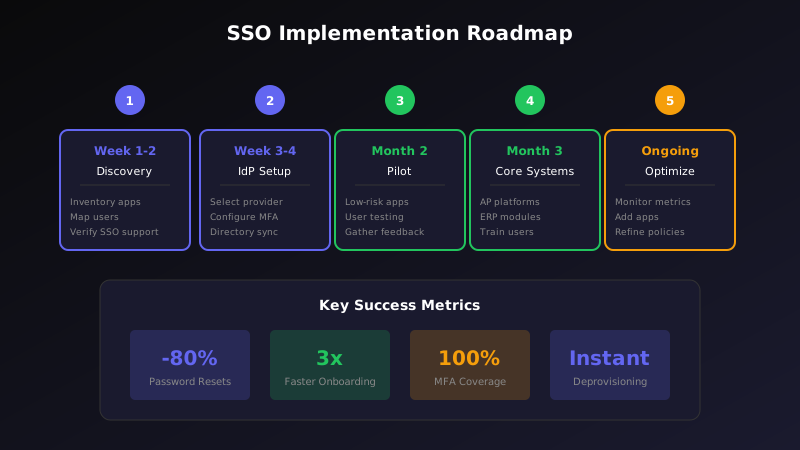
A phased implementation approach ensures successful SSO deployment with minimal disruption
Addressing Common Concerns
Organizations sometimes hesitate to implement SSO due to concerns that can be addressed with proper planning:
Single Point of Failure?
A common concern is that SSO creates a single point of failure. If the IdP goes down, no one can access any application. This risk is mitigated by choosing an IdP with strong SLAs (99.99%+ uptime), implementing emergency access procedures, and maintaining break-glass accounts for critical systems during outages.
Vendor Lock-In
SSO standards like SAML and OIDC are widely supported, making it possible to switch IdPs if needed. Organizations should ensure their selected IdP uses standard protocols and avoid proprietary extensions that create unnecessary dependencies.
Legacy System Compatibility
Some legacy AP systems do not support modern SSO protocols. Options include using SSO gateways that translate protocols, implementing password vaulting as a bridge solution, or prioritizing these systems for modernization or replacement.
Cost Considerations
While SSO requires investment in an IdP and integration effort, the ROI typically materializes within months through reduced help desk costs, improved productivity, and decreased security incident risk. The cost of a single credential compromise often exceeds years of SSO investment.
Implementation Roadmap
A phased approach to SSO implementation minimizes disruption while building organizational confidence:
- Week 1-2: Discovery Inventory AP applications, verify SSO support, document current authentication landscape, and identify stakeholders.
- Week 3-4: IdP Selection and Setup Choose an IdP that meets your requirements, configure directory sync or federation, and establish MFA policies.
- Month 2: Pilot Integration Connect one or two low-risk AP applications, validate user provisioning and attribute mapping, and gather user feedback.
- Month 3: Core AP Systems Integrate primary invoice processing and approval workflow systems. Train users on new authentication flows.
- Month 4: Full Rollout Connect remaining applications including ERP modules and banking portals. Disable local authentication for integrated systems.
- Ongoing: Optimization Monitor authentication metrics, refine conditional access policies, and add new applications as they are adopted.
Measuring Success
Track these metrics to demonstrate SSO value and identify optimization opportunities:
- Password reset tickets: Should decrease 70-80% within three months of full deployment.
- Authentication success rate: Track failed login attempts to identify user friction points.
- Provisioning time: Measure how quickly new employees gain access to AP systems.
- Deprovisioning compliance: Verify that terminated employees lose access within your policy window.
- MFA adoption: Ensure all users are authenticating with strong second factors.
The Bottom Line
Single Sign-On is no longer optional for organizations serious about AP security. The combination of centralized access control, stronger authentication, and comprehensive audit trails addresses the credential-based attacks that threaten financial systems daily.
At the same time, SSO delivers genuine productivity improvements that AP teams appreciate. Eliminating password fatigue and reducing login friction transforms daily workflows and frees staff to focus on value-added work rather than authentication struggles.
The key to success is thoughtful implementation that addresses your organization's specific needs. Start with a clear inventory of your AP application landscape, choose an IdP that meets your security requirements, and roll out in phases that build confidence without disrupting operations.
For AP departments handling sensitive financial data and high-value payments, SSO provides the security foundation that modern threats demand while delivering the user experience that modern employees expect. The question is not whether to implement SSO, but how quickly you can get there.
Ryan Shugars
Director of Product
Ryan has spent 15 years as a Systems Architect, building enterprise solutions that transform how organizations manage their financial operations.