RPA in Accounts Payable: Automating Repetitive Tasks with Robotic Process Automation
Robotic Process Automation offers a powerful way to eliminate repetitive AP tasks without replacing your existing systems. Here is how to identify the right processes, deploy bots effectively, and measure the impact on your AP operations.
Ryan Shugars
Director of Product
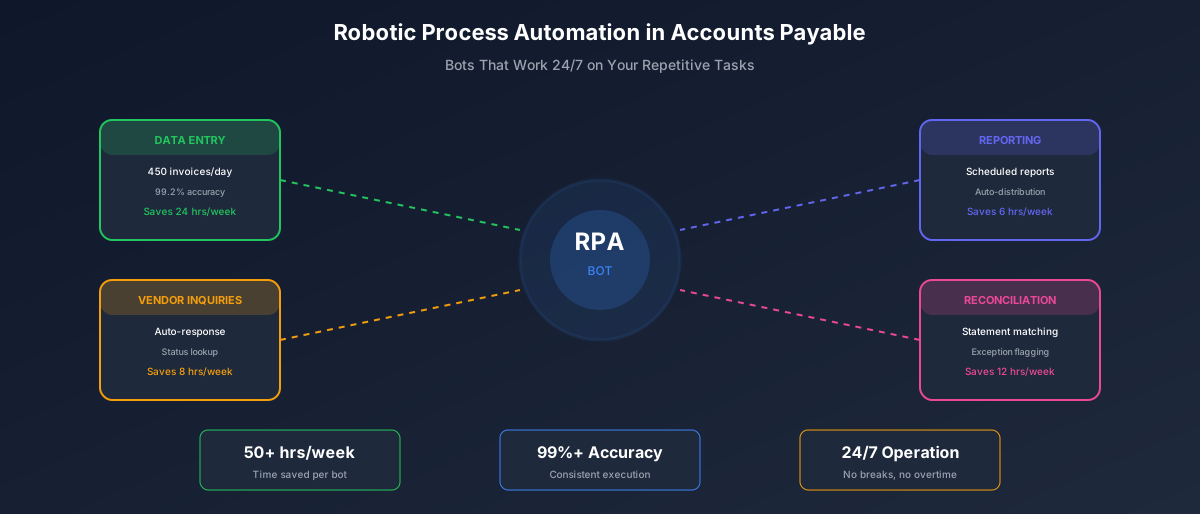
Accounts payable teams spend countless hours on tasks that follow predictable patterns: copying data between systems, checking status, generating reports, sending reminders. These are exactly the tasks that Robotic Process Automation was designed to handle.
RPA deploys software robots that mimic human actions across applications, executing rule-based tasks faster and more accurately than manual processing. For AP departments drowning in repetitive work, RPA offers relief without the complexity and cost of full system replacement.
Understanding RPA in the AP Context
Before diving into implementation, it helps to understand what RPA can and cannot do. RPA bots excel at tasks that are:
- Rule-based: Clear, documented logic with defined decision points
- Repetitive: Performed frequently with consistent steps
- Structured: Working with standardized data formats and screens
- High-volume: Enough volume to justify automation investment
- Stable: Processes and systems that do not change frequently
RPA vs Traditional Automation vs AI
RPA (Robotic Process Automation)
Mimics human actions across applications. Best for: connecting systems without APIs, automating legacy processes, quick wins with existing workflows.
Traditional API Integration
Direct system-to-system communication. Best for: high-volume data exchange, real-time processing, long-term scalable solutions.
AI-Powered Automation
Intelligent processing with learning capabilities. Best for: unstructured data, complex decisions, processes requiring judgment.
The most effective AP automation strategies combine all three approaches: AI for intelligent capture and coding, API integration for system connectivity, and RPA for bridging gaps and handling legacy processes.
High-Value RPA Use Cases in AP
Not all AP tasks are equally suited for RPA. Here are the use cases that consistently deliver the highest ROI.
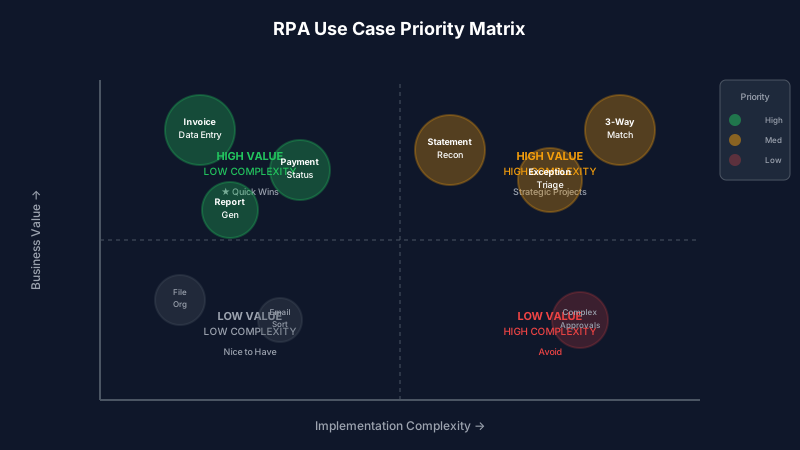
Prioritize use cases by volume, complexity, and business impact
1. Invoice Data Entry and Transfer
RPA bots can extract data from incoming invoices and enter it into your ERP or accounting system. This is particularly valuable when dealing with:
- PDFs received via email that need manual entry
- Vendor portals that lack integration capabilities
- Legacy systems without modern API support
- High-volume periods that exceed team capacity
Real Results: Invoice Data Entry Bot
A mid-size manufacturer deployed an RPA bot for invoice data entry, processing 450 invoices per day with 99.2% accuracy. The bot completed in 4 hours what previously took 3 FTEs an entire day.
2. Vendor Statement Reconciliation
Reconciling vendor statements against your records is tedious but essential. RPA bots can:
- Download statements from vendor portals
- Compare line items against your AP records
- Identify discrepancies and missing invoices
- Generate exception reports for human review
- Send automated follow-up communications
3. Payment Status Updates
Vendors frequently inquire about payment status. RPA can automate the entire inquiry-response cycle:
- Monitor inbox for payment inquiries
- Look up invoice and payment status in ERP
- Generate and send standardized responses
- Escalate complex inquiries to AP staff
4. Report Generation and Distribution
Routine reporting is a perfect RPA candidate. Bots can:
- Run scheduled reports from multiple systems
- Consolidate data into standardized formats
- Distribute to stakeholders via email
- Archive reports with proper naming conventions
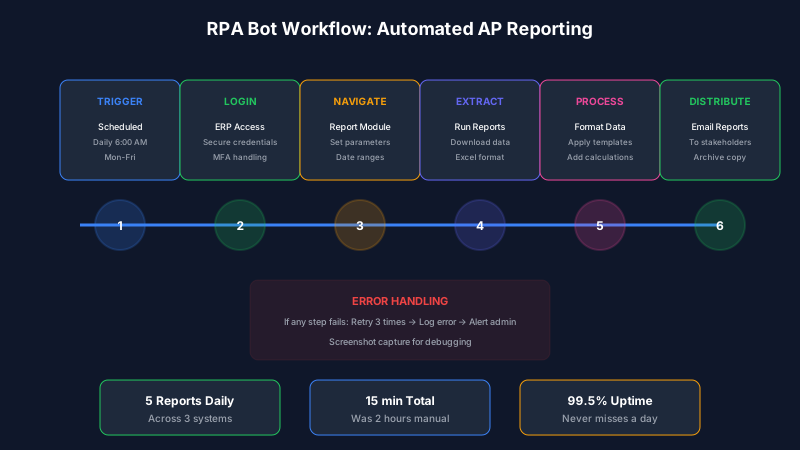
Automated reporting frees AP staff for value-added analysis
5. Exception Handling Triage
While RPA cannot resolve complex exceptions, it can triage them effectively:
- Categorize exceptions by type and priority
- Gather supporting documentation automatically
- Route to appropriate team members
- Track aging and send escalation alerts
Implementing RPA: A Practical Roadmap
Successful RPA implementation follows a structured approach. Rushing deployment without proper preparation leads to bots that break frequently and deliver disappointing results.
RPA Implementation Phases
Process Assessment (Week 1-2)
Document current processes, identify automation candidates, calculate potential ROI, and prioritize based on value and feasibility.
Process Optimization (Week 3-4)
Standardize processes before automating. Fix broken steps, eliminate unnecessary variations, and document clear decision rules.
Bot Development (Week 5-8)
Build and test bots in development environment. Include error handling, logging, and notification mechanisms.
Pilot and Refinement (Week 9-10)
Run bots in production with close monitoring. Identify edge cases, refine error handling, and validate accuracy.
Scale and Optimize (Ongoing)
Expand to additional use cases, optimize bot performance, and establish governance for bot management.
Common RPA Pitfalls and How to Avoid Them
Pitfall 1: Automating Broken Processes
The most common RPA failure is automating a process that should be fixed or eliminated. Automating a bad process just makes it fail faster.
Solution: Always optimize before automating. Map the current process, identify waste and inefficiencies, and streamline before building the bot.
Pitfall 2: Underestimating Exception Handling
Bots handle the happy path well. It is the exceptions that cause problems. Every edge case needs explicit handling, or the bot will fail when it encounters unexpected situations.
Exception Handling Checklist
- What happens if the application is unavailable?
- How does the bot handle unexpected screen layouts?
- What if data is missing or malformed?
- How are timeouts and slow responses handled?
- Who gets notified when the bot fails?
- How does the bot recover from partial completion?
Pitfall 3: Ignoring System Changes
RPA bots interact with application interfaces. When those interfaces change, whether through updates, patches, or redesigns, bots break. Organizations often underestimate the maintenance burden.
Solution: Build change monitoring into your RPA program. Coordinate with IT on system updates, test bots after changes, and maintain a queue of maintenance tasks.
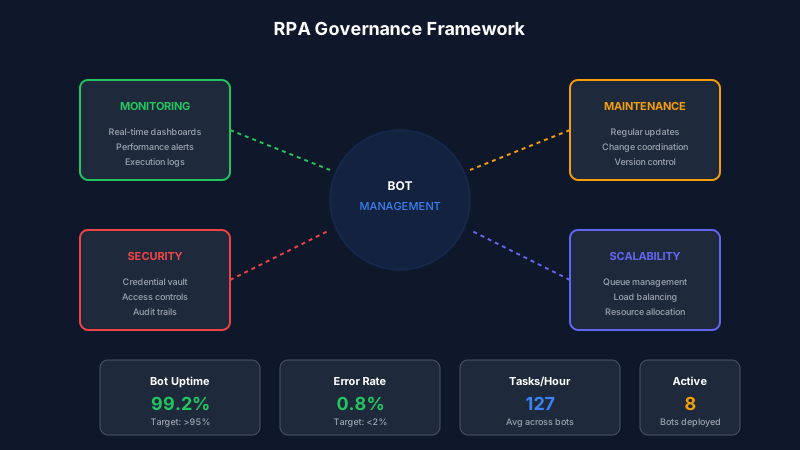
Effective RPA governance prevents bot failures and maximizes uptime
Measuring RPA Success
Track these metrics to understand the true impact of your RPA investment:
RPA Performance Metrics
RPA vs Native AI Automation: Making the Right Choice
Modern AP automation platforms like Remmi offer native AI capabilities that often deliver better results than RPA for core invoice processing. Here is how to decide:
Choose RPA When:
- Connecting legacy systems without APIs
- Automating across multiple disconnected applications
- Process is truly rule-based with no judgment
- Quick wins needed before larger transformation
- Existing RPA platform and expertise in place
Choose Native AI When:
- Processing unstructured invoice formats
- Intelligent coding and categorization needed
- Learning and improvement over time required
- Complex matching and validation logic
- End-to-end invoice automation is the goal
Many organizations use both: native AI automation for core invoice processing, with RPA handling peripheral tasks and legacy system integration. The key is choosing the right tool for each job.
The Bottom Line
RPA offers a practical path to automating repetitive AP tasks without wholesale system replacement. When implemented thoughtfully, with attention to process optimization, exception handling, and ongoing maintenance, RPA delivers significant time savings and error reduction.
Start with high-volume, rule-based tasks where the ROI is clearest. Build expertise with initial successes before expanding to more complex use cases. And always remember: RPA is a tool, not a strategy. The goal is not to deploy bots; it is to free your AP team from tedious work so they can focus on activities that require human judgment and add real value.
As you evaluate RPA for your AP operations, consider whether native AI automation might deliver even better results for your core invoice processing needs. The best automation strategy often combines multiple approaches, each applied where it delivers the most value.
Ryan Shugars
Director of Product
Ryan has spent 15 years as a Systems Architect, building enterprise solutions that transform how organizations manage their financial operations.